Best MRP Software 2026: Top Systems Compared
Compare the 10 best MRP software systems for 2026 with real pricing, module capabilities and picks for discrete and process manufacturers.

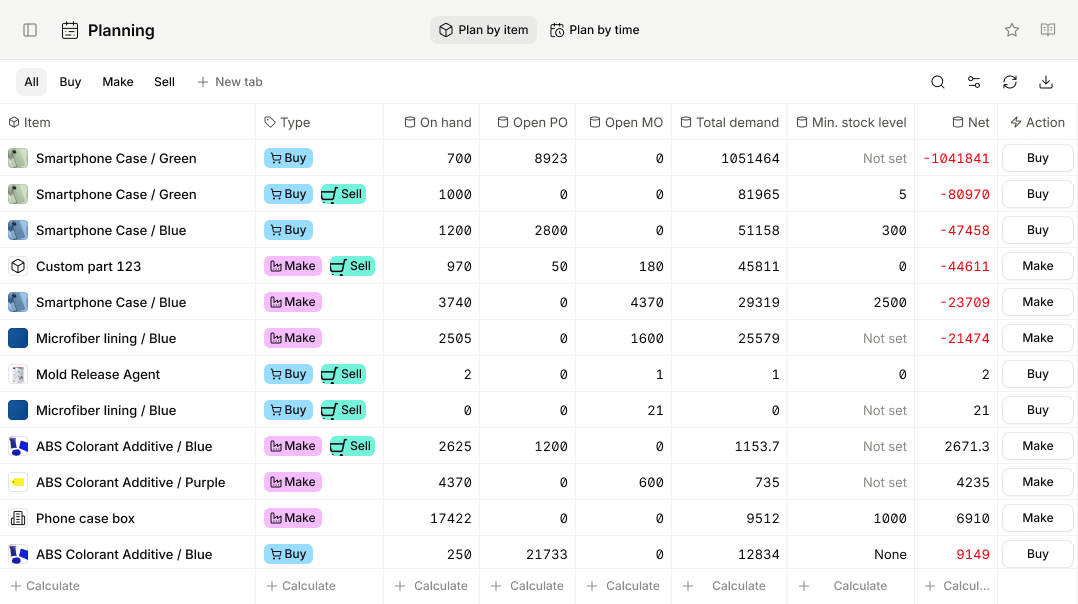
Digit — real-time MRP for manufacturers & distributors
Digit · by Digit Software
Keep production flowing with live material visibility, demand and supply planning, and suggested POs and MOs generated from real-time data — implemented in weeks, not months.
- ✓Live demand/supply planning with safety stock & reorder points
- ✓Suggested purchase & manufacturing orders from real-time data
- ✓Multi-location inventory, barcode scanning & full traceability
How MRP Calculations Work
The MRP calculation engine follows a structured logic:
- Master Production Schedule (MPS) -- defines what finished goods need to be produced and when
- BOM explosion -- breaks each finished good into its component parts across all levels
- Gross requirements calculation -- determines total material needs based on MPS quantities
- Net requirements calculation -- subtracts on-hand inventory and scheduled receipts from gross requirements
- Planned order generation -- creates purchase orders for bought items and work orders for manufactured items, offset by lead times
- Action messages -- alerts planners to reschedule, expedite, or cancel orders based on changing demand
This process runs either in batch mode (typically nightly or weekly) or in real time, depending on the system. Newer platforms like SAP S/4HANA run MRP in real time using in-memory computing, while many mid-market systems still rely on scheduled batch runs.
Top MRP Software Systems Compared
The following table compares the leading MRP software systems available in 2026, covering target market, core MRP strengths, indicative pricing, and deployment options.
| System | Target Market | MRP Strengths | Pricing (per user/month) | Deployment |
|---|---|---|---|---|
| SAP S/4HANA Manufacturing | Mid-market to enterprise | Advanced MRP Live with real-time planning, multi-level BOM, integrated PP/DS, demand-driven MRP (DDMRP) | $200 -- $500+ | Cloud, on-premise, hybrid |
| Oracle NetSuite Manufacturing | SMB to mid-market | Demand planning, work orders, WIP tracking, routing management, assembly and BOM management | $99 -- $249 | Cloud (SaaS) |
| Microsoft Dynamics 365 SCM | Mid-market to enterprise | Planning Optimization, master planning, BOM versioning, production control, lean manufacturing | $180 -- $300 | Cloud, on-premise |
| Epicor Kinetic | Mid-market discrete manufacturers | Advanced MRP with finite scheduling, job-based manufacturing, mixed-mode support, MES integration | $150 -- $275 | Cloud, on-premise, hybrid |
| Infor CloudSuite Industrial (CSI) | Mid-market discrete and mixed-mode | APS scheduling, configure-to-order, multi-site planning, constraint-based planning | $150 -- $250 | Cloud, on-premise |
| Acumatica Manufacturing Edition | SMB to mid-market | MRP processing, rough-cut capacity planning, engineering change control, production order management | $125 -- $200 (resource-based) | Cloud, on-premise |
| Digit | SMB manufacturers & distributors | Real-time demand/supply planning, suggested POs & MOs, multi-level BOMs, lot/serial/batch traceability, barcode warehouse — no native general ledger (integrates QuickBooks, Xero, Sage, NetSuite) | From $400/mo (plan-based) | Cloud (SaaS) |
| SYSPRO | SMB to mid-market | MRP with factory scheduling, BOM management, lot traceability, requirements planning wizard | $100 -- $200 | Cloud, on-premise |
| Plex (Rockwell Automation) | Mid-market process and discrete | Real-time production monitoring, finite capacity scheduling, quality management, traceability | $150 -- $250 | Cloud (SaaS) |
| QAD Adaptive Manufacturing | Mid-market automotive, life sciences, CPG | Demand and supply planning, repetitive and discrete MRP, supplier collaboration, regulatory compliance | $125 -- $225 | Cloud (SaaS) |
| Odoo Manufacturing | SMB and startups | MRP module with BOM management, work orders, maintenance, quality checks, PLM integration | $25 -- $75 | Cloud, self-hosted |
Note: Pricing is indicative and varies based on user count, modules selected, and contract terms. Contact vendors for current quotes.
Source: ERP Research Benchmark — 24,660 tracked implementations analysed. View the data →
MRP vs ERP: What is the Difference?
MRP and ERP are related but distinct concepts. Understanding the difference is essential when evaluating software.
MRP (Material Requirements Planning) focuses specifically on manufacturing planning: calculating material needs based on BOMs, production schedules, and inventory levels. MRP answers the question: "What do I need to make, and what materials do I need to make it?"
ERP (Enterprise Resource Planning) is a broader system that integrates all core business processes -- finance, procurement, sales, HR, warehousing, and manufacturing -- into a single platform. MRP is typically one module within an ERP system.
Key Distinctions
| Aspect | MRP | ERP |
|---|---|---|
| Scope | Production planning and material requirements | Entire business operations |
| Primary users | Production planners, manufacturing managers | All departments |
| Core functions | BOM, scheduling, inventory for production | Finance, HR, CRM, SCM, manufacturing |
| Standalone availability | Rarely sold standalone today | Comprehensive platform |
| Cost | Lower (single module) | Higher (full suite) |
The Evolution from MRP to MRP II to ERP
The software category has evolved through three distinct phases:
- MRP (1960s--1970s) -- focused purely on material requirements calculations based on BOMs and demand
- MRP II (1980s) -- added capacity planning, shop floor control, purchasing, and financial integration to create a complete manufacturing management system
- ERP (1990s--present) -- expanded MRP II to encompass all enterprise functions including HR, CRM, business intelligence, and supply chain management across the entire organization
In practice, most manufacturers today purchase ERP systems that include MRP modules rather than buying standalone MRP software. The advantage is that MRP calculations automatically feed into procurement, finance, and warehouse management without manual data transfer.
However, some smaller manufacturers with straightforward operations may find dedicated MRP tools sufficient, especially if they already have separate accounting software. Systems like Odoo allow manufacturers to start with just the MRP module and add ERP functionality as they grow.
For a deeper comparison of ERP systems built for manufacturing environments, see our Manufacturing ERP guide.
Core MRP Features
When evaluating MRP software, these are the six feature areas that matter most for manufacturing operations.
1. Bill of Materials (BOM) Management
The BOM is the foundation of any MRP system. Look for software that supports:
- Multi-level BOMs -- nested sub-assemblies and components across multiple tiers
- BOM versioning -- tracking revisions and engineering changes over time
- Phantom BOMs -- sub-assemblies that are not stocked but pass through to the next production stage
- Configurable BOMs -- for make-to-order and engineer-to-order manufacturers who need to adjust BOMs per customer specification
- Where-used analysis -- tracing which finished goods use a specific component, critical for managing material shortages and ECOs
- BOM costing -- rolling up material, labor, and overhead costs across all BOM levels for accurate product costing
2. Production Scheduling
Production scheduling translates demand into actionable work orders across the shop floor.
- Finite capacity scheduling -- accounts for machine availability, labor shifts, and tooling constraints
- Infinite capacity scheduling -- plans based on demand without capacity limits, useful for rough-cut planning
- Gantt chart visualization -- graphical representation of production timelines and bottlenecks
- Backward and forward scheduling -- calculating start dates from due dates (backward) or projecting completion dates from start dates (forward)
- Sequence-dependent setup times -- reducing changeover time by intelligently ordering jobs
- Drag-and-drop rescheduling -- allowing planners to adjust schedules visually in real time
3. Capacity Planning
Capacity planning ensures that production schedules are feasible given available resources.
- Rough-Cut Capacity Planning (RCCP) -- high-level check of whether key resources can support the master production schedule
- Capacity Requirements Planning (CRP) -- detailed analysis of capacity needs at each work center
- Load leveling -- redistributing work across time periods and work centers to avoid bottlenecks
- What-if simulation -- modeling the impact of demand changes, machine downtime, or staffing adjustments
- Alternate routing support -- defining backup production paths when primary work centers are at capacity
4. Demand Forecasting
Accurate demand forecasting directly impacts MRP accuracy, and many manufacturers supplement native forecasting with dedicated demand planning tools. Key capabilities include:
- Statistical forecasting -- using historical sales data to project future demand
- Collaborative forecasting -- incorporating input from sales teams, key accounts, and market intelligence
- Seasonality and trend analysis -- adjusting forecasts for cyclical demand patterns
- Demand sensing -- using real-time signals (POS data, channel inventory) to adjust near-term forecasts
- Forecast consumption -- replacing forecast quantities with actual orders as they arrive
- Safety stock optimization -- calculating buffer inventory levels based on demand variability and service level targets
5. Shop Floor Control
Shop floor control bridges the gap between planning and execution.
- Work order management -- creating, releasing, and tracking production orders through each operation
- Labor and machine time tracking -- recording actual vs. planned hours for costing and performance analysis
- Material issue and backflushing -- recording material consumption against work orders, either at issue or upon completion
- Barcode and RFID scanning -- real-time data capture on the shop floor for accuracy and speed
- Production reporting -- OEE (Overall Equipment Effectiveness), scrap rates, and cycle time analysis
- Digital work instructions -- delivering step-by-step assembly instructions to operators at their workstations
6. Quality Management
Quality management integrated with MRP prevents defective materials from entering production and ensures finished goods meet specifications.
- Incoming inspection -- automated quality checks on received materials before they enter inventory
- In-process inspection -- quality checkpoints at defined production stages
- Non-conformance management -- documenting and dispositioning defective materials or products
- CAPA (Corrective and Preventive Action) -- tracking root causes and implementing corrective measures
- Certificate of Analysis (CoA) -- generating compliance documentation for regulated industries
- Statistical Process Control (SPC) -- monitoring process variation in real time to prevent defects before they occur
Compare ERP vendors side by side
Use our interactive comparison tool to evaluate features, pricing, and fit across leading ERP systems.
MRP Software Pricing
MRP software pricing varies significantly based on company size, deployment model, user count, and the number of modules required. The following ranges reflect typical costs observed across the market in 2026.
Small Manufacturers (10--50 employees)
- Annual software cost: $15,000 -- $60,000
- Implementation cost: $10,000 -- $40,000
- Typical solutions: Odoo Manufacturing, Acumatica, SYSPRO, NetSuite
- Pricing model: Per user/month or resource-based licensing
- Key consideration: Cloud deployment reduces upfront costs and IT burden. Many vendors offer starter packages with core MRP functionality that can be expanded over time. Open-source options like Odoo can bring the entry point below $10,000 annually for very small operations.
Mid-Market Manufacturers (50--500 employees)
- Annual software cost: $60,000 -- $250,000
- Implementation cost: $50,000 -- $300,000
- Typical solutions: Epicor Kinetic, Infor CSI, Dynamics 365 SCM, Plex, QAD
- Pricing model: Per user/month with tiered functionality
- Key consideration: Multi-site planning, advanced scheduling, and industry-specific functionality drive costs higher. Budget for integration with existing shop floor systems (MES, SCADA). Most mid-market implementations require 6--12 months and involve significant process re-engineering alongside the technology deployment.
Enterprise Manufacturers (500+ employees)
- Annual software cost: $250,000 -- $1,000,000+
- Implementation cost: $500,000 -- $5,000,000+
- Typical solutions: SAP S/4HANA, Oracle ERP Cloud, Dynamics 365 (enterprise tier)
- Pricing model: Named user licensing or capacity-based pricing
- Key consideration: Global rollouts, multi-plant configurations, and deep integration with PLM, MES, and IoT platforms add complexity and cost. Expect 12--24 month implementation timelines. Many enterprise deployments also involve custom development for regulatory compliance, advanced planning scenarios, and proprietary manufacturing processes.
Hidden Costs to Budget For
Beyond the headline license and implementation fees, manufacturers should account for:
- Data migration -- cleaning and migrating BOMs, routings, and inventory data from legacy systems. BOM data quality is often the single biggest risk factor in MRP implementations.
- Training -- production planners and shop floor staff need hands-on training, typically 2--4 weeks. Budget for refresher training in the months following go-live.
- Customization -- industry-specific workflows, custom reports, and integrations with third-party tools. Process manufacturers often need formula-based BOM support that requires additional configuration.
- Ongoing support -- annual maintenance fees (15--22% of license cost for on-premise) or included in SaaS subscriptions.
- Change management -- consulting and internal resources to manage the organizational transition. MRP implementations change daily workflows for planners, buyers, and shop floor operators.
How to Choose MRP Software
Selecting the right MRP software requires matching your manufacturing environment, growth plans, and budget to the right platform. Use these five evaluation criteria to guide your selection.
1. Manufacturing Mode Compatibility
Different MRP systems are optimized for different manufacturing modes. Identify your primary mode and verify that the software handles it natively:
- Discrete manufacturing -- individual units, job shops, repetitive lines (automotive, electronics, machinery)
- Process manufacturing -- batch and continuous flow with formulas and recipes (chemicals, food, pharma)
- Mixed-mode -- combining discrete and process in a single facility
- Engineer-to-order (ETO) -- unique designs per customer order with project-based production
- Configure-to-order (CTO) -- standard base products with customer-selected options
Do not assume that all MRP systems handle all modes equally. A system designed for repetitive discrete manufacturing will struggle with ETO workflows, and a process manufacturing system may not support job-shop scheduling well. Ask vendors for customer references in your specific manufacturing mode.
2. Scalability and Multi-Site Support
If you operate multiple plants or plan to expand, evaluate how the system handles multi-site planning. Key questions:
- Can a single instance manage multiple plants with inter-facility transfers?
- Does the system support distributed MRP with site-level and consolidated planning?
- How does licensing scale -- per site, per user, or by transaction volume?
- Can you run MRP independently per plant while still sharing a consolidated master data set?
Multi-site planning is one of the areas where enterprise systems like SAP and Dynamics 365 have a clear advantage over smaller platforms.
3. Integration Capabilities
MRP does not operate in isolation. Assess integration with:
- ERP financials -- automatic journal entries for WIP, COGS, and inventory valuation
- PLM/PDM systems -- syncing engineering BOMs with manufacturing BOMs
- MES platforms -- real-time shop floor data feeding back into planning (see our directory of MES and PLM add-ons)
- Warehouse management -- coordinating material movements and picks
- Supplier portals -- sharing forecasts, purchase orders, and ASNs with vendors
- CAD systems -- importing product designs directly into BOM structures
- IoT and sensor data -- machine telemetry for predictive maintenance and real-time capacity updates
Look for systems with pre-built connectors to your existing technology stack rather than relying entirely on custom API development.
4. Industry-Specific Compliance
Regulated industries have specific requirements that not all MRP systems handle well:
- Aerospace and defense -- AS9100, ITAR, DFARS compliance, serialization, counterfeit part prevention
- Food and beverage -- FDA 21 CFR Part 11, lot traceability, recall management, allergen tracking
- Pharmaceuticals -- GMP compliance, batch genealogy, validation (IQ/OQ/PQ), electronic batch records
- Automotive -- IATF 16949, PPAP, IMDS material data management, EDI with OEMs
- Medical devices -- FDA 21 CFR Part 820, UDI tracking, design history file management
If you operate in a regulated industry, verify that the vendor has existing customers in your sector and that compliance features are part of the core product rather than expensive add-ons.
5. Total Cost of Ownership (TCO)
Look beyond the license fee. Calculate the five-year TCO including:
- Software licensing or subscription fees
- Implementation and configuration services
- Data migration and integration development
- Training (initial and ongoing)
- Annual maintenance, support, and upgrades
- Infrastructure costs (for on-premise deployments)
- Internal IT resources for system administration
A lower per-user price does not always mean lower TCO. Systems that require extensive customization or have limited integration options can end up costing more over five years than a higher-priced platform that fits your requirements out of the box.
For a structured approach to gathering requirements, see our ERP Requirements Template.
MRP Software by Vendor
SAP S/4HANA Manufacturing
SAP offers the most comprehensive MRP capabilities on the market through its S/4HANA Manufacturing solution. MRP Live processes material requirements in real time using HANA in-memory computing, eliminating the batch-processing delays that characterized older SAP ECC systems. SAP supports demand-driven MRP (DDMRP), multi-level BOM explosion, and deep integration with PP/DS (Production Planning and Detailed Scheduling) for finite capacity planning.
The platform handles discrete, process, and repetitive manufacturing modes. Its strength lies in complex, multi-plant scenarios where inter-company planning, global ATP (Available to Promise), and integrated quality management are required. SAP also provides embedded analytics for production KPIs, yield analysis, and material availability monitoring.
The main drawback is cost and complexity. SAP implementations are typically the most expensive and longest-running in the market. However, SAP's cloud edition and the GROW with SAP program have made the platform more accessible to mid-market manufacturers.
Best suited for mid-market and enterprise manufacturers with complex supply chains and multi-plant operations.
Read our SAP S/4HANA MRP overview
SAP Business One
SAP Business One is SAP's ERP system for small and mid-sized manufacturers, offering end-to-end coverage of supply chain, production, inventory, financials, and customer relationships in a single package. Its MRP module uses a wizard-driven planning run that generates recommended purchase orders and production orders based on inventory levels, open orders, and defined lead times.
The system's forecasting and planning features help smaller manufacturers make informed decisions about production runs, material orders, and capacity — without the cost and complexity of SAP's enterprise-tier products. Manufacturers who outgrow it have a natural upgrade path within the SAP portfolio.
Best suited for small and mid-sized manufacturers that want SAP-grade MRP and integrated financials at an SMB price point.
Read our SAP Business One guide
Oracle NetSuite Manufacturing
NetSuite provides cloud-native MRP functionality as part of its Manufacturing Edition. The system covers demand planning, work order management, WIP tracking, routing management, and assembly management. NetSuite is particularly strong for growing manufacturers that need MRP tightly integrated with financials, CRM, and ecommerce in a single cloud platform.
NetSuite's MRP module supports both assembly and manufacturing work orders, with BOM management, labor routing, and work center scheduling. The system also includes demand planning tools that pull from sales forecasts, historical data, and open sales orders to generate material requirements.
One limitation is that NetSuite's manufacturing capabilities are less deep than purpose-built systems like Epicor or Infor for complex shop floor scenarios. However, for manufacturers who value a unified business platform over specialized manufacturing depth, NetSuite delivers strong value.
Best suited for SMB and mid-market manufacturers, especially those in distribution-heavy or mixed-mode environments. See our broader guide to NetSuite for manufacturing for more detail.
Read our NetSuite MRP overview
Microsoft Dynamics 365 Supply Chain Management
Dynamics 365 SCM includes the Planning Optimization engine, which runs MRP calculations as a cloud microservice for faster processing and scalability. The system supports master planning, BOM versioning, production control, lean manufacturing, and kanban workflows. Strong integration with the broader Microsoft ecosystem (Power BI, Teams, Azure IoT, Copilot) is a key differentiator.
The platform handles both discrete and process manufacturing, with strong capabilities in product configuration, batch order management, and warehouse management integration. Dynamics 365 also provides a robust vendor collaboration portal for sharing forecasts and purchase orders with suppliers.
Best suited for mid-market and enterprise manufacturers already invested in the Microsoft technology stack.
Epicor Kinetic
Epicor Kinetic is purpose-built for discrete manufacturers, with deep MRP and advanced planning and scheduling (APS) capabilities. The system supports job-based, repetitive, and mixed-mode manufacturing with finite scheduling, MES integration, and built-in quality management. Epicor has a strong installed base in metalworking, plastics, rubber, and industrial machinery.
Epicor's MRP engine handles multi-level pegging, time-phased requirements, and exception-based planning. The system also includes an advanced scheduling module that performs constraint-based scheduling across work centers, considering machine capacity, tooling, labor skills, and material availability simultaneously.
Best suited for mid-market discrete manufacturers with complex job shop or mixed-mode operations. Smaller dedicated job shops that don't need Epicor's scale often shortlist JobBOSS² instead.
Infor CloudSuite Industrial (CSI)
Formerly known as SyteLine, Infor CSI delivers strong APS scheduling with constraint-based planning and configure-to-order capabilities. The system handles multi-site planning, outsourced manufacturing, and complex routing scenarios. Infor's industry-specific functionality for automotive, aerospace, and industrial equipment makes it a strong contender in regulated manufacturing environments.
CSI includes a visual scheduling board that allows planners to drag and drop jobs, adjust priorities, and see the impact on downstream operations in real time. The system also supports outside processing, where certain operations are subcontracted to external vendors while maintaining full production order visibility.
Best suited for mid-market discrete and mixed-mode manufacturers in regulated industries.
Acumatica Manufacturing Edition
Acumatica offers a cloud-based MRP module with BOM management, MRP processing, rough-cut capacity planning, production order management, and engineering change control. Its consumption-based licensing model (based on resources used rather than named users) makes it attractive for manufacturers who need shop floor access for many employees without incurring per-user costs.
Acumatica's manufacturing suite includes production management, estimating, product configurator, and engineering change management. The platform integrates well with its distribution, project accounting, and CRM modules. The open API architecture also makes it relatively straightforward to integrate with third-party MES and shop floor systems.
Best suited for SMB manufacturers seeking flexible licensing and a modern cloud platform.
Digit
Digit is a cloud-native MRP and manufacturing ERP aimed at SMB and lower-mid-market manufacturers and distributors. It leads with operations — real-time demand and supply planning, suggested purchase and manufacturing orders generated from live data, multi-level BOMs, and end-to-end lot, serial, and batch traceability — rather than financials, which run through integrations with QuickBooks, Xero, Sage Intacct, or NetSuite. Barcode-driven warehouse flows (receiving, pick/pack validation, configurable labels) and a modern shop-floor UI round out the platform.
Its main trade-off is the absence of a native general ledger: buyers keep or add a dedicated accounting system. In exchange, Digit implements in weeks rather than months, publishes an open GraphQL API, and starts at $400/month — positioning it below tier-1 cloud ERPs like NetSuite while offering more manufacturing and inventory depth than lightweight tools such as MRPeasy or Katana.
Best suited for operations-led SMB manufacturers and distributors that want real-time MRP, inventory, and traceability without enterprise cost or implementation timelines. Read our full Digit review.
SYSPRO
SYSPRO provides MRP with factory scheduling, BOM management, lot traceability, and a requirements planning wizard that simplifies the MRP process for smaller teams. The system supports both discrete and process manufacturing and is widely used in food and beverage, electronics, and automotive components. Manufacturers in that sector should also see our roundup of electronics manufacturing software.
SYSPRO's MRP module generates planned purchase and production orders based on demand, inventory levels, and lead times. The system includes a planning workbench that gives planners a consolidated view of material requirements, supply status, and exception messages. SYSPRO also offers built-in lot and serial traceability for industries requiring full product genealogy.
Best suited for SMB to mid-market manufacturers in niche verticals, particularly in South Africa, Australia, and North America.
Plex (Rockwell Automation)
Plex is a cloud-native MES and ERP platform with real-time production monitoring, finite capacity scheduling, quality management, and end-to-end traceability. Acquired by Rockwell Automation, Plex integrates directly with industrial control systems and IoT sensors on the shop floor, providing a unique bridge between operational technology (OT) and information technology (IT).
The platform is particularly strong in production tracking, with real-time visibility into machine status, production counts, scrap rates, and labor utilization. Plex also includes robust quality management with SPC, non-conformance tracking, and supplier quality management.
Best suited for mid-market process and discrete manufacturers focused on real-time production visibility and Industry 4.0 initiatives.
QAD Adaptive Manufacturing
QAD specializes in manufacturing for automotive, life sciences, consumer products, and food and beverage. The system provides demand and supply planning, repetitive and discrete MRP, supplier collaboration tools, and built-in regulatory compliance features. QAD's strength is its deep understanding of automotive supply chain requirements, including EDI integration with major OEMs, PPAP management, and just-in-time delivery scheduling. Read our full QAD ERP review for more detail.
The platform also includes demand sensing and supply risk management capabilities that help manufacturers respond quickly to supply chain disruptions.
Best suited for mid-market manufacturers in automotive supply chains and regulated industries.
Odoo Manufacturing
Odoo offers an open-source MRP module that includes BOM management, work orders, maintenance scheduling, quality checks, and PLM integration. The modular architecture allows manufacturers to start with MRP alone and add modules (accounting, inventory, purchasing, CRM) as needed. Odoo's low cost and flexibility make it accessible to small manufacturers and startups.
Odoo's MRP module includes a visual planning board, automated reordering rules, and work order tracking with tablet-friendly interfaces for shop floor operators. The PLM module adds ECO (Engineering Change Order) management with approval workflows. While Odoo lacks the depth of enterprise MRP systems in areas like finite capacity scheduling and DDMRP, it covers the fundamentals well for manufacturers with straightforward production processes.
Best suited for SMBs and startups with limited budgets seeking a flexible, modular system.
Sage X3
Sage X3 is a scalable ERP system that offers comprehensive solutions for manufacturers to manage inventory, supply chain, production, and financials. Its MRP features cover production scheduling, inventory optimization, and materials usage tracking, complemented by production planning, demand forecasting, and order management capabilities.
Sage X3 handles both discrete and process manufacturing, with formula and recipe management for the latter, and scales from single-site operations to multi-company, multi-currency deployments — a common choice for mid-market manufacturers that have outgrown entry-level Sage products.
Best suited for mid-market manufacturers seeking a scalable system that spans discrete and process modes.
Deacom (ECI Software Solutions)
Deacom is a comprehensive ERP system designed specifically for process manufacturers. Its MRP capabilities center on batch processing, formulation management, and inventory control, allowing businesses to track materials usage across formula-based production. Financial management and CRM are integrated in the same code base rather than bolted on, which reduces integration overhead.
Because everything ships in a single system with no third-party modules, Deacom appeals to process manufacturers in food and beverage, chemicals, and personal care that want lot traceability and compliance features without managing multiple vendors.
Best suited for process manufacturers that want formulation-driven MRP, traceability, and financials in one system.
MRP Software for Specific Industries
Different manufacturing sectors have distinct MRP requirements. Choosing a system with native support for your industry reduces customization costs and implementation risk.
Discrete Manufacturing
Discrete manufacturers produce countable, distinct items -- assembled products, machined parts, fabricated components. MRP for discrete manufacturing centers on multi-level BOMs, work order routing, and job costing. Key systems: Epicor Kinetic, Infor CSI, SAP S/4HANA, Dynamics 365 SCM.
Critical requirements include support for engineering change orders (ECOs), revision-controlled BOMs, serial number tracking, and project-based manufacturing for ETO environments.
Process Manufacturing
Process manufacturers work with formulas, recipes, and batch production rather than discrete BOMs. MRP for process manufacturing must handle variable yields, co-products and by-products, potency and concentration tracking, and batch scaling. Key systems: Plex, QAD, SAP S/4HANA, SYSPRO, Dynamics 365 SCM.
Regulatory compliance is often critical. Food manufacturers need HACCP and FSMA support, pharmaceutical companies need GMP and 21 CFR Part 11 compliance, and chemical manufacturers need hazardous materials management and SDS tracking. Licensed cannabis operators sit at the extreme end of this: cannabis ERP software has to reconcile every inventory movement with a state track-and-trace system as a transactional obligation, not a periodic report.
Automotive
Automotive manufacturers and Tier 1/2 suppliers require MRP systems with EDI integration for OEM communication, just-in-time (JIT) and just-in-sequence (JIS) delivery, PPAP documentation, and advanced shipping notice (ASN) generation. Key systems: QAD, Plex, Infor CSI, SAP.
Repetitive manufacturing support with rate-based scheduling, kanban management, and cumulative quantity tracking are essential for automotive supply chain participation.
Aerospace and Defense
Aerospace MRP must handle long lead times (often 12--18 months for castings and forgings), complex multi-level BOMs with thousands of components, strict traceability and serialization requirements, and ITAR/DFARS compliance for defense contracts. Key systems: SAP S/4HANA, Infor CSI, Epicor Kinetic.
Project-based manufacturing with milestone billing, progress payments, and earned value management (EVM) is also required for most defense contracts.
Food and Beverage
Food manufacturers need MRP systems with recipe and formula management, batch scaling, allergen tracking, shelf-life management (FEFO -- First Expired First Out), catch-weight handling, and recall management with full lot traceability. Key systems: SYSPRO, Plex, QAD, SAP.
Compliance with FDA FSMA (Food Safety Modernization Act) and EU food safety regulations requires integrated quality management with hazard analysis and critical control points (HACCP) documentation.
MRP Implementation Best Practices
A successful MRP implementation depends as much on organizational preparation as on software selection. These practices reduce risk and accelerate time to value.
Get BOM Data Right Before Go-Live
Inaccurate BOMs are the most common cause of MRP implementation failure. Before loading data into the new system:
- Audit all BOMs against actual production processes on the shop floor
- Verify component quantities, units of measure, and scrap allowances
- Confirm lead times with suppliers and internal production teams
- Eliminate obsolete BOMs and components from the migration data set
Start with a Pilot Product Line
Rather than rolling out MRP across all products simultaneously, select a representative product line for the initial go-live. This approach allows the team to validate MRP settings (lot sizing rules, safety stock levels, planning horizons) in a controlled environment before expanding to the full product catalog.
Define Planning Parameters Carefully
MRP output quality depends entirely on input parameters. Define and validate:
- Lot sizing rules -- fixed order quantity, lot-for-lot, period order quantity, or economic order quantity
- Safety stock levels -- based on demand variability and acceptable service levels
- Planning horizons -- how far ahead the MRP run should plan
- Planning fences -- time boundaries within which the system should not automatically reschedule orders without planner approval
Train Planners on Exception Management
MRP generates action messages (reschedule in, reschedule out, cancel, expedite) that require human judgment. Train planners to interpret and act on these messages efficiently rather than blindly accepting all MRP suggestions. Experienced planners learn which messages to prioritize and which to filter out based on business context.
Validate Inventory Accuracy First
MRP calculations depend on accurate inventory data. If your current inventory accuracy is below 95%, invest in cycle counting and inventory reconciliation before go-live. Implement barcode or RFID scanning at receiving, production, and shipping to maintain accuracy after launch. Running MRP against inaccurate inventory data produces unreliable purchase and production orders, eroding planner confidence in the system.
Establish KPIs and Measure Progress
Define measurable goals before implementation and track them consistently after go-live:
- Inventory turns -- how many times inventory is sold and replaced per year
- On-time delivery rate -- percentage of customer orders shipped on time
- Stockout frequency -- how often production is stopped due to missing materials
- Excess and obsolete inventory -- value of inventory above reasonable safety stock levels
- MRP action message volume -- a declining trend indicates improving data quality and planning stability
Comparing these metrics before and after MRP implementation provides concrete evidence of the system's impact and helps justify the investment to stakeholders.
Plan for Post-Go-Live Support
The first 60--90 days after go-live are critical. Plan for dedicated support resources during this period, including:
- A super-user in each department who can answer day-to-day questions
- Vendor or implementation partner support on standby for configuration adjustments
- Weekly review meetings to identify issues and refine MRP parameters
- A formal process for logging and prioritizing system issues
Most MRP implementations require 2--3 cycles of parameter tuning after go-live before the system runs smoothly. Lot sizing rules, lead times, and safety stock levels almost always need adjustment based on real-world results.
Free Download
Top 10 Manufacturing ERP Report
Data from 50+ real manufacturing ERP selections — MRP system shortlists, implementation timelines, cost ranges, and the decision criteria that drive vendor choice in discrete and process manufacturing.
ERP Evaluation Toolkit
Ready to Evaluate MRP Software?
Build a vendor-ready requirements list in 15 minutes, or compare the leading MRP and ERP systems side by side.
Frequently Asked Questions
What is the difference between ERP and MRP software?
MRP software is limited to planning material flow — calculating what to buy or make based on BOMs, supply, and demand signals — and optimizing inventory and supply chain processes. ERP (enterprise resource planning) software is a business-wide system that brings sales, service, operations, inventory, production, supply chain, finance, and accounting into one system and database. ERP typically includes MRP functionality as a module, which is why most manufacturers today buy an ERP with built-in MRP rather than a standalone MRP tool: the material plan then feeds procurement, finance, and warehousing automatically.
What is the difference between MRP and MRP II?
MRP (Material Requirements Planning) focuses on material calculations -- determining what materials are needed, when, and in what quantities based on BOMs and production schedules. MRP II (Manufacturing Resource Planning) extends this to include capacity planning, shop floor control, financial integration, and performance measurement. Most modern systems implement MRP II functionality, though the term MRP is still commonly used. Today, MRP II capabilities are typically embedded within ERP systems.
Can small manufacturers benefit from MRP software?
Yes. Small manufacturers with as few as 10 employees can benefit from MRP software, particularly when managing multiple products with complex BOMs, long supplier lead times, or high material costs. Cloud-based systems like Odoo and Acumatica offer entry-level MRP at price points accessible to small businesses. The key benefit is replacing spreadsheet-based planning with automated material calculations and purchase order generation. Even simple MRP can reduce inventory carrying costs by 10--30% and improve on-time delivery rates significantly.
How long does it take to implement MRP software?
Implementation timelines vary by system complexity and organizational readiness. Small manufacturers implementing cloud-based MRP can expect 2--4 months. Mid-market implementations with multiple modules typically take 6--12 months. Enterprise-scale deployments with multi-site rollouts and extensive customization often require 12--24 months. The most time-consuming activities are usually data migration (cleaning and structuring BOM data) and user training. A phased rollout by product line or plant typically yields better results than a big-bang approach.
Should I choose standalone MRP or an ERP with MRP modules?
For most manufacturers, an ERP system with integrated MRP modules is the better choice. Integrated systems eliminate data silos between planning, procurement, finance, and warehouse management. Standalone MRP may make sense for very small manufacturers who already have separate accounting software and want to minimize cost and complexity. However, as the business grows, the lack of integration typically becomes a bottleneck that forces a migration to a full ERP system anyway.
What is Demand-Driven MRP (DDMRP)?
DDMRP is an evolution of traditional MRP that uses strategically placed inventory buffers to decouple supply from demand variability. Instead of relying solely on forecasts, DDMRP uses actual demand signals to drive replenishment decisions. This approach reduces the bullwhip effect, lowers inventory levels, and improves delivery performance. Key concepts include strategic decoupling points, dynamic buffer sizing, and demand-driven planning. SAP S/4HANA, Oracle, and several other platforms now support DDMRP natively or through add-ons from partners like Demand Driven Technologies.
How does MRP software handle engineer-to-order (ETO) manufacturing?
ETO manufacturing requires MRP systems that can manage unique BOMs for each customer order, often with components that have never been produced before. Systems like Infor CSI, Epicor Kinetic, and SAP support ETO workflows by allowing BOMs to be created or modified at the quote or order stage, with MRP then generating material requirements for those one-off configurations. Look for systems that integrate MRP with project management for tracking costs and timelines on ETO jobs. The ability to copy and modify existing BOMs as templates for new orders is also critical for ETO efficiency.
What is the difference between MRP and APS?
MRP (Material Requirements Planning) calculates what materials are needed and when, using infinite capacity assumptions -- it does not consider whether sufficient machine or labor capacity exists to execute the plan. APS (Advanced Planning and Scheduling) adds finite capacity constraints, optimizing production sequences across work centers while respecting machine availability, labor skills, tooling, and material constraints simultaneously. Many modern systems combine MRP for material planning with APS for detailed production scheduling. Manufacturers with complex scheduling requirements should evaluate APS capabilities alongside core MRP.
Related Resources
Compare the vendors mentioned in this article
See how SAP Business One, Oracle NetSuite, Oracle ERP Cloud, Microsoft Dynamics 365 stack up side by side.
Vendors Mentioned in This Article
Related Resources
Oracle NetSuite vs SAP Business One
GuideBest ERP for UK Healthcare 2026 | NHS & Private Healthcare Systems Compared
Compare ERP systems for UK healthcare organisations. Covers NHS procurement, DSPT compliance, CQC requirements, and systems for NHS trusts and private providers.
GuideBest ERP for UK Manufacturers 2026 | Top Systems Ranked & Compared
Compare the best ERP systems for UK manufacturers. Ranked by industry fit, UK compliance, pricing in GBP, and implementation partner availability.
GuideBest ERP Software 2026: 20+ Systems Independently Compared
Compare the best ERP software of 2026 by company size, industry and budget — SAP, NetSuite, Dynamics 365, Acumatica and more. Independent, vendor-neutral. Updated July 2026.
IndustryMicrosoft Dynamics 365 for Construction: ERP, Job Costing & Billing
Compare construction ERP systems for contractors, builders, and engineering firms. Job costing, project management, and field reporting compared.
Have questions about this topic?
Our ERP experts can help you find the right solution for your business.