
Workday vs SAP 2026: Independent ERP Comparison
Workday vs SAP — which ERP is right for your business? We compare S/4HANA, SuccessFactors and Workday on pricing, HR, finance, and deployment in this independent guide.
Updated July 2026. Choose Workday if your priority is a single, cloud-native platform for finance, HR and planning with a modern user experience — it suits services, financial services, healthcare and education organisations. Choose SAP if you need a complete ERP spanning manufacturing, supply chain and complex finance, or you want on-premise and hybrid deployment options alongside cloud.
SAP and Workday are two of the world's prominent ERP, finance and HRIS software vendors and a top choice for fast-growing or large organisations. In this post, we'll compare SAP versus Workday across various different factors that are crucial when evaluating financial management, ERP and HR systems.
| Feature | SAP (S/4HANA + SuccessFactors) | Workday |
|---|---|---|
| Best For | Large enterprises needing a full ERP suite (supply chain, manufacturing, finance, HR) | Organisations focused on finance, HR and planning on a single platform |
| Deployment | Cloud, On-Premise & Hybrid | Cloud-only |
| Industry Focus | Manufacturing, Pharmaceuticals, Automotive, Oil & Gas, Professional Services | Professional Services, Financial Services, Healthcare, Education |
| Pricing | ££££ (~£125–160/user/mo for S/4HANA + SuccessFactors, plus modules) | ££££ (~£140–180/user/mo) |
| Implementation Time | Implementations start at ~£400K; can cost tens of millions for large organisations | Similar cost range; can often be more expensive than SAP to implement |
| Key Strength | Complete ERP covering supply chain, production, finance, HR and beyond | Unified single-platform 'Power of One' for finance and HR with strong UX |
| User Experience | SAP Fiori UX (S/4HANA) + SuccessFactors UI (linked via API) | Single unified interface for finance and HR, end-to-end on any device |
Functionality
SAP isn't a software product, it's a company that creates software products, and lots of them. SAP's portfolio spans almost every type of enterprise software from CRM to HRIS, expenses management, spend management, ecommerce, field service management and of course enterprise resource planning (ERP).

So when comparing SAP vs Workday, you need to understand exactly what you are comparing as SAP can offer an entire suite of products and applications, whereas Workday is a little bit more specialised in the areas of finance, HR and planning.
SAP S/4HANA & SuccessFactors Vs Workday Finance & HR
Most organisations will be comparing SAP's flagship ERP product SAP S/4HANA and the HR solution SAP SuccessFactors to Workdays human resources and financial management solutions.
In essence, SAP provides everything that Workday can provide and more.

Workday is focussed only on providing human resource management and financial management capabilities and with its acquisition of Adaptive Insights in 2018, it can also provide market leading capabilities in enterprise planning.
Get SAP S/4HANA Pricing
On the other hand, SAP offers a complete ERP solution that can cover financial management, supply chain, purchasing, inventory, production and much more with a strong background in powering the worlds most complex organisations from pharmaceuticals to manufacturing, oil and gas and beyond.
If you need more than an ERP and want to sell your products online, manage engineers in the field or perform complex purchasing and supply chain operations, then SAP also has products such as SAP Commerce, Field Service Management, Ariba and more to complete the picture. Whereas Workday relies on integrating with third party solutions.
Read our full guide to Workday
So, should you just buy SAP then? Maybe, maybe not. Read on...
Workday
A key differentiator for Workday is it's message of being a single platform for finance and HR, something that SAP can't claim to the same extent - although it's a message which is becoming diluted as Workday makes its own acquisitions.

Workday plays heavily on it's 'power of one' message in its marketing and this will be a core message portrayed by their sales reps when you evaluate the solution.
SAP
SAP offers various products for ERP, HRIS, Customer Experience, Analytics and beyond - all of which can offer a complete portfolio of solutions that can help organisations to digitise almost any process within their business.
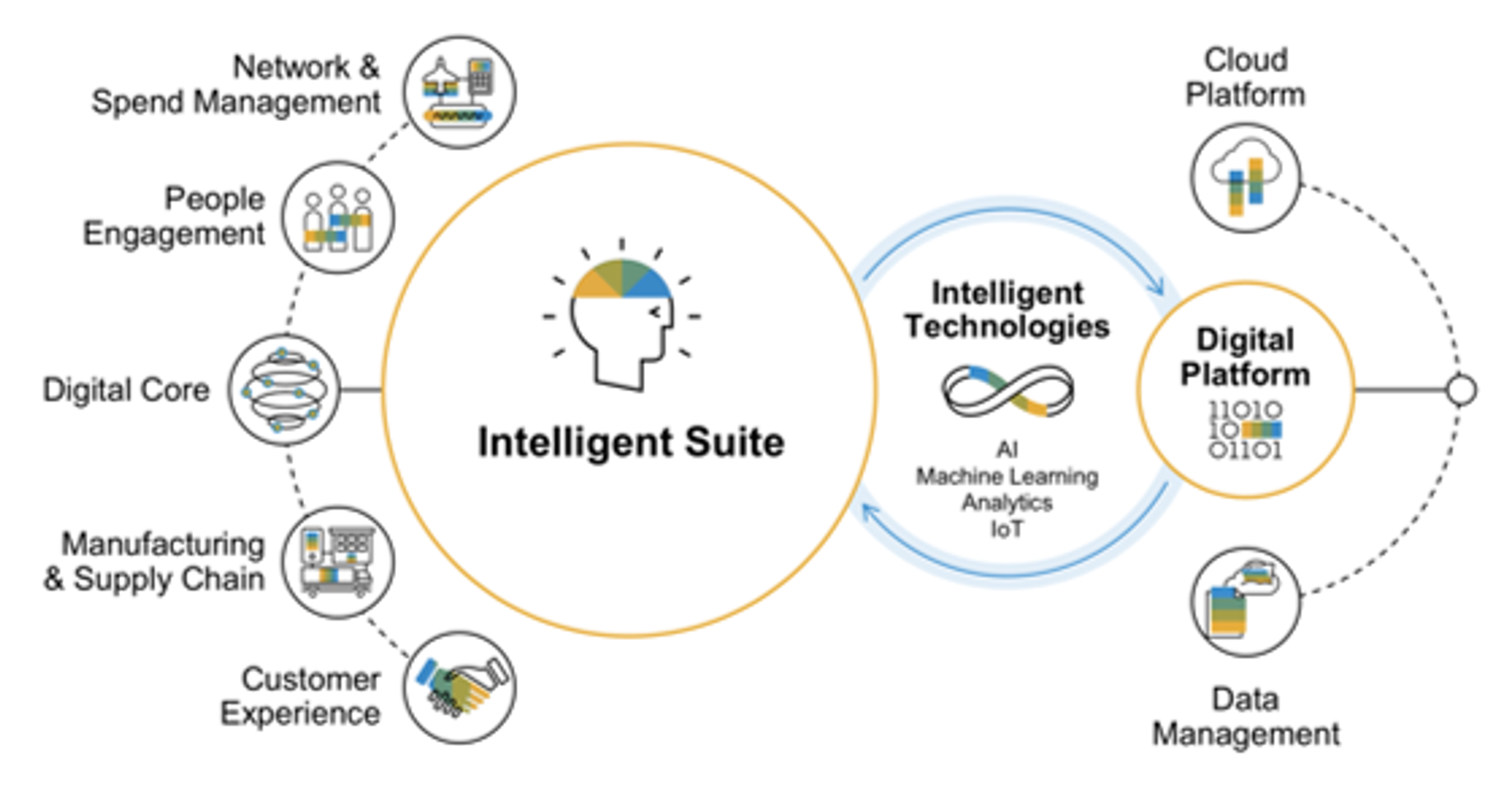
However, the architecture of SAP is fundamentally different to Workday in that each application typically has a different database and therefore processes and data need to be integrated on an individual basis.
User Experience
A key benefit of having finance and HR on one platform is the benefit this has on the user experience of Workday. Processes run in one user interface end-to-end which is available on any device.

The same can't be said for SAP to the same extent. Although both SAP S/4HANA and SuccessFactors do run the same style of user interface, they are fundamentally two different products which are linked via API for data and processing.
Manufacturing
Manufacturing companies comparing SAP and Workday typically decide on SAP in our experience. SAP is entrenched in manufacturing industries such as pharmaceuticals, automotive, high tech and beyond and has developed specific functionality to accomodate the needs of these organisations into its entire suite of products.

On the other hand, Workday does not offer a complete ERP solution, instead focussing on financial management and accounting and human resources specific needs like recruiting, onboarding, timesheets, learning and development and so on.
That means that you won't be able to manage stock, production and supply chain in Workday and will need to integrate with specific third party applications to complete the picture.
For manufacturing organisations only looking for HR or finance capabilities, then Workday is a great fit. However, most organisations will want to standardise their IT platforms and for this, SAP is a great choice.
Professional Services
Professional services firms can be spoilt for choice when evaluating SAP vs Workday which is where both solutions have perhaps the most crossover and have far less to differentiate themselves. Lets compare SAP vs Workday across many of the features and modules used by professional services companies.
Read our complete guide to SAP S/4HANA:

Project and Resource Management
Workday provides integrated project and resource management functionalities designed to help professional services firms plan, execute, and analyse their projects. Its resource management capabilities allow for effective staffing by matching project requirements with employee skills and availability.

SAP S/4HANA offers robust project management capabilities, including project planning, execution, and billing. It's well-suited for managing complex projects and can handle various billing arrangements like fixed price, time and materials, or milestone-based billing. This integration ensures that project-related financials are closely aligned with the overall financial management of the company.

Financial Management
Workday's financial management suite is comprehensive, offering capabilities that rival those of SAP S/4HANA. It includes core accounting, revenue management, project billing, and financial reporting, tailored to the needs of services firms. Its analytics and reporting tools give real-time insights into financial performance.

As an ERP solution, SAP S/4HANA excels in financial management, offering comprehensive features for accounting, financial reporting, and compliance. This is crucial for professional services firms that need to maintain tight control over their finances, manage cash flow efficiently, and meet various regulatory requirements.
Human Capital Management
Workday's HCM suite is a strong competitor to SuccessFactors, offering a wide range of functionalities including talent management, workforce planning, learning, and development. It's known for its user-friendly interface and cloud-native design, which can enhance employee experience and operational efficiency in HR processes.
SuccessFactors shines in managing the employee lifecycle, from recruiting and onboarding to performance management and development. It helps professional services firms attract and retain top talent, develop their skills, and ensure high levels of employee engagement and productivity.
Comparing Costs
The cost of implementing SAP S/4HANA & SuccessFactors versus Workday are typically quite similar and ultimately will depend on the size of your project, the scope, the resourcing model and the level of customisation or configuration, as well as integration with existing business systems.
SAP vs Workday Licence Costs
SAP offers its flagship ERP S/4HANA in various different guises, from On-Premise to Private Cloud and Public Cloud and as such, the system can be purchased in the Cloud or as an On-Premise product - so either as a subscription or as a one-off purchase. With that said, although the cost of buying SAP On-Premise is typically up front, you will also need to pay an annual maintenance cost of 22%.
On the other hand, SAP SuccessFactors is only available as a Cloud solution, meaning you'll need to sign up to an annual subscription to use the service.
On the other hand, Workday is only available as a Cloud solution and does not have any On-Premise alternative, which means your only option is to sign an annual subscription.
The cost of S/4HANA and SuccessFactors is typically around £125–160 per user per month, however there will be additional costs for each module or piece of advanced functionality that you add.
The cost of Workday is typically £140–180 per user, however like SAP, it also offers cheaper user types if you need to give some of your employees access to the system to perform a few simple tasks.
Click here to get a quote for SAP or Workday.
Workday versus SAP Implementation Costs
The cost of implementing Workday versus SAP is typically the same and in our experience, Workday can often be more expensive than SAP to implement.
Typically the cost of implementing SAP or Workday is 2-4 times the cost of the annual subscription cost and implementations typically start at £400,000 for a simple implementation but can cost tens of millions for larger companies.
SAP Implementation Approach
SAP's implementation methodology is known as the 'SAP Activate Methodology'. This approach is tailored for SAP S/4HANA and is designed to guide customers through the planning, preparation, and execution of their implementation projects. The SAP Activate Methodology is structured around three pillars: Best Practices, Methodology, and Guided Configuration.
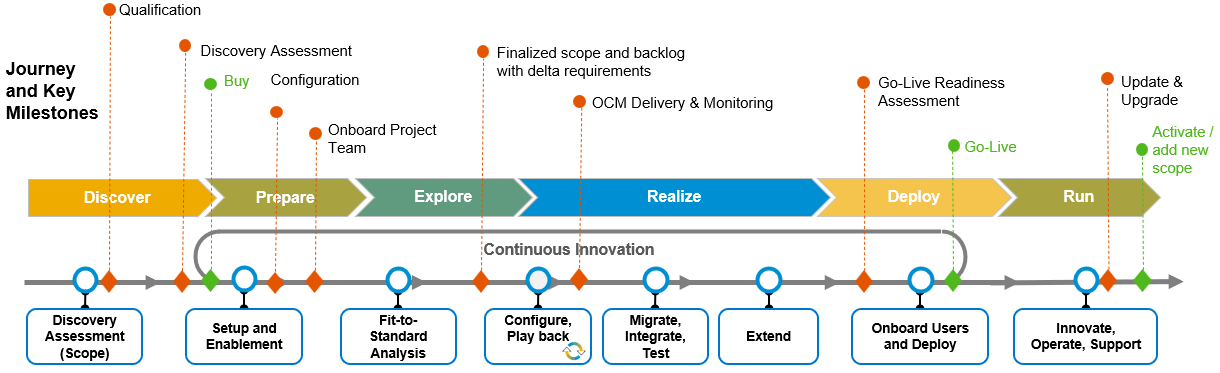
Best Practices
SAP provides pre-configured processes based on industry best practices. These are designed to accelerate the implementation by providing a ready-to-use reference guide that reduces the need for custom development.
Guided Configuration
SAP offers tools and content to support the configuration of the SAP S/4HANA system. This includes the SAP Fiori app for guided configuration, which helps simplify the setup process by providing a step-by-step guide to configuring the system according to the organisation's needs.
SAP's approach emphasises flexibility, allowing for a tailored implementation that can be adapted to the specific requirements of each organisation. However, due to the complexity and breadth of SAP's solutions, implementations can be lengthy and resource-intensive, often requiring dedicated teams and significant investment in training and change management.
Workday Implementation Approach
Workday's implementation methodology is designed to be streamlined and customer-centric, with a focus on rapid deployment and user adoption. Unlike SAP's approach, which can vary significantly in complexity and duration depending on the scope of the implementation, Workday aims to simplify the process with a clear, concise methodology that leverages its cloud-native architecture.
Customer-Centric Methodology
Workday's approach is highly collaborative, involving close cooperation between Workday consultants, partners, and the customer's project team. This partnership is designed to ensure that the implementation is aligned with the customer's business goals and operational needs.
Deployment Flexibility
Workday offers a range of deployment options, from 'Launch' for small to medium-sized businesses needing a quicker, more standardised implementation, to more customised approaches for larger, more complex organisations.
Continuous Development and Support
Workday's single code base for all customers means that updates and new features are rolled out regularly and seamlessly, without the need for extensive downtime or reimplementation. Customers are encouraged to adopt these updates to leverage new functionalities and maintain system optimisation.
Training and Enablement
Workday places a strong emphasis on user training and enablement, offering extensive resources and tools to ensure that users can effectively use the system from day one. This focus on user adoption is a critical component of their implementation strategy.
Get the ERP requirements checklist
A structured checklist to evaluate ERP vendors based on your business needs.
Which Should You Choose?
There is no single winner in the SAP vs Workday debate — the right platform depends on what sits at the centre of your business.
Choose Workday if finance and HR are your core systems and you want them unified on one cloud-native platform. Workday tends to suit professional services, financial services, healthcare, education and other people-centric or services-led organisations that value a modern user experience, strong workforce analytics, and built-in planning (via Adaptive Planning). If you don't need to run manufacturing, inventory or a complex physical supply chain inside your ERP, Workday's focus is an advantage rather than a limitation.
Choose SAP if you need a complete ERP that reaches beyond finance and HR into manufacturing, supply chain, procurement, production and industry-specific processes. SAP is deeply entrenched in manufacturing, pharmaceuticals, automotive, oil and gas and other asset- and product-heavy sectors, and it is the stronger choice if you want to standardise most of your operations on a single vendor. SAP also offers cloud, on-premise and hybrid deployment, which matters for organisations with data-residency, latency or legacy-integration requirements that Workday's cloud-only model cannot meet.
For many mid-to-large organisations the honest answer is that both can do the job for finance and HR, and the decision comes down to industry fit, deployment needs and which vendor's ecosystem you want to standardise on. The most reliable way to decide is to score both against your own prioritised requirements rather than a generic feature list.
Frequently Asked Questions
Is Workday better than SAP?
Neither is universally better — it depends on your needs. Workday is generally considered better for organisations that want a single cloud platform for finance, HR and planning with a modern user experience, particularly in services, financial services, healthcare and education. SAP is better for organisations that need a full ERP covering manufacturing, supply chain and complex finance, or that require on-premise or hybrid deployment.
What is the difference between Workday and SAP?
The core difference is scope. SAP offers a complete ERP suite — finance, HR, supply chain, manufacturing, procurement and more — across cloud, on-premise and hybrid deployments, with S/4HANA and SuccessFactors linked via APIs. Workday is a cloud-only platform focused on finance, HR and planning built on a single unified data model, so processes run end-to-end in one interface but stop short of full ERP capabilities like inventory and production.
Workday vs SuccessFactors — which is better?
For HR alone, both are strong. Workday HCM is built on a single unified data model and is often praised for its user experience, analytics and built-in planning, making it a good fit when HR and finance sit on one platform. SAP SuccessFactors is modular — Employee Central, Recruiting, Learning, Performance and more — and is usually the better choice for organisations already running SAP S/4HANA that value deep learning capabilities and modular configuration for complex global compliance.
How much does Workday cost vs SAP?
Licence costs are broadly comparable and both are quoted per user with tiered user types. As a rough guide, S/4HANA plus SuccessFactors typically lands in a similar per-user range to Workday, with Workday often slightly higher, though exact pricing depends on modules, user mix and negotiation. Implementation is usually the larger cost for both — commonly two to four times the annual subscription — and in our experience Workday can be more expensive to implement than SAP. Get a tailored quote rather than relying on list ranges.
Can you migrate from SAP to Workday?
Yes, and it is a well-trodden path, especially for HR moving from SuccessFactors to Workday. The main challenge is data-model translation: SAP's effective-dated, modular structures have to be mapped into Workday's unified object model, alongside integration and change-management work. Enterprise migrations typically run over several months and benefit from experienced Workday partners, careful data mapping and a phased approach.
Comparing Workday and SAP for your business? Get personalised pricing or build a vendor-ready requirements list to shortlist the right fit.
Further Reading
Oracle ERP Cloud Implementation Cost Breakdown (2026)
Real Oracle ERP Cloud implementation cost data: licensing, services, data migration, training, and support. Total cost of ownership scenarios for 500–5,000 users.
BlogOracle ERP Cloud Implementation Cost Breakdown (2026)
Real Oracle ERP Cloud implementation cost data: licensing, services, data migration, training, and support. Total cost of ownership scenarios for 500–5,000 users.
BlogOracle ERP Cloud vs SAP for Finance (2026)
Compare Oracle Fusion Financials vs SAP S/4HANA Finance on financial close speed, treasury, DSO/DPO, compliance and total cost of ownership for CFOs.
See Pricing
ERP Benchmark: Which Vendors Do Companies Actually Choose?
See real-world vendor adoption data for your industry — 10,000+ verified implementations.
Interested in Workday?
Request a free, no-obligation demo and get personalised pricing for your business.
Get a Workday Demo
See Workday in action with a personalised walkthrough for your business.
Want to discuss this further?
Reach out and our team will help you navigate your ERP journey.