
Sage Intacct Modules & Capabilities
Sage Intacct is rated across 9 of 14 ERP modules, 3 of them a core strength and 2,357 documented capabilities catalogued across those modules.
- 9of 14
- Modules rated
- 3
- Core strengths
- 2,357
- Documented capabilities
- Cloud
- Deployment
Sage Intacct module ratings
Ordered strongest to weakest. Each rating reflects standard-edition depth, not what a third-party add-on could bolt on.
Finance & Accounting
strongCore financial management including general ledger, accounts payable/receivable, fixed assets, cash management, and financial reporting. The backbone of any ERP system.
›1,112 documented capabilities in 239 areas
Finance & Accounting
strong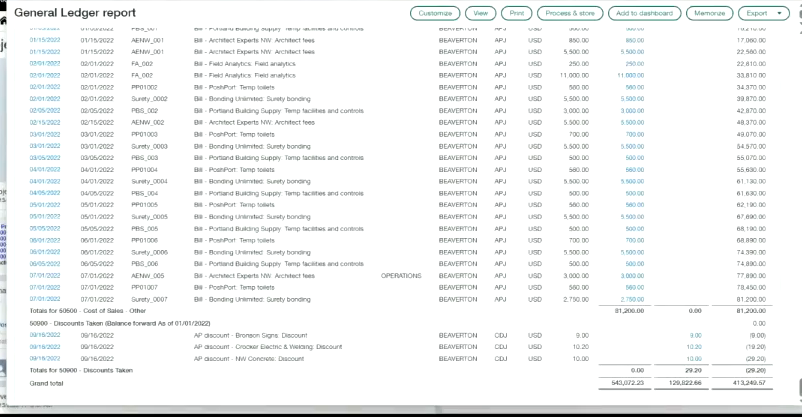
Contracts5
Provides standard and custom reports, plus visual boards, for analyzing contract billing, revenue, and expense data.
ICRW reports · Custom report objects · Standard report packages · Visual boards
Learn About3
Explains the revenue recognition methods available, such as straight-line and prorated variants, and how each allocates revenue across full and partial periods.
Revenue recognition schedule FAQs · About the revenue recognition process
Dimension basics5
Introduces the core concepts behind dimensions, including how they function, the different dimension types available, how dimension relationships work, and why they matter for financial reporting.
How dimensions work · Types of dimensions · Understand dimension relationships · Why dimensions are important
1099s3
Covers the end-to-end process of submitting 1099 and 1096 forms, from ordering and printing to filing electronically when more than 10 forms are involved.
1099 FAQs · 1099 vendor contact verification report
Audit focus areas and control techniques5
Covers key audit focus areas including outlier detection in the General Ledger, IT security and privacy practices, process documentation, and what to expect during a Sage Intacct audit.
GL Outlier Detection · IT security and privacy · Accounting process documentation · The Sage Intacct audit experience
Troubleshooting3
Runs standard Accounts Payable reports on amounts owed and paid to vendors, including 1099 preparation reports and graphical views of bill and vendor aging analysis.
1099 report · Reconcile AP subledger or aging to the GL account · Troubleshoot Vendor Aging report
Troubleshooting3
Provides standard Accounts Receivable reports that can be run, customized, and exported, plus troubleshooting guidance for subledger-to-GL discrepancies, aging report issues, and customer reconciliation problems.
AR subledger and GL discrepancies · Troubleshoot Customer Aging report · Troubleshoot customer reconciliation
General concepts3
Covers relabeling billable terminology for grants, tracking and billing against grants, and recognizing revenue under nonprofit accounting rules.
Change billable-related labels to reflect grant management terminology · Grant tracking and billing · Nonprofit revenue recognition
1099 – 1099 Report4
Runs before printing or e-filing 1099 forms to confirm vendors and employees carry the correct 1099 form, box, and taxable amount, excluding anyone under the IRS minimum reporting threshold.
Field descriptions: 1099 report · Run the 1099 report · 1099 report
Adjustments to closed books4
Lets finance teams define custom reporting books, separate from the standard GAAP and tax books, to track specialized adjustments and report on them individually or in combination.
Adjustments to closed books · Field descriptions · List of adjustments
Unapply, delete, or reverse a vendor credit (debit memo)5
Records credit and debit memo adjustments against vendor balances, letting users apply, unapply, reverse, or delete them as vendor account corrections change.
When can I unapply, reverse, or delete an AP debit memo adjustment? · Adjustments · Field descriptions · Apply an AP adjustment to a bill
Credits and refunds5
Lets finance teams record debit and credit memos against a customer's balance once an invoice has already been paid, keeping an audit trail instead of editing the original invoice, with entries posted at the company or entity level in multi-currency setups.
Apply an AR credit to an invoice · Process a check returned for non-sufficient funds · Credits and refunds · Field descriptions
Use cases and workflows5
Explains how Sage Intacct treats credit and debit cards as cash accounts, and walks through common setups such as several employees sharing card users, combining point-of-sale purchases with bill payment on one card, or tracking employee expenses on a company card.
About using multiple cards for multiple card users · About using a single card for point-of-sale use and bill payment · About using a single credit card for point-of-sale use · About using a credit card for employee expenses
Nonprofit reporting5
Covers nonprofit-specific reporting tools, including account categories, dashboards, financial reports, and traditional fund accounting.
Account categories and account groups · Dashboards · Financial reports and graphs · Traditional fund accounting
Billing price lists5
Sets up billing price lists and processes historical contract schedules so that past contract balances can be posted for ASC 606 reporting.
About historical contract lines · Billing price lists · Fixed price item pricing examples · How Sage Intacct determines variable billing quantities for usage
OE Revenue Recognition5
Recognizes revenue on Order Entry transactions, including tracking by contract dimension, delivering line items, and running bulk recognition actions.
Track Order Entry transactions with the contract dimension · Revenue recognition · Bulk action runs · Deliver a transaction line item
Bank Accounts3
Covers setting up and managing bank account records within a console.
Bank accounts · Field descriptions: Bank accounts—Consoles
Adjustments5
Corrects an employee's expense balance after an overpayment or underpayment, with the correction appearing on the expense ledger report.
Add expense adjustments · Apply an expense adjustment to an expense report · Delete expense adjustments · Edit expense adjustments
Adjust assets5
Adjusts an asset's cost or transfers it to a new location or classification, even after the asset is already in service.
About assets · About adjusting an asset's cost · About asset transfers · Creation and service
Apps And Reports ME Guidelines5
Provides guidelines for using Accounts Payable, Accounts Receivable, Cash Management, and Contracts within a multi-entity company.
Accounts Payable multi-entity guidelines · Accounts Receivable multi-entity guidelines · Cash Management multi-entity guidelines · Contracts multi-entity guidelines
Consolidate ownership structures5
Automates multi-level consolidations and non-controlling interest entries by defining ownership structures that capture parent-subsidiary relationships across a company.
Consolidate ownership structures · Consolidate an ownership structure · Re-consolidate an ownership structure · Manage ownership structures
Classes5
Covers the Classes dimension, including how class groups are configured, managed, and used to filter reports and dashboards, plus field-level reference and renaming guidance.
About Classes · Classes · Field descriptions: Classes · Rename and repurpose classes
Importing3
Covers importing standard cost type lists and work-in-progress schedule data into Construction.
Import standard cost types · Import work in progress (WIP) schedule information
Close Automation – Close Assistant4
Closed books overview, part of Close Assistant, shows the latest period each entity has closed across an organization, listing the date each application closed through for General Ledger, Cash Management, Accounts Receivable, and Accounts Payable depending on subscriptions.
Close Assistant · Set up Close Assistant · Use Close Assistant
Assignment rules5
Automatically pairs an unmatched incoming bank deposit with a customer, then lets that payment be received in a batch from the Bank transactions page, working across checking and savings accounts.
About Bank transaction assistant file import · Assignment rules · Field descriptions: Assignment rules · Deactivate an assignment rule
Advances4
Issues and tracks advance payments made to employees before they submit an expense report, then applies those advances against the resulting reimbursement.
Create an advancement · Field descriptions: Create advance payments · Posted advances
Allocation groups5
Automates the distribution of revenues and costs across departments, projects, and other dimensions using recurring allocation templates, reducing manual work as transaction volume grows.
About transaction allocations · Allocations overview · Allocation group field descriptions · Allocation groups
Unapply, void, or delete an advance5
Records advance payments to vendors made before a bill exists; once paid, the amount converts into a credit that can be applied to that vendor's future bills.
Adjust for an AP advance applied in error · Advances · Field descriptions · Apply an AP advance to a bill
Customer advances5
Records a prepayment or retainer received from a customer before any invoice exists, then lets that credit be applied once the invoice is created; multi-currency and multi-entity companies can capture advances at the top or entity level.
Customer advances · Field descriptions · Apply an advance to an invoice · Receive advances
Using Contracts – Billing5
Bills contract lines using fixed price, quantity-based, or time-and-materials methods, with usage records driving the amounts billed for consumption-based lines.
Billing methods · Quantity-based - Committed · Fixed price billing · Project time and materials
Project revenue recognition5
Recognizes fixed-fee project revenue on percentage of completion, calculated automatically from budgeted cost or time, or set manually.
Project revenue recognition · Project revenue recognition by budgeted cost · Project revenue recognition scheduled posting dates · Project revenue recognition schedules FAQ
Bulk action runs4
Runs bulk actions—such as capitalizing or disposing of multiple assets at once—and tracks the status of each run.
View the status of a bulk action run · About bulk action runs · Field descriptions: Bulk action runs
Before you begin3
Guides planning decisions and offers a step-by-step checklist to follow before setting up a multi-entity company.
Multi-entity shared installation checklist · Guidelines for a multi-entity company
Concepts5
Introduces the affiliate entity dimension, which tags transactions so companies can run detailed reports on inter-entity and affiliate account activity.
Concepts · About tracking financial transactions by affiliate entity dimension · Affiliate entity standard dimension overview · Examples
Departments5
Covers the Departments dimension, including how department groups filter reports and dashboards, permission requirements, and how to manage department records and their parent locations.
Departments · Change a parent location · Field descriptions: Departments · Manage departments
Joint check payment method—Construction5
Covers the joint check payment method, which issues a single check payable to both a general contractor and a subcontractor's supplier.
Joint check basics—Construction · Secondary vendors FAQs · Joint check payment method FAQs · Pay Construction bills
1099 – File Electronically5
E-files 1099 forms through the integrated TaxBandits partner without exporting data or manipulating spreadsheets, sharing form data with a click and completing the filing on the TaxBandits site for state, federal, or mailed submissions.
E-file 1099s—powered by TaxBandits · File 1099s electronically (E-file) · Field descriptions · E-file 1099s
Internal controls4
Internal controls safeguard an organization, minimize risk, and keep operations running efficiently, protecting assets, ensuring accurate records, and supporting adherence to industry regulations. Building an effective governance framework typically involves consulting an experienced auditor to select controls suited to the organization's specific risk profile.
Internal controls · Internal control objectives · Internal control types
Close Automation – Close Workspace5
Close Workspace integrates Collaborate directly into checklist and task records so close-related conversations and documents stay linked in context, eliminating the need to work outside Sage Intacct and giving managers better visibility into close progress.
About Close progress monitor · About Close Workspace notifications · About Close Workspace roles · Close Workspace overview
Approve expense reports5
Gives managers the tools to review, approve, or decline submitted employee expense reports and their line items.
Approve or decline expense report lines · Decline expense reports · Field descriptions: Approve or decline expense reports · Approve expense reports
Approval delegation5
Routes general ledger journal entries through an optional approval workflow before posting, with email notifications and the ability to delegate approval authority to another user.
About journal entry approval delegation · Approval delegation · Field descriptions · Stop approver delegates
Approvals – Bill Approvals5
Routes bills through a configurable approval policy based on vendor, amount, or department before they become eligible for payment.
About bill approvals · Notifications · Receive bill approval notifications · Stop bill approval notifications
Deposits5
Moves payments sitting in an undeposited-funds account into the bank, combining AR invoices and advance payments with other Cash Management receipts into a single deposit as funds are actually transferred.
Deposits · Create a deposit · View a list of deposits · Field descriptions: Deposits
Banking And Payment Cloud – Bank Feeds5
Matches transactions arriving from a connected bank feed or import file against existing records, and lets users set aside irrelevant or duplicate unmatched items by marking them as ignored.
Bank feeds—Overview · Ignore bank transactions · Ignore a bank transaction · Stop ignoring a bank transaction
Using Contracts – Contracts5
Manages contract lifecycle events such as renewals and cancellations, including how outstanding billing and revenue balances are cleared when a contract is canceled.
About contract renewals · Field descriptions: Cancel Contract · Reopen a closed evergreen contract line · Troubleshoot contract cancellation
Reports5
Reports on MEA allocations and deferred revenue, including current balances, forward-looking forecasts, and multi-currency revaluations.
MEA allocation details · Deferred revenue details · Deferred revenue forecast · Deferred revenue revaluation
CIP assets5
Manages large capital projects, such as buildings or custom equipment, during construction or assembly—tracking costs as they accrue and capitalizing the asset once the work is complete.
CIP assets · Capitalize a CIP asset · Workflow for CIP assets · Connect a CIP asset with a project
Best practices3
Shares recommended practices for configuring and operating a multi-entity company effectively.
Auto-default location and entity in a single entity company with a top level · Considerations before restricting work to the top level only
Examples4
Walks through examples of consolidating financial statements for the first time, combining a parent company's data with its subsidiaries using methods like full consolidation and equity.
Examples · Example: Consolidating for the first time with prior period activity · Example: Consolidating for the first time from the first period of business activity
Employees5
Covers the Employee dimension used to tag time entries, expense claims, and project labor for costing, tracking, and payroll-related reporting, along with setup, field reference, and reporting-specific employee management.
Employees · Manage employees in Reporting · Field descriptions: Employee information · Work with employees
Lien waivers5
A lien waiver confirms a vendor has been paid and gives up the right to file a claim against the property where work took place. Sage Intacct automatically builds a compliance record for each lien waiver tied to an AP bill or payment, letting teams print or email waivers, mark them received, and withhold future payments if none arrives.
Lien waivers · Enable primary documents on transaction definitions · Mark a lien waiver as received · Print or email lien waivers
1099 – Forms5
Covers how credit card transactions, minimum reporting thresholds, and form options affect which 1099 forms to order and use.
1099 credit card transactions · 1099 minimum reportable amounts · Order forms · Form 1099 options
Delete or reverse expense reports4
Deletes or reverses expense reports, including controls to prevent unpaid employee reports from being deleted.
Delete an expense report · Prevent deletion of unpaid employee expense reports (reverse only) · Reverse an expense report
Budgets And Spending – Budgets5
Provides financial report writer tools for building custom budget reports that compare actual spending to budgeted amounts across periods, locations, and departments for managers, approvers, and finance leaders.
About the budget report · About budgets · Budget data · Field descriptions: Details
Approvals – Payment Approvals5
Routes outgoing vendor payments through an approval step before they're processed, with configurable email notifications.
Consolidate payment approval emails · Receive notification when payment requests are pending your approval · Receive notification when your payment requests are approved · Stop payment approval notifications
Setup5
Automates customer collections by defining dunning levels tied to how overdue an invoice is and by how much, each with its own printed or emailed notice template and tone.
Setup · Add dunning levels · Add templates for dunning notices · Field descriptions
Workflow Controls4
Covers recommended controls for the Order to Cash, Procure to Pay, and Record to Report business workflows.
Order to Cash workflow controls · Procure to Pay workflow controls · Record to Report workflow controls
Banking And Payment Cloud – Bank Files4
Configures which checking accounts and which vendors are eligible for the bank file payment option once Sage Cloud Services is turned on.
CSV import template Update employees for bank file payments · CSV import template Update vendors for bank file payments · Bulk import and update vendors and employees with bank file details
Using Contracts – Contracts And Projects5
Links contracts to projects so that revenue for time-and-materials engagements can be estimated, deferred, and recognized under ASC 606 variable consideration guidance.
About percent complete recognition · About percent complete contract lines in MEA allocations · Estimated time-based recognition · Revalue a Project time contract line
Revenue recognition schedules5
Shows which periods of a transaction line's deferred revenue have been posted, are pending, or are scheduled, and lets that schedule be held, resumed, reallocated, or posted.
Hold or resume revenue recognition · Post revenue recognition · Reallocate a revenue recognition schedule · Revenue recognition schedules list
Asset classifications5
Groups similar assets—like computer equipment, vehicles, or buildings—under shared default GL accounts and depreciation rules for consistent accounting and easier reporting.
Asset classifications · Create an asset classification · Delete an asset classification · Edit an asset classification
Custom Activity Restrictions3
Restricts certain transactions and activities so they can only be entered at the entity level rather than the top level.
Restrict transactions to the entity level · When to work at the entity level
Book Setup5
Defines and manages the attributes of a Domestic Consolidation book, which combines daily operations across entities that share one base currency, with automatic eliminations.
Domestic Consolidation overview · Book Setup · Book information—Domestic Consolidation · Elimination accounts — Domestic Consolidation
Dimension groups5
Covers how to create, configure, and remove dimension groups, which bundle related dimension members together for use as report and dashboard filters.
Delete a dimension group · About dimension groups · Frequently asked questions: Dimension groups · Set up dimension groups
1099 – Guide3
Walks through the full process of setting up and printing 1099 forms, from deciding how you'll tag transactions and issue forms across entities to assigning a default 1099 form and box per vendor or employee, with optional line-level overrides.
Vendor 1099s · Step-by-step guide to 1099s
Close Automation – Variance Analysis5
Covers configuring, customizing, and troubleshooting Copilot's automated Variance Analysis feature.
Customize Variance Analysis email notification messages · Field descriptions: Configure Copilot Variance Analysis · Set up Copilot Variance Analysis · Troubleshoot Copilot Variance Analysis
Approvals – Vendor Approvals5
Requires new and edited vendor records to clear a review step before they're usable in Accounts Payable or Purchasing records.
Notifications when vendors are approved · Notifications of pending approvals · Stop vendor approval notifications · Approve vendors
Budgets And Spending – Copilot Variance Analysis5
Uses AI-assisted Copilot Variance Analysis to flag and explain notable differences between actual results and budget, with configurable email alerts.
Customize Variance Analysis email notification messages · Set up Copilot Variance Analysis · Troubleshoot Copilot Variance Analysis · Use Copilot Variance Analysis
Discounts and penalties5
Governs how far an invoice can be edited based on its current state — drafted invoices allow broad changes, while posted invoices allow only limited edits such as term, memo, or GL reclassification — and covers applying discounts and late-payment penalties.
About managing invoices · Discounts and penalties · Apply discounts · Apply penalties
Distribute employee expenses5
Splits a single expense payment into multiple entries automatically using percentage-based transaction allocations, speeding up data entry for qualifying expense types.
Distribute employee expenses · Distribute credit card transactions linked with electronic receipts · Field descriptions: Select credit card transactions · Field descriptions: Distribute employee expenses
Using Contracts – Expenses5
Schedules and posts deferred expenses associated with a contract or contract line over the contract term, with the ability to hold, resume, or reallocate a schedule.
Expense schedules · Hold or resume an expense schedule · Reallocate an expense schedule · Expenses
Setup5
Covers initial setup of Revenue Management, including recognition categories, reusable templates, and the layout of the filtered schedules list.
Before you set up Revenue Management · Customize the Filtered schedules column layout · Revenue recognition categories · Revenue recognition templates
Generate project invoices5
Generates invoices covering all billable transactions tied to a project, with options to preview, print, or email the resulting invoices.
Generate project invoices FAQs · Field descriptions: Preview a project invoice · Field descriptions: Print and email project invoices · Generate project invoices with the Pre-Bill report
Post depreciation5
Posts, reverses, or summarizes asset depreciation each month, either manually or on an automated schedule.
About posting depreciation · About reversing posted depreciation · About summarized depreciation · Field descriptions: Depreciation schedules
Data sharing and restrictions5
Controls which data—account titles, bank accounts, customers, and vendors—is shared across entities and which users can access it.
Account titles by entity · Bank accounts in a multi-entity shared company · Customers and vendors in a multi-entity shared company · Entity restrictions for users
Equity consolidation method5
Within Advanced Ownership Consolidation, the equity method automatically posts a subsidiary's earnings to its parent entity in proportion to how much of it the parent owns.
Equity consolidation method · About user-defined books for the equity consolidation method · Example: Equity method with affiliate entity in Advanced Ownership Consolidation · Use the equity consolidation method with Advanced Ownership Consolidation
Locations5
Covers the Locations dimension, including how location groups filter reports and dashboards, plus how to add, reparent, inactivate, or delete individual location records.
Locations · Add new parent location · Inactivate or delete a location · Field descriptions: Locations
1099 – Open Balances4
Enters historical year-to-date 1099 amounts carried over from a prior system, at the entity level or the top level depending on whether a company issues separate 1099s per entity.
Enter 1099 opening balances · Vendor 1099 opening balances · Manually enter vendor 1099 opening balances
Manual deposits5
Records a deposit for payments tied to an existing invoice or for a single payment with no invoice on file; single-currency companies can post these at the top or entity level, while multi-currency companies must use the entity level.
Manual deposits · Create a manual deposit · Field descriptions: Manual deposits · View manual deposits in a summary
Bill approvals4
Covers how to set up approval requirements for vendors, bills, and payments.
Vendor approval · Approvals · Payment approvals
Budgets And Spending – Planning5
Extends basic budgeting with Sage Intacct Planning, a cloud-based tool for building, sharing, reviewing, and forecasting budgets in a continuous planning cycle.
Basic budgeting vs. Budgeting and Planning · Budgeting with Sage Intacct Planning · Grant access to Sage Intacct Planning · Integrate Planning
Cash Management5
Provides standard reports covering bank, check, deposit, and credit card registers, plus cash balance and adjusted available cash reporting, each customizable and exportable.
Cash Management · Adjusted available cash · Bank register · Cash analysis
Using Contracts – Learn About5
Introduces Sage Intacct's contract management capabilities for subscription and SaaS businesses, covering automated revenue recognition under ASC 606 and IFRS 15, multiple-element allocations, and flexible billing across hundreds of scenarios.
Contract accounting flow · Contract basics · Exchange rate dates · Expense recognition accounting flow
Credit card transactions linked to employee expenses5
Links, views, and manages credit card transactions and electronic receipts tied to employee expense reports.
Add credit card transactions and electronic receipts · Remove credit card transactions · View transactions linked to employee expense reports · Staff expense reports
Depreciation methods5
Offers a range of depreciation methods, such as declining balance calculations, for computing how an asset's value decreases over time.
About depreciation methods · 150% declining balance · 200% declining balance · Custom declining balance without true-up
Inter-entity bill back5
Automatically generates a bill in one entity's Accounts Payable whenever another entity invoices it for shared goods or services, such as corporate rent charged to satellite offices.
Create bill back templates · Set up inter-entity bill back · Inter-entity bill back · Add a tax solution to a bill back bill
Book setup5
Defines and manages the attributes of a global consolidation book, which converts entities operating in different currencies into a single reporting currency and eliminates inter-entity balances.
Global Consolidation overview · CTA accounts · Book setup · Accounts to override
Manage relationships5
Covers how to build relationships between dimensions so that selecting one value automatically fills in a related value, including one-to-many and many-to-many setups, display options, and naming conventions.
Create dimension relationships · Create a relationship between two dimensions · Set the display of related dimension field (optional) · Create a naming convention (optional)
1099 – Print Alignment3
Adjusts print alignment settings so 1096 and 1099 forms print correctly on preprinted stock.
Adjust 1096 alignment · Adjust 1099 alignment
Sage Copilot3
Introduces the Sage Copilot interface and answers common questions about using it.
Copilot basics · Copilot FAQs
Budgets And Spending – Spend Management5
Validates General Ledger, Accounts Payable, and Purchasing transactions in real time against a specified budget, alerting users when spending — including committed but unbilled expenses — would exceed the limit.
Spend Management · Field descriptions · Include committed expenses · Spend Insight
Bill automation settings4
Automatically creates draft bills from documents that are emailed or uploaded, identifying the vendor and filling in bill details with the source document attached for reference.
About AP Automation setup · Bill automation settings · Troubleshoot general AP Automation issues
Posted payments5
Reverses a posted customer payment that landed on the wrong account or the wrong date, preserving a full audit trail with a matching Reversal entry so a corrected payment can be received against the invoice.
About multi-currency overpayments · Posted payments · Field descriptions · Payments
Deposits5
Moves payments held in an undeposited-funds account into the bank once they're collected, combining receipts from AR invoices, advances, and other Cash Management receipts into a single deposit.
Deposits · Cannot reverse a deposit · Field descriptions · Troubleshoot deposits
Using Contracts – Revenue5
Allocates a bundled contract's total value across its distinct performance obligations based on each item's relative standalone selling price, then recognizes each portion on its own revenue schedule.
Define MEA allocations · MEA allocation calculation examples · MEA allocations · Override MEA amounts
Employee types5
Classifies employees into types—such as full-time, contractor, or seasonal—to improve budgeting and forecasting accuracy. Types can be flagged as 1099-eligible for contractor payments.
Make an employee type 1099-eligible · Field descriptions: Employee type information · Field descriptions: Employee types list · Deactivate or delete employee types
Depreciation rules5
Defines the calculation method, convention, and expected service life used to determine how an asset depreciates, whether inherited from a classification or customized on an individual asset.
Depreciation rules · Add a depreciation rule · Delete a depreciation rule · Edit a depreciation rule
Manage structures5
Covers dimension structures, which arrange dimension members into custom hierarchies for use as rows or columns on financial reports, including how to list, limit, and apply them across multiple entities.
Dimension structure lists · Dimension structures for financial reports · Limit members in dimension structures · Multi-entity report structures (account groups and dimension structures)
Managed Console Consolidation – Consolidate Data5
Runs monthly consolidations for subsidiaries in a managed console, tracks status, calculates currency conversions, and allows adjustments.
Consolidate monthly data · Consolidation status list · Currency calculations · Make adjustments to a consolidation
1099 – Print Forms5
Covers common 1099 printing scenarios, including multi-entity companies, corrected forms, and printing for individual entities or entity groups.
About printing 1099 forms in a multi-entity company · Print one 1099 form for all or multiple entities from the top level company · Print a corrected 1099 form · Print an individual 1099 form for an entity or entity group
1099 – Set Up5
Covers setting up vendors and employees for 1099 tracking, including custom list views and the names that print on forms.
Create a custom list view for 1099 vendors · Set up employees · Set up vendors · Set up 1099 names to print on forms
Bills – Delete Or Reverse Bills5
Explains when a bill can be deleted outright versus reversed with an offsetting transaction, depending on its payment and approval status.
Delete or reverse a bill · Reverse a bill · Delete an unpaid bill · Reverse a paid bill
Prepaids5
Handles PCA (produits constatés d'avance) deferral schedules so customer prepayments spanning several accounting periods flow into the General Ledger over time, supporting the French Plan Comptable Général.
Prepaids · Create a deferred adjustments invoice · Run a deferred adjustments report · View a deferred adjustments schedule
Funds transfers5
Records the movement of funds between two cash accounts sharing a base currency, with transfers supported within or across entities in multi-entity, multi-currency companies.
Funds transfers · Field descriptions: Funds transfers · Funds Transfers list · Record a funds transfer
Employee dimension groups5
Groups employee records into named sets for filtering and reporting across expense reports, timesheets, and project labor costs.
About employee dimension groups · Employee dimension groups · Field descriptions: Employee group information · Field descriptions: Employee groups
Disposal5
Fully or partially disposes of assets that have been removed from service, such as through a sale.
About full asset disposals · Field descriptions: Asset disposal · Fully dispose of an asset · Partially dispose of an asset
Inter-Entity Transactions5
Tracks transactions between entities in the same company through configured inter-entity account mappings, with dedicated reporting on inter-entity activity.
About the automatic migration of your inter-entity setup · Custom report objects—Inter-entity transactions · Inter-entity transaction report package · Inter-Entity Transactions
Managed Console Consolidation – Setup5
Sets up subsidiaries and their account mappings for Management Console Consolidation, including partial ownership percentages.
Partial ownership of subsidiaries · Subsidiaries list · Subsidiary information · Accounts
Manage user-defined dimensions5
Walks through building a custom user-defined dimension from scratch, covering the essentials, creation and deployment, adding values, and making it available for use on transactions.
Read 1st: User-defined dimension essentials · Step 1: Create and deploy a user-defined dimension · Step 2: Add values to a user-defined dimension · Step 3: Make a user-defined dimension available
GL Outlier Detection5
Applies machine learning to historical transaction patterns so approvers see an outlier flag on journal entries that look unusual, adding an extra layer of control to the approval process.
GL Outlier Detection · Customize GL Outlier Detection · Stop Outlier Assistant · Field descriptions
1099 – Transactions5
Automatically tags transaction line items for 1099 tracking once the linked employee or vendor is configured for 1099 treatment, with options to exclude or retroactively flag individual lines.
About 1099s and inter-entity transactions · Exclude a line item from 1099 treatment · Tag a transaction as 1099 eligible or ineligible after the fact · Update existing vendor 1099 transactions with an import file
Bills – Edit Bills3
Lets users edit a bill, with the available fields depending on whether a payment has already been recorded against it.
Edit a paid bill · Edit an unpaid bill
Reclassifying5
Lets finance teams move an already-posted invoice or adjustment to a different GL account, department, or location without reversing the original transaction.
Set up reclassification · Reclassify an invoice · Reclassify an adjustment · Reclassifying transactions
Open and close periods3
Controls whether a Cash Management accounting period is open for new transactions or closed to further entries.
Close periods · Open periods
Using Order Entry – Billing Groups5
Groups customers together to apply shared charges in one batch run, speeding up invoicing and keeping billing consistent, with the option to manually trigger or retry a billing period run.
About billing groups · Field descriptions: Billing groups · Run the next open billing period manually · Retry a failed billing period run
Use dimension counts4
Covers dimension counts, which automatically track how many active members exist for a given dimension — such as how many customers are currently active — so the totals can feed reports or metrics like recurring revenue per customer.
Automate dimension count posting overview · Dimension count rules · Set up dimension count
Expense payment types3
Maintains the payment types—such as cash, personal card, or company card—used to categorize how an expense was paid.
Add, edit, or delete expense payment types · Field descriptions: Expense payment types
Historical assets5
Tracks assets whose depreciation periods fall before the company's go-live date in Fixed Assets Management, keeping those historical periods out of the general ledger.
About historical assets · Historical assets · Historical accumulated depreciation examples · Workflow for historical assets
Manage entities5
Creates and maintains the entity records that make up a multi-entity company, including their relationship to locations.
Entities list · Entities · Field descriptions: Entities · Entities and locations
Management Console Consolidation (for managed consoles only)3
Automatically consolidates subsidiaries whose accounting currency differs from the parent company's, applying the appropriate conversion rate as accounts roll up.
Management Console Consolidation (for managed consoles only) · About the Management Console Consolidation application
General Ledger Reports – Account Groups Hierarchy5
Runs the standard Account Groups Hierarchy report, listing member account groups together with their accounts so groups still missing a mapping stand out.
Account groups hierarchy · Report filters · Customize · Format
Expense summaries5
Groups related expense reports into summaries that can be opened or closed for processing.
Close an expense summary · Field descriptions: Expense summaries · Add, edit, or delete expense summaries · Open an expense summary
Bills – Inline Credits3
Lets users enter a negative line item directly on a bill as an inline credit, which is either applied within that bill automatically or made available as a vendor credit, depending on company configuration.
Inline credits · Enter an inline credit on a bill
Refunds5
Resolves a customer's credit balance by issuing a refund, either logging one already paid outside the system or generating a linked Accounts Payable bill for a new refund, matched against the customer's available credits.
Refunds · Field descriptions: Customer refunds · Record a customer refund · Troubleshoot customer refunds
Other receipts5
Records cash, card, transfer, or check receipts unrelated to a customer invoice, such as an employee reimbursement or a booth fee, and posts each one automatically into the General Ledger and its subledgers.
Other receipts · Edit, view, delete other receipts · Field descriptions: Other receipts · Record other receipts
Reporting3
Provides reports for reviewing consolidation books, including drilling down from general ledger entries to their source accrual data.
Drill down to source accrual data in GL reports for Consolidation books · Example of a GL report on a Consolidation book
Import5
Creates or updates assets in bulk through an import service, including bulk capitalization and disposal.
Update assets · Capitalize CIP assets in bulk · Fully dispose of assets in bulk · Partially dispose of assets in bulk
Multi-base currencies5
Enables entities within the same company to operate in different base currencies, with settings to turn the feature on or off.
Turn off multiple base currencies · Enable multi-base currencies · Multi-base currency considerations · Set up multiple currencies
Manage work in progress (WIP) projects5
Tracks overbilling and underbilling on active projects and forecasts their final cost and revenue outcome.
Field descriptions: WIP schedule fields · Work in progress (WIP) management · Base PM forecasts on primary forecast estimates · Tips for entering forecasts in work in progress (WIP) schedules
1099 – Troubleshoot3
Covers fixing payer information and resolving common problems that arise during 1099 processing.
Edit company or entity 1099 payer information · Troubleshoot 1099s
General Ledger Reports – Account Balance5
Runs the Account Balances report, showing opening balances, debits, credits, and adjustments per account for budget planners, forecasters, and auditors.
Account balances · Filters · Customize · Format
Bills – Recurring5
Covers how to set up and manage bills that repeat on a schedule, including handling amounts that change from cycle to cycle.
Pay a recurring bill · Field descriptions · Recurring bills list · Handling fluctuating recurring amounts
Setup – AR Batches4
Groups invoices, adjustments, and deposits into summaries for batch handling, built either from an uploaded CSV of transactions or automatically by the system at preset time intervals.
Payment summaries · Field descriptions · Summaries
Payment Methods – CSI5
Pays vendors electronically through the CSI payment provider, which selects among ACH, check delivery, or virtual card once a request is approved, typically delivering funds within four to five business days.
Payments · Refund a virtual card payment from CSI · Vendor enrollment with Vendor Payments powered by CSI · Vendor remittance with Vendor Payments powered by CSI
Using Order Entry – Recurring Transactions5
Generates transactions automatically on a schedule from a recurring template, governed by header and schedule status fields where the higher-priority setting among Active, Inactive, and Ended controls whether the template keeps running.
About recurring transactions · Recurring transactions · Post scheduled transactions · Recurring template list
Expense types3
Maintains the expense type categories—such as travel, meals, or supplies—used to classify expense report lines.
Add, edit, or delete expense types · Field descriptions: Expense types
AP integration5
Automatically creates assets from Accounts Payable bills and purchasing transactions when a line item's GL account matches an asset classification, linking each new asset back to its source bill.
About the Purchasing integration · AP integration · Integrations · Purchasing integration
Application setup3
Sets up how individual applications, such as Accounts Receivable and Order Entry, behave within a multi-entity company.
Accounts Receivable in a multi-entity shared company · Order Entry in a multi-entity shared company
1099 – Update Defaults And Amounts5
Updates existing 1099 dollar amounts and changes the default form and box assigned to a vendor or employee.
Update employee 1099 amounts · Update or remove 1099 form and box for an employee · Update or remove 1099 form and box for a vendor · Update vendor 1099 amounts
Setup – AR Terms5
Defines the payment terms, such as due dates and early-payment discounts, that can be assigned to customer invoices.
About terms · Add a term · Assign a term to a customer · Field descriptions
General Ledger Reports – Accounting Entries File3
Generates the French Accounting Entries File (FEC), a legally mandated export of all bookkeeping entries for a fiscal year, required for French tax audits.
Accounting entries file · Accounting entries file (FEC) filters
Payment Methods – Check5
Processes as many as a thousand checks in one offline check run, letting a user filter which approved payment requests are included, generate a printable file, and void an individual check before it's finalized.
About foreign check formats (blank check stock only) · Check runs · Start a check run · Check signatures
Using Order Entry – Transactions5
Tracks an Order Entry transaction through its lifecycle states, such as Draft, In Progress, Pending, and Partially converted, as it's created, posted, or converted into the next transaction in the workflow.
About Order Entry transactions · Process multiple sales transactions · Transaction lists · Field descriptions: Sales transactions
Using Purchasing – Match Tolerances4
Automatically compares quantities and unit prices between converted purchasing transactions, such as a purchase order and its vendor invoice, and flags any that fall outside a configured percent tolerance for review.
Match tolerances · Resolve a transaction with match tolerance exceptions · View transactions with match tolerance exceptions
Expenses5
Offers preconfigured reports—such as employee aging, expense reclassification, and employee lists—that can be run as-is or lightly customized with filters.
Expenses · Employee aging · Employee expense reclassification report · Employee list
Reports5
Provides standard reports for analyzing fixed asset data, including one that reconciles opening and closing balances for cost, depreciation, and net book value over a period.
Reports · Assets by Employee · Assets by Location · CRW columns
Setup3
Covers the initial setup steps for configuring a multi-entity company, including bank accounts and entity management.
Creating bank accounts in a multi-entity shared company · Manage multiple entities
Indirect Tax – Sales Tax4
AvaTax calculates accurate sales tax by relying on complete address information for customers, warehouses, and the company and its entities, with a nexus defined for every location a business operates in. Reporting location settings then determine which jurisdiction a transaction's tax submissions route to.
Shipping charges on sales overview · About AvaTax · AvaTax set-up checklist in Sage Intacct
Setup – Account Labels5
Lets companies rename GL accounts with plain-language labels, such as showing "Sales Revenue" instead of a numeric code, once account labels are enabled for Accounts Receivable.
About · Add an AR account label · Delete an AR account label · Field descriptions
General Ledger Reports – Chart Of Accounts5
Runs a read-only, filterable, and printable version of the chart of accounts for review and distribution.
Chart of accounts · Filters · Customize · Format
Create a bill5
Covers how to enter vendor bills, including field-level guidance and a quick reference for common bill-entry tasks.
AP bill basics · Bills · Field descriptions: Bills · Quick reference guide—bills
Payment Methods – Credit Card5
Groups credit card charges into a single payoff, converting the outstanding liability into an Accounts Payable bill that can then be paid, with entity-level payoffs supported in multi-currency companies.
About credit card transactions · Finance charges and fees · Field descriptions: Credit card charges and other fees page · Record credit card charges and fees
Electronic receipts5
Lets employees attach digital receipts to their expense reports and use AI-assisted expense automation once an account manager or reseller enables it.
Automate employee expenses · Field descriptions: Select electronic receipts · Expense reports · My expense reports
Journal rules5
Defines journal rules that control which journals Fixed Assets Management posts to, auto-populating valid depreciation rule details to speed up setup.
Implementation guide · Before you begin · Install the reports package · Field descriptions: Fixed Assets Management configuration
Tax3
Covers tax handling in a multi-entity company, including 1099 forms and tax return processes across entities.
About printing 1099 forms for multi-entity companies · Tax returns in a multi-entity shared company
Tax export3
Exports tax data from client instances for use outside Sage Intacct.
Instance data tax export list · Export instance tax data
Payments – Pay Bills5
Selects bills for payment and generates payment requests, either immediately or via an outbox that holds draft requests — grouped by bank, currency, or method — until they're ready to process.
Joint checks overview · About paying bills · Pay bills basics · Troubleshoot shared filters
General Ledger Reports – Comparative Trial Balance4
Compares account balances across two reporting periods side by side, with drill-down from account balances to individual transactions.
Comparative trial balance · Filters · Customize
Setup – Credit Limits3
Sets a maximum credit exposure per customer and can place a customer on hold once that limit is reached.
Credit limits for customers · Place customers on hold
Payment Methods – Manual Payments5
Records a one-off payment that bypasses the usual bill-and-pay cycle, automatically generating a matching Accounts Payable bill, or a matching credit card entry when Credit card is chosen as the method.
Manual payments · Add a manual payment · Field descriptions: Manual payments · Reclassify a bill created by a manual payment
Manage retainage5
Withholds a portion of a contract price, known as retainage, until work is substantially complete, with setup for both customer billing and vendor payments and options to release it flexibly or during construction billing.
Manage retainage · Flexible retainage release · Release retainage · Customers (Accounts Receivable)
Payment notifications and copies5
Prints expense reimbursement checks and payment copies, and sends payment notification emails to employees.
Confirm printed expense reimbursement checks · Set up payment notification email · Print expense reimbursement checks · Print expense reimbursement payment copies
Currencies5
Manages transaction currencies and exchange rates, including revaluation that recognizes unrealized gains or losses from fluctuating rates on multi-currency balances.
About the Intacct daily exchange rate · Currencies · Supported currencies and standard codes · Select currencies for your company
Indirect Tax – VAT And GST4
VAT and GST setup depends on which tax engine a company uses: a pre-configured standard solution for countries such as Australia, Canada, France, Germany, and the United Kingdom, a custom solution built from scratch, Advanced tax for Order Entry and Purchasing, or Avalara Tax across Purchasing, Order Entry, and Accounts Receivable.
Tax reports overview · Taxes application overview · Tax objects
General Ledger Reports – DATEV Data Export3
Exports chart of accounts, customer, vendor, and transaction data in the DATEV format used by German accountants and tax consultants, supporting entities operating in Germany.
DATEV export filters · DATEV export
Payments – Payment Requests5
Tracks a payment request's status as it moves from draft through approval to posted payment, whether it originated from paying bills, the outbox, or an advance.
Payment requests · Field descriptions · Quick reference guide—Payment requests · Track a bill payment request
Setup – Customer Types3
Sorts customers into named groups, like reseller or end user, so records can be managed and reported on more efficiently.
Customer Types list · Define customer types
Payment Methods – MineralTree5
Pays vendors electronically through the MineralTree provider, which selects among ACH, check, or virtual card and updates payment status automatically as each one is processed.
Payments with MineralTree FAQs · Quick reference guide · Reports · Before you begin
Reclassifying4
Reclassifies expense reports or adjustments to a different account, department, or dimension after they are posted.
Set up reclassification · Reclassify an expense adjustment · Reclassify an expense report
Accumulation types5
The Cost Type dimension captures and categorizes granular project cost detail, such as labor, equipment rental, and other operational spend, at both the estimate and actual level. Associating GL accounts and items with cost types keeps transaction posting consistent and lets Construction prefill GL information automatically.
About cost type groups · Accumulation types · Deactivate accumulation types · Cost type dimension and groups
Statement of contract payments (T5018)5
Canadian companies whose construction-related income exceeds 50% of business revenue can generate a T5018 report of payments to subcontractors and contractors, then export the data as an XML file to submit to Canada's tax authority, the CRA.
Enable T5018 · Set up T5018 vendor information · Export T5018 information · Run the T5018 report
General Ledger Reports – Department Activity3
Runs a hierarchical activity report by department, showing account-level detail for one department or the whole company.
Department activity · Filters
Payments – Payment Copies3
Lets users print copies of previously issued check payments for records or reissue purposes.
Field descriptions · Print payment copies
Setup – Customers5
Maintains the master list of customer records, including contact details, health indicators, and the ability to apply a payment directly from the list.
About customers · Field descriptions: Customers · Apply a payment · Customer health insights
Payment Methods – Record Transfer3
Marks a bill as paid when the actual transaction, such as a wire transfer, happened outside Sage Intacct, logging the movement of funds from the bank account without printing a check.
Record a bill with Record Transfer · Void a payment made by Record transfer
Pending reimbursements5
Manages the accounting workflow for selecting, approving, and paying employee expense reimbursements, then tracks payments once posted.
Posted reimbursements · Reimbursements · Select expenses to reimburse · Approve or decline employee expense reimbursement requests
Invoicing5
Creates invoices for billable transactions tied to Construction projects, including summarized and time-and-materials billing.
Generate project invoices for Construction project contract lines · Generate a project invoice for time and materials Construction project contract lines · Troubleshoot previous billing totals on project contract invoices · View Project contract summarized invoices
Taxable payments annual report (TPAR)5
Australian companies required to lodge a TPAR can generate the report in Sage Intacct, tracking payments it makes to subcontractors and contractors within specific industries, then verify the figures after the financial year closes before submitting to the Australian Tax Office.
Enable TPAR · Set up TPAR for vendors · Troubleshoot TPAR · Taxable payments annual report (TPAR)
General Ledger Reports – Dimension Balances5
Summarizes account balances by dimension, side by side or in a single cascading column, including year-to-date retained-earnings balances for income statement accounts.
Dimension balances · Customize · Filters · Format
Payments – Payment Notifications And Copies5
Automatically emails vendors a payment notification as soon as their payment posts, with configurable content and optional delivery to a secondary contact email.
Payment notifications · Check that a payment notification was sent correctly · Include or exclude information in notifications · Notify vendors that they've been paid
Setup – Prepaids3
Enables and configures the deferred revenue adjustment templates used for prepaid customer transactions.
Enable deferred adjustments · Set up a deferred adjustments template
Payment Methods – Standard ACH5
Pays US-dollar vendor bills and employee reimbursements by generating a NACHA-format ACH file for the bank to process, available once a company has subscribed to both Cash Management and Accounts Payable applications.
Manage standard ACH payment files · Field descriptions · Confirm a standard ACH file · Download the contents of a standard ACH payment
General Ledger Reports – General Ledger Report4
Runs the core General Ledger report, letting users drill from account activity down to individual transaction detail across a chosen time period.
General Ledger · Customize · Filters
Payments – Posted Payments4
Lists all posted vendor payments, with troubleshooting guidance for resolving posting issues.
Field descriptions · Posted payments list · Quick reference guide—AP posted payments
Setup – Shipping Methods3
Maintains the list of shipping methods that can be selected on customer invoices and orders.
Shipping Methods list · Define shipping methods
Payment methods3
Covers the range of ways vendors can be paid, spanning paper checks through fully electronic transfers, including switching the payment method already chosen on a bill.
Change the payment method for a bill · Payment methods overview
General Ledger Reports – GoBD Data Export3
Exports tax-relevant accounting data in the GoBD format required by German tax authorities for machine-readable, audit-ready review.
GoBD data export filters · GoBD export
Payments – Void Payments5
Voids a vendor payment that's already completed or still processing, undoing its posted effect in the ledger and keeping the original payment visible as an audit trail.
Void payments · Troubleshoot void payments · Void a posted payment · Void an unconfirmed payment
Setup5
Configures core Accounts Receivable behavior, including GL account overrides, unpaid-invoice deletion protection, and territory assignments.
Configuration · Override the GL account in AR transactions · Prevent unpaid invoice deletion · Territories
Reconcile – Bank Interest And Charges5
Records and reverses bank-charged interest or fees found on a statement so they can be matched during reconciliation.
Bank interest and charges list · Record bank interest or charges · Field descriptions: Bank interest and charges · Reverse bank interest or charges
Manual payments3
Lets users record a payment that isn't tied to an existing bill, automatically creating the corresponding bill — or credit card transaction, for card payments — behind the scenes.
Payments · Deposit and record a vendor refund
Statements5
Generates and delivers customer account statements, either printed offline or sent by email.
About Accounts Receivable statements · Field descriptions · Print statements generated offline · Print or email statements
General Ledger Reports – Journals Report4
Displays transactions posted to one or several journals for a chosen reporting period via the Journal report.
Journals · Customize · Filters
Reconcile – Create Additional Transactions5
Lets a user manually create a matching entry, such as a journal entry or credit card charge, for a bank transaction with no counterpart yet in Sage Intacct, or automate that creation using rules.
Manually create a draft match for a journal entry · Create additional transactions for reconciliation from the Banking cloud tab · Create additional transactions for reconciliation from the Bank transactions list · Create additional transactions during reconciliation
Prepaids5
Spreads prepaid vendor expenses (CCA, aligned with France's General Accounting Plan) across a custom span of future periods, automatically posting and reverting the deferred amounts as each period passes.
Prepaids · Create a deferred adjustments bill · Run a deferred adjustments report · View a deferred adjustments schedule
General Ledger Reports – Location Activity4
Runs a hierarchical activity report by location, showing account-level detail for one location or the whole company.
Location activity · Customize · Filters
Reconcile – Filter Sort View Transactions4
Narrows the transaction list by status — not yet matched, fully matched, part-matched, or in draft — while working through an account reconciliation.
About using filters and sorting to view transactions during reconciliation · View bank feed transactions during reconciliation · Use filters to view transactions during reconciliation
General Ledger Reports – Revaluation5
Revalues foreign-currency balances — for example, transactions between related entities — to capture unrealized exchange gains or losses, with the option to auto-create the resulting draft journal entry.
GL revaluation · Customize · Auto-create draft journal entry from General Ledger revaluation report · Filters
Reclassifying5
Covers how to move a bill or adjustment to a different account or dimension after it's been posted.
Set up reclassification · Reclassify an AP adjustment · Reclassify a bill · Reclassifying transactions
Reconcile – Get Started5
Introduces how to reconcile a bank or credit card account, whether monthly or more often, and covers permissions, best practices, and what to check before a first reconciliation.
Set up to reconcile · Best practices · Reconciliation permissions · First time reconciliation
General Ledger Reports – Trial Balance4
Verifies that all account balances are correct, ahead of reports that depend on balanced books, using the Trial Balance report.
Trial balance · Customize · Filters
Setup3
Covers general Accounts Payable configuration, including 1099 vendor setup and overriding the default GL account on transactions.
1099s for vendors · Override the GL account in AP transactions
Reconcile – Initial Open Items4
Records checks, deposits, and other items still uncleared at the bank as of the prior reconciliation but already folded into the opening General Ledger balance, without touching the GL itself.
Enter initial open items · Field descriptions: Initial open items · Manually add initial open items for reconciliation
General Ledger4
Collects the General Ledger's standard reports and the Financial Report Writer, letting finance teams run, customize, and export reports such as budget variance analysis, departmental expense breakdowns, gross margin, and cash flow statements.
General Ledger · Regularization account reclassification report · GL account reconciliations activity report
Setup – AP Summaries5
Groups vendor bills, adjustments, and manual payments into transaction summaries that post to the General Ledger on a schedule, with the ability to open or close each summary independently.
Summaries · Field descriptions · Close a summary · Open a summary
Reconcile – Match Sequence5
Generates a lettered sequence identifying which transactions matched during reconciliation, built from document sequencing that can apply to manually matched, automatically matched, or both kinds of transactions.
Reconciliation match sequences · Assign a reconciliation match sequence to an account · Create a reconciliation match sequence · Create and run a match sequence report
Using Inventory Control – Maintain Inventory Valuation5
Keeps inventory costs current as purchase prices change, automatically or on demand, so cost of goods sold and financial statements stay accurate rather than misstated.
Adjust COGS for prior periods · Maintain inventory valuation · Automatically update costs nightly · Update costs in basic mode
Create journal entries5
Covers how to enter, tax-tag, and manage standard journal entries posted directly to the General Ledger.
Capture tax in a journal entry · Field descriptions · Manage journal entries · Recall
Setup – AP Terms5
Defines the payment terms vendors extend, such as Net 30 or discount-bearing terms, so Sage Intacct can recommend payment dates and track associated discounts.
About terms · Field descriptions · Manage terms · Troubleshoot terms
Reconcile – Matching Transactions5
Matches bank transactions to Sage Intacct records automatically or by hand, including matching across periods and matching one transaction to several at once.
Match transactions · Automatically match transactions · Match transactions across periods · Match one transaction to multiple transactions
Statistical journal entries5
Covers how to enter and adjust journal entries against statistical accounts, which track nonfinancial data such as headcount.
Modify the Statistical Journal Entries page · Field descriptions · Adjust statistical journal entries · List of entries
Setup – Account Labels5
Lets users code Accounts Payable transactions to descriptive account labels instead of raw GL account numbers, with the underlying account mapped behind each label.
Account labels—Accounts Payable · Field descriptions · Set up AP account labels · View AP account labels
Reconcile – Reconciliation Reports4
Reviews reconciliation reports and outstanding open items for previously reconciled periods, with the option to reopen a closed reconciliation where permissions allow.
Outstanding items report · Pending reconciliation report · Reconciliation report
Memorized journal entries5
Lets users save a journal entry as a reusable template, without a fixed transaction date, so it can be posted or saved as a draft repeatedly when needed.
Field descriptions · Field descriptions: Find and post · Modify the page layout · Recurring journal entries
Setup – Configure5
Covers the core Accounts Payable configuration options, including journals, account settings, release-to-pay, and remittance information.
Configure Accounts Payable · Set up journals, accounts, and summaries · Set up Release to pay · Configure bank file remittance information
Reconcile – Reconciliation Rules5
Defines matching and creation rules that automatically pair or generate transactions from imported bank data, requiring dedicated Cash Management permissions before the rule set options appear.
About the Rule set performance log · Examples · Rule set performance log · Field descriptions: Rule set performance log
Avalara AvaTax4
Covers reporting for the Avalara AvaTax integration, including viewing transaction logs and running tax reports.
AvaTax Logs list · AvaTax Log · Tax reports for AvaTax
GL account reconciliations4
Matches debits and credits manually using unique lettering codes, so that unmatched entries stand out as exceptions needing attention.
Field descriptions: GL account reconciliations · Enable GL account reconciliations for individual accounts · Match transaction lines using GL account reconciliations
Setup – Credit Limits3
Covers how to set vendor credit limits and place a vendor on credit hold when a limit is reached.
Credit limits for vendors · Place vendors on credit hold
Reconcile – Troubleshooting4
Covers frequently asked questions and fixes for common reconciliation problems, including clearing a stuck reconciliation and removing an incorrect initial open item.
FAQs · Clear a pending reconciliation and start over · Delete an initial open item
Nonprofit restriction release5
Automates the release of purpose-restricted revenue for nonprofit organizations once qualifying expenses have been spent, generating the corresponding revenue release journal entry.
Nonprofit restriction release · Field descriptions · Generate a restriction release · See the way the release was derived
Setup – Prepaids3
Enables deferred adjustments for prepaid vendor expenses and lets administrators build the templates that define how they're scheduled.
Enable deferred adjustments · Set up a deferred adjustments template
Reconcile an account5
Reconciles a checking, savings, or credit card account by matching transactions against a bank or card statement and finalizing the results once everything is accounted for.
Reconciliation · Begin reconciling an account · Finalize a reconciliation · Field descriptions
Open and close books5
Closes transaction summaries across subledgers and Cash Management for a period, with the flexibility to reopen and adjust a single application's books without reopening everything.
Open and close books · Field descriptions · Close books · Lock closed periods
Setup – Vendor Types5
Lets administrators define custom vendor types to segment vendors for reporting, with an option to default the 1099 form and box for every vendor sharing that type.
Create a vendor type for 1099 vendors · Deactivate or delete a vendor type · Edit a vendor type · Field descriptions: Vendor types
Regularization accounts3
Flags accounts whose balance no longer matches its normal asset or liability classification and can auto-generate the journal entries needed to reclassify them for regional compliance.
Regularization accounts · Reclassify regularization accounts
Setup – Vendors5
Covers how to maintain vendor records, including removing inactive or duplicate vendors from the list and paying a vendor directly from that list.
Deactivate a vendor · Field descriptions: Vendor information page · Vendors list · Pay a vendor
Setup – Accounting Methods3
Covers how to select and change the accounting method a company uses to recognize revenue and expenses.
Accounting methods · Change accounting methods
Setup – Accounting Sequence5
Covers how to define document numbering sequences and assign them to journals for consistent, auditable transaction numbering.
Assign sequences to journals · Configure summaries for accounting sequences · Create the document numbering sequence · Delete an accounting sequence
Setup – Accounts5
Lets administrators build a chart of accounts using both financial accounts, which track monetary value, and statistical accounts, which track operational data like headcount, so the two can be combined in reporting.
Introduction to reporting for alternate Chart of Accounts · About reporting accounts · Alternate accounts for reporting (advanced) · Map GL accounts to reporting accounts
Setup – Adjustments5
Covers how to define adjustment journals used to record entries against closed books.
Field descriptions: Adjustment journals · Define adjustment journals · Field descriptions · List of journals
Setup – Approvals3
Covers how to configure journal entry approval requirements and delegate approval authority.
Set up delegation for journal entry approvals · Set up journal entry approvals
Setup – Journals5
Covers how to create, edit, and manage the journals that transactions post to within the General Ledger.
Add or edit journals · Delete or deactivate a journal · Field descriptions · Prevent direct posts to specified journals
Setup – Statistical Accounts And Journals5
Sets up statistical accounts and journals for tracking nonfinancial data, such as headcount, alongside financial data for combined metrics reporting.
Statistical accounts · Statistical accounts list · Statistical journals · Statistical journals list
Setup – User Defined Books4
Covers how to set up custom reporting books and the journals that post to them.
Journals for user-defined books · Set up for user-defined books · Field descriptions
Setup4
Covers general configuration options for the General Ledger application, including field layout and GL account reconciliation setup.
Field descriptions: Configure General Ledger · Configuration · Set up GL account reconciliations
PEA with user-defined-dimensions5
Lets prepaid expense amortization schedules carry a user-defined dimension, tagging every journal entry the schedule generates for more detailed reporting on bills and vendor invoices.
About · PEA with user-defined-dimensions · Permissions · Workflow
Account group purpose5
Covers reporting setup fundamentals, including account group purpose tags that filter long account group lists when building reports, and standard system reporting periods.
Introduction · About standard system reporting periods · Learn about reporting periods · Account group purpose
Other capabilities42
Configure Cash Management · GAAP and Sage Intacct · Setup · Configure Expenses · FAQs
Project Management
strongProject planning, resource allocation, time tracking, expense management, and project accounting for project-centric businesses.
›228 documented capabilities in 46 areas
Project Management
strong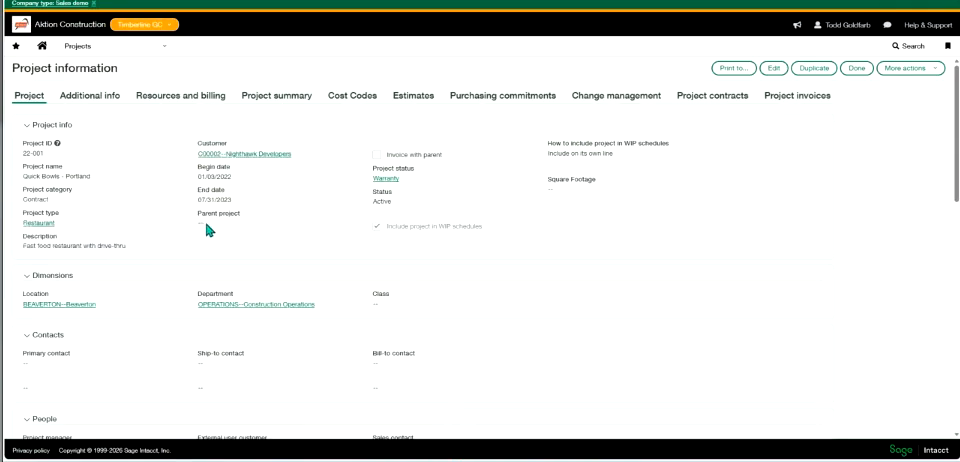
General concepts4
Covers the foundational concepts for working with projects, including configuration, project information fields, and how the Projects dimension relates to other applications.
Manage Projects · Field descriptions: Configure projects · Field descriptions: Project information · Projects applications and dimensions
General concepts3
Covers foundational reporting tools and setup steps for getting a Construction project up and running in Sage Intacct.
Construction reporting solutions · Configure Construction · Construction project basics
Use billing templates5
Defines reusable rules for how a sales order line item should be billed, whether at completion or at set percentages, including milestone-based billing.
Associate billing templates with sales orders · Billing template workflow · Calculate billing by percent completed · Define billing templates
Employee dimension groups5
Groups employees into named sets—by state, manager, or other criteria—for filtering and reporting on timesheets and labor data. Members can be selected manually or through automatic filters.
Employee dimension groups · Assign members to employee groups · Create an employee group · Delete employee groups
Importing3
Covers importing standard cost type lists and work-in-progress schedule data into Construction.
Import standard cost types · Import work in progress (WIP) schedule information
Project revenue recognition5
Recognizes fixed-fee project revenue on percentage of completion, calculated automatically from budgeted cost or time, or set manually.
Project revenue recognition · Project revenue recognition by budgeted cost · Project revenue recognition scheduled posting dates · Project revenue recognition schedules FAQ
Employee dimension groups5
Groups employee records, the financial dimension used to track labor costs, timesheets, expense reports, and project labor, for reporting and workflow purposes.
About employee dimension groups · Employee dimension groups · Field descriptions: Employee groups · Field descriptions: Employee group information
Joint check payment method—Construction5
Covers the joint check payment method, which issues a single check payable to both a general contractor and a subcontractor's supplier.
Joint check basics—Construction · Secondary vendors FAQs · Joint check payment method FAQs · Pay Construction bills
Employee types5
Classifies employees into types—such as full-time, contractor, or seasonal—to sharpen budgeting and workforce forecasting. Types can be flagged as 1099-eligible for contractor payments.
Deactivate or delete employee types · Make an employee type 1099-eligible · Field descriptions: Employee type information · Field descriptions: Employee types list
Labor costing3
Configures how employee labor time and cost post to the general ledger for projects.
Set up labor cost posting · Troubleshoot: labor cost not posting to GL
Lien waivers5
A lien waiver confirms a vendor has been paid and gives up the right to file a claim against the property where work took place. Sage Intacct automatically builds a compliance record for each lien waiver tied to an AP bill or payment, letting teams print or email waivers, mark them received, and withhold future payments if none arrives.
Lien waivers · Enable primary documents on transaction definitions · Mark a lien waiver as received · Print or email lien waivers
Using Contracts – Contracts And Projects5
Links contracts to projects so that revenue for time-and-materials engagements can be estimated, deferred, and recognized under ASC 606 variable consideration guidance.
About percent complete recognition · About percent complete contract lines in MEA allocations · Estimated time-based recognition · Revalue a Project time contract line
Work with project groups5
Groups related projects together so they can be filtered, reported on, and exported as a set.
About Project groups · Create a project group · Export project groups · Filter with Project dimensions
Employees5
Maintains employee records as a financial dimension tied to timesheets, expense claims, and labor costs on projects, supporting cost tracking, GL posting, and compensation reporting.
Employees · Manage employees in Time · Field descriptions: Employee information · Field descriptions: Employee list
Generate project invoices5
Generates invoices covering all billable transactions tied to a project, with options to preview, print, or email the resulting invoices.
Generate project invoices FAQs · Field descriptions: Preview a project invoice · Field descriptions: Print and email project invoices · Generate project invoices with the Pre-Bill report
Overviews3
Provides release notes and a general overview of Sage's Construction offering.
Sage Construction release notes · Sage for Construction
Project statuses3
Defines the statuses, such as active or closed, that can be assigned to a project.
Create a project status · Project Status list
Project types4
Defines the project types used to categorize and report on projects.
Add project types · Field descriptions: Add project types · View project types
Convert transactions5
Covers converting purchasing documents into new transactions, including quantity and price conversion rules and default tax schedule setup.
Configure Purchasing converted quantity or price on Construction purchase orders · Convert multiple documents into a single Purchasing transaction · Field descriptions: Convert from an existing transaction · Create default purchasing tax schedules
Run project reports5
Provides standard, installable project reports covering project accounting, health, employee utilization, resource forecasting, and Gantt chart views.
Run project reports · Employee utilization · Forecast by Resource · Gantt chart customization
Time types5
Defines categories of non-project time—such as vacation, overtime, or travel—used to capture overhead and admin hours apart from project tasks. Categories can be imported from a spreadsheet.
Time types · Add time types · Delete time types · Edit time types
Assign resources5
Staffs projects and tasks by matching resources to skills, positions, and availability, with advanced scheduling available through the Project & Resource Management module.
Resource scheduling · Define employee positions and skills · Field descriptions: Add project resources · Field descriptions: Add recurring schedule
Timesheet rules3
Enforces company timesheet policies by blocking submission of timesheets that fail to meet defined rules.
Specify timesheet rules · Add, edit, or delete timesheet rules
Work with project tasks5
Tracks project tasks as a dimension bound to a specific project, with standard tasks and task groups available to speed up data entry, including cost type tracking for Construction subscriptions.
About task groups · Work with project tasks · Define standard tasks · Field descriptions: Define standard tasks
Approve timesheets5
Lets project workers fill out, save as drafts, and resubmit timesheets, while managers review submissions, enforce daily or weekly hour limits, and approve or decline entries.
Approve timesheets · Approve or decline timesheets · Field descriptions: Approve or decline timesheets · My timesheets
Manage work in progress (WIP) projects5
Tracks overbilling and underbilling on active projects and forecasts their final cost and revenue outcome.
Field descriptions: WIP schedule fields · Work in progress (WIP) management · Base PM forecasts on primary forecast estimates · Tips for entering forecasts in work in progress (WIP) schedules
Work with project transaction rules5
Automatically calculates and posts secondary transactions, such as indirect labor cost journal entries, to projects based on configured rules.
Project transaction rules FAQs · Work with project transaction rules · Field descriptions: Project transaction rules · Project transaction rule examples
Create work orders5
Work Order Management lets service-related jobs run through a dedicated work order dimension, keeping short-duration service calls separate from complex construction projects. Teams can sync work orders with field operations tools, customize types, problem codes, and states, and report on them through Custom Report Writer.
Create work orders · Set up work orders · Work Order Management · Configure Work Order Management
Learn about project types5
Describes the different project billing types available, including bill-to-maximum, fixed-fee with percent-complete billing, overhead, and time-and-materials projects.
Bill to a maximum projects · Fixed fee projects with percent complete billings · Overhead projects · Time and materials projects
Sage Intelligent Time – Geofences5
Marks off virtual zones around work locations so managers can confirm employees are on-site during their scheduled shift.
Assign geofences to employees · Delete geofences · Edit geofence configuration · Field descriptions: Geofence configuration
Change requests5
Change requests capture how cost and pricing shifts affect a project over its lifecycle, updating the primary project estimate and, when linked, the General Ledger budget. Teams can attribute posted changes to a specific contract line and add them into project change orders that update contract line pricing.
Project change order overview · Email change requests · Project change orders · Email project change orders
Use project estimates5
Approximates what a project will cost to complete, then tracks actual costs against that estimate, using cost types for Construction subscriptions, to monitor profitability.
Use project estimates · Configure project estimates · Create project estimates manually · Define estimate types
Intelligent time4
An AI-powered assistant that gathers work activity from email, calendars, browsers, and files, then suggests entries for employee timesheets.
Sage Intelligent Time · Download the mobile app · Privacy
Manage retainage5
Withholds a portion of a contract price, known as retainage, until work is substantially complete, with setup for both customer billing and vendor payments and options to release it flexibly or during construction billing.
Manage retainage · Flexible retainage release · Release retainage · Customers (Accounts Receivable)
Sage Intelligent Time – Mobile App3
A mobile app for entering timesheet hours, managing expense reports, and approving or declining submissions from a phone.
Log in to the mobile app · Set up the mobile app for expense reports
Commitment compliance tab on primary documents5
Vendor compliance management tracks insurance certificates and other required documents, such as licenses, checking them automatically when vendor bills are paid in Accounts Payable. Teams define compliance types and definitions, then create compliance records per vendor to flag missing or expired documents and optionally block payment.
Commitment compliance tab on primary documents · Field descriptions: Commitment compliance tab on primary documents · Vendor compliance definitions · Field descriptions: Vendor compliance definitions
Sage Intelligent Time – Overtime5
Defines overtime rules that drive payroll calculations and project billing, then automatically computes overtime hours as employees clock in and out of shifts.
Field descriptions: Overtime ruleset configuration · Assign overtime rules to employees · Create overtime rules · Delete overtime rules
Accumulation types5
The Cost Type dimension captures and categorizes granular project cost detail, such as labor, equipment rental, and other operational spend, at both the estimate and actual level. Associating GL accounts and items with cost types keeps transaction posting consistent and lets Construction prefill GL information automatically.
About cost type groups · Accumulation types · Deactivate accumulation types · Cost type dimension and groups
Sage Intelligent Time – Rate Cards5
Sets billing rates by employee, item, and project so the correct rate is applied automatically when timesheets are submitted, standardizing invoices and cutting manual calculation.
Field descriptions: Rate cards · Create a rate card · Delete rate cards · Edit rate cards
Invoicing5
Creates invoices for billable transactions tied to Construction projects, including summarized and time-and-materials billing.
Generate project invoices for Construction project contract lines · Generate a project invoice for time and materials Construction project contract lines · Troubleshoot previous billing totals on project contract invoices · View Project contract summarized invoices
Sage Intelligent Time – Set Up5
Walks admins through the initial setup steps to turn on and configure Sage Intelligent Time.
Assign permissions · Configure data retention for all employees · Link an employee to a user · Turn on Intelligent time
Setup5
Construction terminology can be renamed to match industry conventions, such as changing Project to Job. Project contracts and their contract lines attach billable details to a project, letting teams capture a mix of billing types within one construction project.
Construction project contract basics · Field descriptions: User-defined timesheet entries · Map time and material tasks to Construction project contract lines · Construction project contracts
Sage Intelligent Time – Time Clocks5
Provides digital time clocks that let employees or admins clock in and out of shifts, projects, or tasks.
Admins clock in or out employees · Clock in or out of a project or task · Field descriptions: View time clock · Field descriptions: Create time clock
Sage Intelligent Time – Time Sources5
Connects calendars and email accounts so Sage Intelligent Time's machine learning can turn daily activity into suggested timesheet entries, without tracking keystrokes, screenshots, or location.
Connect calendars · Connect email accounts · Disconnect calendars or email accounts · Disconnect the Time Assistant
Sage Intelligent Time – Timesheets5
Provides timesheets enhanced with AI-suggested activity cards, plus sortable and filterable lists for tracking personal and staff timesheets.
Approve or decline time entries · Approve or decline timesheets · Recall a timesheet · Field descriptions: Edit timesheets
Other capabilities20
Configure Time · Add, edit, or delete employee positions · Configure Order Entry converted quantity or price on Construction subcontracts · Add, edit, or delete labor classes · Add, edit, or delete labor shifts
Business Intelligence
strongReporting, dashboards, analytics, and data visualisation capabilities built into the ERP platform for operational and strategic decision-making.
›381 documented capabilities in 83 areas
Business Intelligence
strong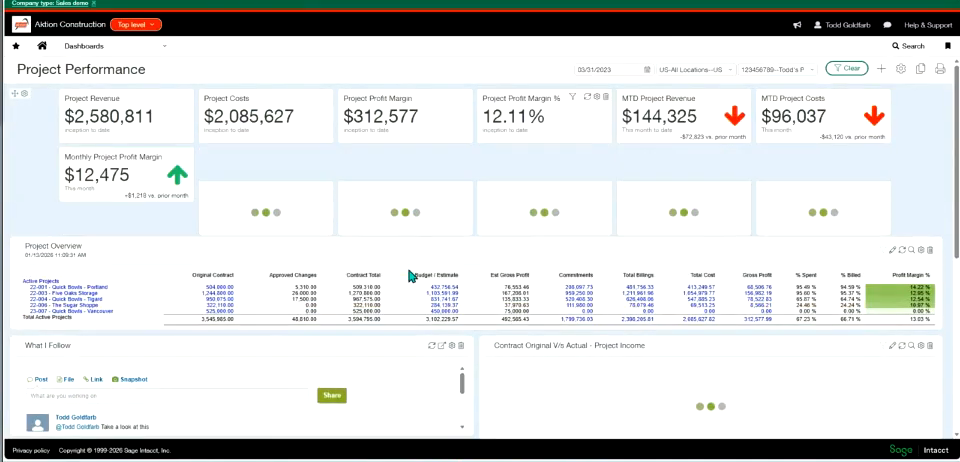
Dimension basics5
Introduces the core concepts behind dimensions, including how they function, the different dimension types available, how dimension relationships work, and why they matter for financial reporting.
How dimensions work · Types of dimensions · Understand dimension relationships · Why dimensions are important
Choose a report3
Helps identify the right report for a specific business need, using examples such as vendor payment reports and account statement reports.
View a report of vendor payments · View an account statement report
Nonprofit reporting5
Covers nonprofit-specific reporting tools, including account categories, dashboards, financial reports, and traditional fund accounting.
Account categories and account groups · Dashboards · Financial reports and graphs · Traditional fund accounting
Apps And Reports ME Guidelines5
Provides guidelines for using Accounts Payable, Accounts Receivable, Cash Management, and Contracts within a multi-entity company.
Accounts Payable multi-entity guidelines · Accounts Receivable multi-entity guidelines · Cash Management multi-entity guidelines · Contracts multi-entity guidelines
Classes5
Covers the Classes dimension, including how class groups are configured, managed, and used to filter reports and dashboards, plus field-level reference and renaming guidance.
About Classes · Classes · Field descriptions: Classes · Rename and repurpose classes
Close Automation – Close Assistant4
Closed books overview, part of Close Assistant, shows the latest period each entity has closed across an organization, listing the date each application closed through for General Ledger, Cash Management, Accounts Receivable, and Accounts Payable depending on subscriptions.
Close Assistant · Set up Close Assistant · Use Close Assistant
Custom Report Writer5
Covers building reports with the Custom Report Writer, plus adding them to dashboards, copying them between companies or entities, and turning report data into graphs.
Add a CRW report to a dashboard · Add a CRW report · Copy a custom report from one company or entity to another—CRW · Create a graph of a CRW report
Departments5
Covers the Departments dimension, including how department groups filter reports and dashboards, permission requirements, and how to manage department records and their parent locations.
Departments · Change a parent location · Field descriptions: Departments · Manage departments
Custom Reports – Custom Report Wizard5
Walks through the Custom Report Wizard step by step, covering how to select the underlying data source, format charts, and add and organize runtime prompts.
Select data · Format charts · Include prompts · Label and organize prompts
Reports5
Reports on MEA allocations and deferred revenue, including current balances, forward-looking forecasts, and multi-currency revaluations.
MEA allocation details · Deferred revenue details · Deferred revenue forecast · Deferred revenue revaluation
Custom Reports – Custom Report Examples5
Provides sample Custom Report Writer reports — covering user permissions activity, ownership consolidation by GL account, and all-user permissions — that can be used as starting points.
About the example CRW reports · Example User Permissions Activity report—CRW · Advanced Ownership Consolidation entries by GL account report · Permissions report for all users
Dimension groups5
Covers how to create, configure, and remove dimension groups, which bundle related dimension members together for use as report and dashboard filters.
Delete a dimension group · About dimension groups · Frequently asked questions: Dimension groups · Set up dimension groups
Close Automation – Variance Analysis5
Covers configuring, customizing, and troubleshooting Copilot's automated Variance Analysis feature.
Customize Variance Analysis email notification messages · Field descriptions: Configure Copilot Variance Analysis · Set up Copilot Variance Analysis · Troubleshoot Copilot Variance Analysis
Budgets And Spending – Copilot Variance Analysis5
Uses AI-assisted Copilot Variance Analysis to flag and explain notable differences between actual results and budget, with configurable email alerts.
Customize Variance Analysis email notification messages · Set up Copilot Variance Analysis · Troubleshoot Copilot Variance Analysis · Use Copilot Variance Analysis
Dashboards – Add Dashboards5
Covers creating new dashboards, cloning existing ones, setting who can access them, and a field-by-field reference for dashboard setup.
Create a dashboard · Field descriptions · Clone a dashboard · Set permissions
Locations5
Covers the Locations dimension, including how location groups filter reports and dashboards, plus how to add, reparent, inactivate, or delete individual location records.
Locations · Add new parent location · Inactivate or delete a location · Field descriptions: Locations
Dashboards – Define Content5
Covers the types of content that can be added to a dashboard, including attachment links, custom navigation menus, billboard text banners, and a view of when books were last closed.
Link to attachment · Custom navigation · Billboard text · See when books were closed
Sage Copilot3
Introduces the Sage Copilot interface and answers common questions about using it.
Copilot basics · Copilot FAQs
Dashboards – Troubleshooting5
Offers fixes for common dashboard problems, including a dashboard that won't delete, unexpected consolidation book dates, missing custom navigation items, and filters that don't apply to a report.
Cannot delete a dashboard · Consolidation book dates in dashboards · Custom navigation item missing · Dashboard does not filter report
Manage structures5
Covers dimension structures, which arrange dimension members into custom hierarchies for use as rows or columns on financial reports, including how to list, limit, and apply them across multiple entities.
Dimension structure lists · Dimension structures for financial reports · Limit members in dimension structures · Multi-entity report structures (account groups and dimension structures)
Finance Intelligence Agent--Early Adopter5
Introduces the early-adopter Finance Intelligence Agent, including its capabilities, prompt library, and guidance for writing effective prompts.
About the Finance Intelligence Agent—Early Adopter · Finance Intelligence Agent FAQs—Early Adopter · Finance Intelligence Agent Prompt Library—Early Adopter · How to write prompts for the Finance Intelligence agent—Early Adopter
Manage user-defined dimensions5
Walks through building a custom user-defined dimension from scratch, covering the essentials, creation and deployment, adding values, and making it available for use on transactions.
Read 1st: User-defined dimension essentials · Step 1: Create and deploy a user-defined dimension · Step 2: Add values to a user-defined dimension · Step 3: Make a user-defined dimension available
Dashboards5
Covers the fundamentals of dashboards — configurable, role-specific views built from components like charts, performance cards, records, reports, and smart links — along with icon meanings and best practices for building effective ones.
Dashboard basics · Dashboards · Dashboard icons · Best practices for dashboards
GL Outlier Detection5
Applies machine learning to historical transaction patterns so approvers see an outlier flag on journal entries that look unusual, adding an extra layer of control to the approval process.
GL Outlier Detection · Customize GL Outlier Detection · Stop Outlier Assistant · Field descriptions
Use dimension counts4
Covers dimension counts, which automatically track how many active members exist for a given dimension — such as how many customers are currently active — so the totals can feed reports or metrics like recurring revenue per customer.
Automate dimension count posting overview · Dimension count rules · Set up dimension count
Nonprofit Financial Board Book3
Covers Nonprofit Financial Board Book, a preconfigured set of reports and graphs built on industry-standard nonprofit metrics across three dashboards, plus how the subscription gets set up.
Nonprofit Financial Board Book · Set up the Nonprofit Financial Board Book
General Ledger Reports – Account Groups Hierarchy5
Runs the standard Account Groups Hierarchy report, listing member account groups together with their accounts so groups still missing a mapping stand out.
Account groups hierarchy · Report filters · Customize · Format
Reporting3
Provides reports for reviewing consolidation books, including drilling down from general ledger entries to their source accrual data.
Drill down to source accrual data in GL reports for Consolidation books · Example of a GL report on a Consolidation book
Distribute And Run Reports – Export Reports4
Covers exporting reports to Excel, including troubleshooting steps when an export fails.
Can't export a report to Excel · Export a report to Excel · Export reports
General Ledger Reports – Account Balance5
Runs the Account Balances report, showing opening balances, debits, credits, and adjustments per account for budget planners, forecasters, and auditors.
Account balances · Filters · Customize · Format
Distribute And Run Reports – Memorize Reports5
Covers memorized reports, which save a named set of report settings so it can be reused, added to a dashboard or report group, scheduled, edited, or deleted.
Add to a dashboard or report group · Delete a memorized report · Edit a memorized report · Field descriptions: Memorized reports
General Ledger Reports – Accounting Entries File3
Generates the French Accounting Entries File (FEC), a legally mandated export of all bookkeeping entries for a fiscal year, required for French tax audits.
Accounting entries file · Accounting entries file (FEC) filters
Reports5
Provides standard reports for analyzing fixed asset data, including one that reconciles opening and closing balances for cost, depreciation, and net book value over a period.
Reports · Assets by Employee · Assets by Location · CRW columns
Distribute And Run Reports – Print Reports And Graphs4
Covers printing reports, report groups, and graphs to PDF, including the browser and PDF reader setup required.
Install the Adobe Acrobat Reader · Print reports, report groups, and graphs · Set up your browser for PDF printing
General Ledger Reports – Chart Of Accounts5
Runs a read-only, filterable, and printable version of the chart of accounts for review and distribution.
Chart of accounts · Filters · Customize · Format
Distribute And Run Reports – Report Groups5
Covers bundling multiple reports into a report group that can be run together, plus adding cover letters and field-level setup reference.
Run as a group · Cover letters for report groups · Cover letters list · Field descriptions: Report groups
General Ledger Reports – Comparative Trial Balance4
Compares account balances across two reporting periods side by side, with drill-down from account balances to individual transactions.
Comparative trial balance · Filters · Customize
Distribute And Run Reports – Run Reports5
Covers running custom, financial, and standard application reports, plus drilling down from a report line into the underlying transactions.
Drill down to transactions · Run custom reports · Run financial reports · Run standard application reports
General Ledger Reports – DATEV Data Export3
Exports chart of accounts, customer, vendor, and transaction data in the DATEV format used by German accountants and tax consultants, supporting entities operating in Germany.
DATEV export filters · DATEV export
Distribute And Run Reports – Schedule And Deliver Reports5
Covers scheduling reports to run automatically on a recurring basis, with delivery by email, in-app storage, or to a cloud storage destination, including triggering a report run on GL close.
Report schedule basics · Email reports · Run a scheduled report on GL close · When do scheduled reports run?
General Ledger Reports – Department Activity3
Runs a hierarchical activity report by department, showing account-level detail for one department or the whole company.
Department activity · Filters
Distribute And Run Reports – Store Reports3
Covers storing generated reports for later access, either within the system or delivered to a connected cloud storage location.
Cloud storage for reports · My stored reports
General Ledger Reports – Dimension Balances5
Summarizes account balances by dimension, side by side or in a single cascading column, including year-to-date retained-earnings balances for income statement accounts.
Dimension balances · Customize · Filters · Format
General Ledger Reports – General Ledger Report4
Runs the core General Ledger report, letting users drill from account activity down to individual transaction detail across a chosen time period.
General Ledger · Customize · Filters
Financial Reports – Create5
Covers building and editing financial reports with the Financial Report Writer, from standard income statements and balance sheets to custom reports analyzing metrics like revenue by product line, including dimension-based analysis, multi-entity lists, and permissions.
Customize an existing financial report · Slice and dice by dimension · Financial Reports list for entities · Financial report permissions
General Ledger Reports – GoBD Data Export3
Exports tax-relevant accounting data in the GoBD format required by German tax authorities for machine-readable, audit-ready review.
GoBD data export filters · GoBD export
Financial Reports – FRW5
Covers the Financial Report Writer's row and column tools, including filters, notations, column arrangement, and comparing results by dimension.
About filters · About notations · Arrange columns · Compare by dimension
General Ledger Reports – Journals Report4
Displays transactions posted to one or several journals for a chosen reporting period via the Journal report.
Journals · Customize · Filters
Financial Reports – Financial Library Reports5
Covers the prebuilt QuickStart library of financial reports, plus how to build custom cash balance, year-to-date profit and loss, and financial ratio reports from them.
About QuickStart library reports · Create a custom cash balance report · Create a custom profit and loss report (YTD) · Financial ratios
General Ledger Reports – Location Activity4
Runs a hierarchical activity report by location, showing account-level detail for one location or the whole company.
Location activity · Customize · Filters
Financial Reports – Refine5
Covers refining a financial report with column comparisons, computed columns, hidden columns, and the option to auto-generate a separate report for each member of a dimension group.
Column comparisons · Computations · Hide or reveal column · Generate an individual report for each member of a dimension group
General Ledger Reports – Revaluation5
Revalues foreign-currency balances — for example, transactions between related entities — to capture unrealized exchange gains or losses, with the option to auto-create the resulting draft journal entry.
GL revaluation · Customize · Auto-create draft journal entry from General Ledger revaluation report · Filters
Financial Reports – Run A Financial Report3
Covers the two ways to run a financial report — from the Financial Reports list or directly as an HTML view.
From Financial Reports list · In HTML
General Ledger Reports – Trial Balance4
Verifies that all account balances are correct, ahead of reports that depend on balanced books, using the Trial Balance report.
Trial balance · Customize · Filters
Financial Reports – Sample Reports5
Provides sample financial report layouts, including customers listed in rows, rows filtered by a dimension, period-over-period comparisons, and locations spread across columns.
Customers in rows · Filtered by dimension in rows · Compare data across periods · Locations across columns
Financial reports3
Covers building financial reports with the tabbed Financial Report Writer interface, plus tips for optimizing report performance online and restoring a previous version of a report.
Optimize your financial reports to run online · View and restore previous versions of a report
Report basics5
Covers the fundamentals of building reports, including permissions, the different report types available, how to plan a report before building it, and how filters work.
Learn about permissions · About report types · Plan a report · Work with filters
Statistical journal entries5
Covers how to enter and adjust journal entries against statistical accounts, which track nonfinancial data such as headcount.
Modify the Statistical Journal Entries page · Field descriptions · Adjust statistical journal entries · List of entries
Standard application graphs5
Covers the predefined graphs built into specific applications, including bills analysis, customer aging, and deferred revenue forecasting for AR or Order Entry, plus the basics of how graphs work.
Graph basics · Bills Analysis · Customer Aging · Deferred Revenue Forecast — AR or Order Entry
Avalara AvaTax4
Covers reporting for the Avalara AvaTax integration, including viewing transaction logs and running tax reports.
AvaTax Logs list · AvaTax Log · Tax reports for AvaTax
Interactive Visual Explorer – Create And Edit Visualization5
Covers building visualizations in Interactive Visual Explorer, including adding data, creating visual boards, and choosing the reporting area a visualization draws from.
Add data · Add visual board · Create visualizations · Reporting areas
Interactive Visual Explorer – Filters5
Covers narrowing what appears on a visual board, chart, or canvas using range, list, or date filters, including how to build new filters and bind them to parameters.
Apply filters · Create and bind parameters to filters in IVE · Create filters · Filter
Interactive Visual Explorer – Format IVE5
Covers formatting options in Interactive Visual Explorer, including adjusting the canvas layout, editing existing visualizations, reformatting date fields, and sorting or selecting displayed data.
Adjust canvas · Modify visualizations · Reformat date fields in IVE · Sort and select data
Interactive Visual Explorer – Functions And Calculations5
Covers the calculation functions available in Interactive Visual Explorer, from common everyday calculations to advanced analytics and the AGO and PERIODROLLING time-series functions.
Advanced analytic functions · Common functions and calculations · IVE time series AGO calculation · IVE time series PERIODROLLING calculation
Interactive Visual Explorer – IVE Walkthroughs5
Provides step-by-step walkthroughs for building an Interactive Visual Explorer pivot table and exploring project data with combo charts, display tiles, and line and donut charts.
1. Create an IVE pivot table · 2. Explore with a combo chart · 4. Explore data with dsiplay tiles · 3. Explore with line and donut charts
Interactive Visual Explorer – Manage3
Covers managing Interactive Visual Explorer content, including exporting and importing visualizations and adding them to a dashboard.
Export and import · Add to dashboard
Interactive Visual Explorer – Narrate4
Covers the Narrate workspace, which lets users capture insights from visualizations into a presentation-style story that can be shared or used in live events.
Create stories · View and share stories · Build stories
Interactive Visual Explorer – Troubleshoot3
Offers troubleshooting tips for Interactive Visual Explorer, including cases where a visualization renders differently in two places.
Troubleshooting tips · Visualization has two different displays
Interactive Custom Reports – Create Interactive Custom Reports5
Covers building Interactive Custom Report Writer reports, including when custom SQL is needed for reports spanning multiple reporting areas, plus how variables, timestamps, and session variables work.
Understand variables · About ICRW timestamps · Variables · Session variables
Setup – Statistical Accounts And Journals5
Sets up statistical accounts and journals for tracking nonfinancial data, such as headcount, alongside financial data for combined metrics reporting.
Statistical accounts · Statistical accounts list · Statistical journals · Statistical journals list
Interactive Custom Reports – Custom Report Examples5
Provides sample Interactive Custom Report Writer reports — covering calculated fields, AP transactions grouped by currency, and AR snapshot and aging — plus a video on modifying custom SQL reports with Apply XML.
Report with calculations · AP transactions, sectioned by currency · AR Snapshot and Aging example—ICRW · Video: Modify a custom SQL report with Apply XML
Setup – User Defined Books4
Covers how to set up custom reporting books and the journals that post to them.
Journals for user-defined books · Set up for user-defined books · Field descriptions
Interactive Custom Reports – Format5
Covers formatting options for Interactive Custom Report Writer reports, including column basics, custom totals and subtotals, pivot table grand totals, and number display formats.
ICRW column formatting basics · Custom total and subtotal formatting · Pivot table grand total formatting · Define how numbers appear
Interactive Custom Report Writer3
Introduces Interactive Custom Report Writer, a separately subscribed tool, with a guided learning journey and an overview of its advantages over other reporting options.
ICRW learning journey · Advantages of using ICRW
Interactive Custom Reports – ICRW Permissions5
Covers the permission model for Interactive Custom Report Writer, including how admins assign roles, who qualifies as a Designer user, and the overall permissions process.
About ICRW permissions · ICRW admin: assign roles and permissions · ICRW Designer users · ICRW permissions process
Interactive Custom Reports – Manage Reports5
Covers managing Interactive Custom Report Writer reports day to day, including saving and exporting them, previewing before running, running a finished report, and general tips and tricks.
ICRW tips and tricks · Save and export reports · Preview and run from preview · Run a report
Interactive Custom Reports – Reference Information5
Provides reference material for Interactive Custom Report Writer, including example calculations, common functions, an icon glossary, and a video gallery.
Example calculations · Common functions · Interactive Custom Report Writer icons · ICRW video gallery
Interactive Custom Reports – Report Library5
Covers the construction-industry report library within Interactive Custom Report Writer, including commitment reports, project reports, retainage reports, and AP/AR snapshot and aging reports.
ICRW Construction commitment reports · ICRW Construction project reports · ICRW Construction retainage reports · ICRW AP and AR snapshot and aging reports
Interactive Custom Reports – Troubleshoot ICRW5
Offers troubleshooting guidance for Interactive Custom Report Writer, including when to escalate to support, prompts that stop working in custom SQL reports, slow-loading dashboard reports, and columns that export incorrectly.
When to ask support for help with ICRW · Prompts no longer work in custom SQL reports · ICRW reports load slowly on dashboards · Column format exports incorrectly
Reports Center5
Covers the Reports Center, a central hub organizing every report by application and type, where users can create new reports, mark favorites, and run reports with formatted output.
Reports center basics · Create a report · Mark a favorite · Run and format output
Account group purpose5
Covers reporting setup fundamentals, including account group purpose tags that filter long account group lists when building reports, and standard system reporting periods.
Introduction · About standard system reporting periods · Learn about reporting periods · Account group purpose
Troubleshoot financial reports5
Offers troubleshooting steps for reports that aren't displaying as expected, covering filter issues, general financial report problems, missing columns, and computations that produce unexpected totals.
Troubleshoot report filters · Troubleshoot financial reports · Column doesn’t appear · Computation shows unexpected totals
Other capabilities11
Explore reporting solutions · Grant and restrict access · Search help with Copilot · Sage Ai features · IVE subscriptions and permissions
Sales
moderateThe sales side of an ERP: quotes and pricing, order processing, customer and account management, post-sale service, and sales reporting on shared master data.
›158 documented capabilities in 34 areas
Sales
moderateReports5
Provides standard reports covering customer backlog, customer lists, and item lists, each customizable and exportable like other Order Entry reports.
Reports · Customer Backlog · Customer List · Item List
Contracts5
Provides standard and custom reports, plus visual boards, for analyzing contract billing, revenue, and expense data.
ICRW reports · Custom report objects · Standard report packages · Visual boards
Learn About3
Explains the revenue recognition methods available, such as straight-line and prorated variants, and how each allocates revenue across full and partial periods.
Revenue recognition schedule FAQs · About the revenue recognition process
Setting Up Order Entry – Items5
Configures GL accounts, cross references, and groupings for items sold through Order Entry.
Define GL accounts for items · Item GL groups · Item cross references · Item groups
Billing price lists5
Sets up billing price lists and processes historical contract schedules so that past contract balances can be posted for ASC 606 reporting.
About historical contract lines · Billing price lists · Fixed price item pricing examples · How Sage Intacct determines variable billing quantities for usage
OE Revenue Recognition5
Recognizes revenue on Order Entry transactions, including tracking by contract dimension, delivering line items, and running bulk recognition actions.
Track Order Entry transactions with the contract dimension · Revenue recognition · Bulk action runs · Deliver a transaction line item
Setting Up Order Entry – Price Lists5
Defines price lists, their entries and schedules, and which customers or transactions they apply to.
Assign a price list to objects · Price list entries · Define price lists · Price schedules—Order Entry
Using Contracts – Billing5
Bills contract lines using fixed price, quantity-based, or time-and-materials methods, with usage records driving the amounts billed for consumption-based lines.
Billing methods · Quantity-based - Committed · Fixed price billing · Project time and materials
Project revenue recognition5
Recognizes fixed-fee project revenue on percentage of completion, calculated automatically from budgeted cost or time, or set manually.
Project revenue recognition · Project revenue recognition by budgeted cost · Project revenue recognition scheduled posting dates · Project revenue recognition schedules FAQ
Using Contracts – Contracts5
Manages contract lifecycle events such as renewals and cancellations, including how outstanding billing and revenue balances are cleared when a contract is canceled.
About contract renewals · Field descriptions: Cancel Contract · Reopen a closed evergreen contract line · Troubleshoot contract cancellation
Reports5
Reports on MEA allocations and deferred revenue, including current balances, forward-looking forecasts, and multi-currency revaluations.
MEA allocation details · Deferred revenue details · Deferred revenue forecast · Deferred revenue revaluation
Setting Up Order Entry – Renewal Templates3
Defines renewal templates and contract renewal settings used when a customer contract comes up for renewal.
Define renewal templates · Set up contract renewals
Using Contracts – Contracts And Projects5
Links contracts to projects so that revenue for time-and-materials engagements can be estimated, deferred, and recognized under ASC 606 variable consideration guidance.
About percent complete recognition · About percent complete contract lines in MEA allocations · Estimated time-based recognition · Revalue a Project time contract line
Revenue recognition schedules5
Shows which periods of a transaction line's deferred revenue have been posted, are pending, or are scheduled, and lets that schedule be held, resumed, reallocated, or posted.
Hold or resume revenue recognition · Post revenue recognition · Reallocate a revenue recognition schedule · Revenue recognition schedules list
Discounts and penalties5
Governs how far an invoice can be edited based on its current state — drafted invoices allow broad changes, while posted invoices allow only limited edits such as term, memo, or GL reclassification — and covers applying discounts and late-payment penalties.
About managing invoices · Discounts and penalties · Apply discounts · Apply penalties
Setting Up Order Entry – Transaction Definitions5
Defines the templates that control GL posting, approval rules, and overall behavior for Order Entry transactions; standard workflows ship with preconfigured, non-deletable definitions that allow limited edits such as user access or edit permissions.
Transaction definitions · Auto-reversal of on-hold quantities · Customize a transaction's Entries grid layout · Subtotal templates
Using Contracts – Expenses5
Schedules and posts deferred expenses associated with a contract or contract line over the contract term, with the ability to hold, resume, or reallocate a schedule.
Expense schedules · Hold or resume an expense schedule · Reallocate an expense schedule · Expenses
Setup5
Covers initial setup of Revenue Management, including recognition categories, reusable templates, and the layout of the filtered schedules list.
Before you set up Revenue Management · Customize the Filtered schedules column layout · Revenue recognition categories · Revenue recognition templates
Setting Up Order Entry – UOM Groups3
Bundles related measurement units — say, inches with feet — under one named group with a defined base unit and a fixed ratio between members; six groups come predefined and custom ones can be added.
Define unit of measure groups · Units of measure
Using Contracts – Learn About5
Introduces Sage Intacct's contract management capabilities for subscription and SaaS businesses, covering automated revenue recognition under ASC 606 and IFRS 15, multiple-element allocations, and flexible billing across hundreds of scenarios.
Contract accounting flow · Contract basics · Exchange rate dates · Expense recognition accounting flow
Setting Up Order Entry – Workflows3
Installs and configures the workflow that determines which transaction types users can create across Order Entry, Inventory, and Purchasing, how those transactions convert into one another, and which GL accounts are affected at each stage.
Workflows · Change your workflow—Standard
Using Contracts – Revenue5
Allocates a bundled contract's total value across its distinct performance obligations based on each item's relative standalone selling price, then recognizes each portion on its own revenue schedule.
Define MEA allocations · MEA allocation calculation examples · MEA allocations · Override MEA amounts
Setting Up Order Entry5
Configures core Order Entry settings, including customer GL groups and customer groups used for reporting and posting.
Field descriptions: Order Entry · Configuration · Customer GL groups · Customer groups
Using Order Entry – Billing Groups5
Groups customers together to apply shared charges in one batch run, speeding up invoicing and keeping billing consistent, with the option to manually trigger or retry a billing period run.
About billing groups · Field descriptions: Billing groups · Run the next open billing period manually · Retry a failed billing period run
Using Order Entry – Print And Email Txns5
Prints or emails Order Entry documents one at a time, tracks delivery through an email log, and supports adding custom messages to printed documents.
Email an individual document · Email delivery log · Messages in printed documents · Print an individual document
Using Order Entry – Recurring Transactions5
Generates transactions automatically on a schedule from a recurring template, governed by header and schedule status fields where the higher-priority setting among Active, Inactive, and Ended controls whether the template keeps running.
About recurring transactions · Recurring transactions · Post scheduled transactions · Recurring template list
Using Order Entry – Transactions5
Tracks an Order Entry transaction through its lifecycle states, such as Draft, In Progress, Pending, and Partially converted, as it's created, posted, or converted into the next transaction in the workflow.
About Order Entry transactions · Process multiple sales transactions · Transaction lists · Field descriptions: Sales transactions
Setup – Credit Limits3
Sets a maximum credit exposure per customer and can place a customer on hold once that limit is reached.
Credit limits for customers · Place customers on hold
Setup – Customer Types3
Sorts customers into named groups, like reseller or end user, so records can be managed and reported on more efficiently.
Customer Types list · Define customer types
Setup – Customers5
Maintains the master list of customer records, including contact details, health indicators, and the ability to apply a payment directly from the list.
About customers · Field descriptions: Customers · Apply a payment · Customer health insights
Setup – Shipping Methods3
Maintains the list of shipping methods that can be selected on customer invoices and orders.
Shipping Methods list · Define shipping methods
Statements5
Generates and delivers customer account statements, either printed offline or sent by email.
About Accounts Receivable statements · Field descriptions · Print statements generated offline · Print or email statements
Using Inventory Control – Fulfillment5
Guides sales orders through picking, packing, shipping, and invoicing from a single page, reserving and allocating inventory quantities along the way so they can't be used elsewhere.
Fulfillment · How inventory quantity totals work in fulfillment · Fulfillment transaction workflows and item types · Troubleshoot fulfillment
Other capabilities7
Recurring schedules · Configure Order Entry converted quantity or price on Construction subcontracts · Order Entry
Inventory Management
moderateInventory tracking, stock management, reorder point planning, multi-location management, and inventory valuation across warehouses and locations.
›143 documented capabilities in 32 areas
Inventory Management
moderateReports5
Provides standard reports on inventory quantities, values, costing calculations, and transaction activity, including analysis to support reorder decisions.
Reports · Inventory Analysis · Inventory Costing · Inventory Journal
Setting Up Supplies Inventory3
Covers initial configuration of Supplies Inventory, including its transaction definitions.
Setup · Set up Supplies Inventory transaction definitions
Setting Up Order Entry – Items5
Configures GL accounts, cross references, and groupings for items sold through Order Entry.
Define GL accounts for items · Item GL groups · Item cross references · Item groups
Using Supplies Inventory5
Manages supply requests and purchases end to end, from approval through fulfillment, to maintain optimal stock levels and internal cost controls.
Acknowledge received supplies · Approve supplies requisitions · Process supplies requests · Replenish supplies items
Setting Up Inventory Control – Bins5
Sets up bins, bin faces, and bin sizes used to track inventory down to a specific storage location within a warehouse.
Bin faces · Bin sizes · Manage bins · Bins
Setting Up Purchasing – Items5
Configures how purchased items post to the general ledger, including GL account assignments, GL groups, item groups, and cross-references.
Define GL accounts for items · Item GL groups · Item cross references · Item groups
Setting Up Inventory Control – Inventory Cycles3
Defines the inventory cycles used to schedule recurring cycle counts.
Inventory cycles list · Define inventory cycles
Setting Up Inventory Control – Inventory Totals4
Defines the running totals Sage Intacct tracks for inventory items and how available quantity is calculated.
Inventory totals list · Define inventory totals · Specify how quantity available is calculated
Setting Up Order Entry – UOM Groups3
Bundles related measurement units — say, inches with feet — under one named group with a defined base unit and a fixed ratio between members; six groups come predefined and custom ones can be added.
Define unit of measure groups · Units of measure
Setting Up Inventory Control – Items5
Sets up the goods and services tracked as items, including how to add, deactivate, group, and cross-reference them for inventory purposes.
Adding items · Deactivate or reactivate an item · Item GL groups · Item cross references
Setting Up Purchasing – UOM Groups3
Bundles units of measure that belong together — length or weight, for example — into groups with a base unit and conversion ratios for purchasing.
Define unit of measure groups · Units of measure
Setting Up Inventory Control – Kits5
Configures kits, bundles of individual items assembled and tracked as a single inventory unit, and the process for building or disassembling them.
Build kits list · Build kits · Disassemble kits list · Disassemble kits
Setting Up Inventory Control – Landed Costs5
Configures the categories and distribution methods used to allocate freight, insurance, and other acquisition costs into inventory valuation.
Landed costs · Landed cost categories · Distribution methods and calculations overview · Set up landed costs
Setting Up Inventory Control – Lot Categories3
Defines the lot categories used to group and track lots of inventory items.
Define lot categories · Lot categories list
Using Purchasing – Landed Costs4
Captures the freight, insurance, and handling costs added to a purchase so inventory valuation and cost of goods sold reflect the full landed cost of an item.
Landed costs for inventory · Enter an actual cost · Enter an estimated cost
Setting Up Inventory Control – Product Lines3
Defines the product lines used to categorize and report on inventory items.
Define product lines · Product lines list
Setting Up Inventory Control – Replenishment5
Configures replenishment methods and demand forecasts used to determine when and how much inventory to reorder.
How a fluctuating demand forecast works · Define fluctuating demand forecasts · Replenishment methods and calculations · Set up replenishment
Setting Up Inventory Control – Serial Masks3
Defines serial number masks used to format and auto-generate serial numbers for tracked items.
Serial masks list · Define serial masks
Setting Up Inventory Control – Transaction Definitions5
Configures the templates that control the accounting and workflow behavior of Inventory Control transactions, with advanced workflows recommended for greater flexibility.
Transaction definitions · Self-paced training · Field descriptions: Inventory Control transaction definitions · Transaction definitions list
Setting Up Inventory Control – Units Of Measure3
Groups related units of measure into unit of measure groups with a defined base unit and conversion ratios for inventory tracking.
Define unit of measure groups · Units of measure
Setting Up Inventory Control – Warehouses5
Defines warehouses and warehouse hierarchies, and tracks on-hand quantities and values down to the bin level within each location.
Warehouses · Warehouse groups · Field descriptions: Warehouses · Warehouses list
Setup3
Covers the initial configuration of the Inventory Control application, including which features and pages to enable.
Field descriptions: Configure Inventory Control · Configuration
Using Inventory Control – Cycle Counts5
Runs scheduled cycle counts of small subsets of inventory throughout the year, then reconciles the results and adjusts on-hand quantities without shutting down operations.
Cycle counts · Reassess the scope of a count · Reconcile count results and adjust inventory · Start a count
Using Inventory Control – Fulfillment5
Guides sales orders through picking, packing, shipping, and invoicing from a single page, reserving and allocating inventory quantities along the way so they can't be used elsewhere.
Fulfillment · How inventory quantity totals work in fulfillment · Fulfillment transaction workflows and item types · Troubleshoot fulfillment
Using Inventory Control – Inventory Utilities3
Provides utility tools for investigating and troubleshooting inventory transaction discrepancies.
Download an Inventory utilities report · Utilities
Using Inventory Control – Landed Costs3
Adds actual or estimated landed costs, such as freight or insurance, to purchased inventory so its valuation reflects the full acquisition cost.
Enter an actual cost · Enter an estimated cost
Using Inventory Control – Maintain Inventory Valuation5
Keeps inventory costs current as purchase prices change, automatically or on demand, so cost of goods sold and financial statements stay accurate rather than misstated.
Adjust COGS for prior periods · Maintain inventory valuation · Automatically update costs nightly · Update costs in basic mode
Using Inventory Control – Replenishment5
Identifies items due for reorder and automatically creates the purchase orders needed, suggesting the most economical quantity to minimize holding and ordering costs.
Replenishment overview · Field descriptions: Replenishment · Replenish inventory · Replenishment troubleshooting
Using Inventory Control – Transactions5
Tracks Inventory Control transactions through their workflow states, from draft through pending and conversion into the next transaction type.
About Inventory Control transactions · Transactions · Field descriptions: Inventory Control transactions · Transaction lists
Using Inventory Control – Warehouse Transfers5
Moves inventory between warehouses or bins from a single transaction, automatically creating the underlying transfer entries and propagating item costs.
Warehouse transfers · Button descriptions · Field descriptions · Warehouse transfer
Using Inventory Control3
Tracks merchandise purchased and sold, integrating with General Ledger, Purchasing, Order Entry, Accounts Payable, and Accounts Receivable so transactions flow unbroken from vendor quote through customer invoice.
Inventory costing basics · Understanding inventory reports
Other capabilities14
Aisles · Cycle counts · Inter-entity sales of inventory · Prior period COGS adjustments · Rows
Procurement
moderatePurchase order management, supplier management, requisition workflows, contract management, and spend analytics.
›106 documented capabilities in 22 areas
Procurement
moderate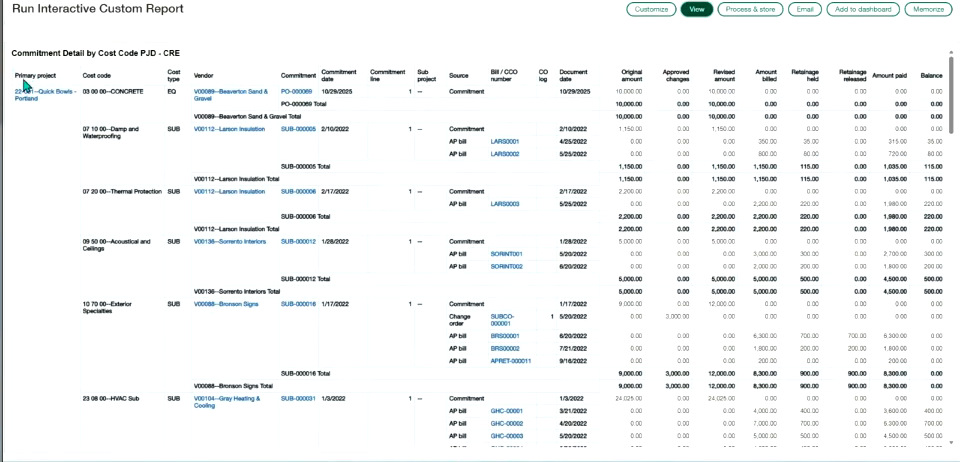
Reports5
Provides standard, filterable reports for purchasing activity, including price list comparisons, purchase price variance, and the status of recurring purchase transactions.
Reports · Purchase Price Variance · Purchasing Analysis · Purchasing Recurring
Setting Up Purchasing – Approvals5
Configures who must approve purchasing transactions and lets approvers delegate their responsibilities to a backup user or group while they're unavailable.
About approvals · Approvals · Approval policies · Manage delegate approvers
Setting Up Purchasing – Automation4
Sets up AP Automation so incoming vendor documents are automatically matched to purchasing transactions, reducing manual data entry.
Set up AP Automation with Purchasing · Modify transaction definitions for use with automation · Troubleshoot setup
Setting Up Purchasing – Items5
Configures how purchased items post to the general ledger, including GL account assignments, GL groups, item groups, and cross-references.
Define GL accounts for items · Item GL groups · Item cross references · Item groups
Lien waivers5
A lien waiver confirms a vendor has been paid and gives up the right to file a claim against the property where work took place. Sage Intacct automatically builds a compliance record for each lien waiver tied to an AP bill or payment, letting teams print or email waivers, mark them received, and withhold future payments if none arrives.
Lien waivers · Enable primary documents on transaction definitions · Mark a lien waiver as received · Print or email lien waivers
Setting Up Purchasing – Price Lists5
Defines the price lists, entries, and schedules used to determine what vendors charge for purchased items.
Assign a price list to objects · Price list entries · Define price lists · Price schedules—Purchasing
Approvals – Vendor Approvals5
Requires new and edited vendor records to clear a review step before they're usable in Accounts Payable or Purchasing records.
Notifications when vendors are approved · Notifications of pending approvals · Stop vendor approval notifications · Approve vendors
Setting Up Purchasing – Transaction Definitions5
Configures the templates that control the accounting, workflow, and behavior of each type of purchasing transaction, from standard preconfigured definitions to advanced customized ones.
Transaction definitions · Auto-reversal of on-order quantities · Subtotal templates · Field descriptions: Purchasing transaction definitions
Budgets And Spending – Spend Management5
Validates General Ledger, Accounts Payable, and Purchasing transactions in real time against a specified budget, alerting users when spending — including committed but unbilled expenses — would exceed the limit.
Spend Management · Field descriptions · Include committed expenses · Spend Insight
Setting Up Purchasing – UOM Groups3
Bundles units of measure that belong together — length or weight, for example — into groups with a base unit and conversion ratios for purchasing.
Define unit of measure groups · Units of measure
Setup5
Covers the initial setup of the Purchasing application, including general configuration, product lines, and vendor GL groups.
Field descriptions: Configure Purchasing · Configuration · Product lines · Vendor GL groups
Using Purchasing – Automation5
Uses AI-driven AP Automation to automatically create and match incoming purchasing transactions to vendors, improving accuracy as users correct predictions over time.
Quick reference guide—AP Automation with Purchasing · Manage automated transactions · Automation · Field descriptions: Automated transaction list
Using Purchasing – Landed Costs4
Captures the freight, insurance, and handling costs added to a purchase so inventory valuation and cost of goods sold reflect the full landed cost of an item.
Landed costs for inventory · Enter an actual cost · Enter an estimated cost
Using Purchasing – Match Tolerances4
Automatically compares quantities and unit prices between converted purchasing transactions, such as a purchase order and its vendor invoice, and flags any that fall outside a configured percent tolerance for review.
Match tolerances · Resolve a transaction with match tolerance exceptions · View transactions with match tolerance exceptions
Using Purchasing – Print And Email Txns5
Prints or emails purchasing documents individually or in bulk, with support for custom messages on printed output.
Email an individual document · Messages in printed documents · Print an individual document · Print or email multiple documents
Using Purchasing – Recurring Templates5
Sets up templates that automatically generate purchasing transactions on a repeating schedule, with header, schedule, and line-level status settings that control when generation stops.
About recurring transactions · Recurring transactions · Recurring templates list · Define a recurring template
Commitment compliance tab on primary documents5
Vendor compliance management tracks insurance certificates and other required documents, such as licenses, checking them automatically when vendor bills are paid in Accounts Payable. Teams define compliance types and definitions, then create compliance records per vendor to flag missing or expired documents and optionally block payment.
Commitment compliance tab on primary documents · Field descriptions: Commitment compliance tab on primary documents · Vendor compliance definitions · Field descriptions: Vendor compliance definitions
Using Purchasing – Transactions5
Tracks purchasing transactions through their workflow states, from draft through conversion to the next document type, such as turning purchase orders into vendor invoices.
About Purchasing transactions · Field descriptions: Convert from an existing transaction · Process transactions · Field descriptions: Purchase transactions
Setup – Credit Limits3
Covers how to set vendor credit limits and place a vendor on credit hold when a limit is reached.
Credit limits for vendors · Place vendors on credit hold
Setup – Vendor Types5
Lets administrators define custom vendor types to segment vendors for reporting, with an option to default the 1099 form and box for every vendor sharing that type.
Create a vendor type for 1099 vendors · Deactivate or delete a vendor type · Edit a vendor type · Field descriptions: Vendor types
Setup – Vendors5
Covers how to maintain vendor records, including removing inactive or duplicate vendors from the list and paying a vendor directly from that list.
Deactivate a vendor · Field descriptions: Vendor information page · Vendors list · Pay a vendor
Other capabilities8
Transaction allocations · Commitments basics · Apply transaction allocations
Asset Management
moderateEnterprise asset management including preventive maintenance, asset lifecycle tracking, work order management, and asset depreciation.
›40 documented capabilities in 9 areas
Asset Management
moderateSetting Up Supplies Inventory3
Covers initial configuration of Supplies Inventory, including its transaction definitions.
Setup · Set up Supplies Inventory transaction definitions
Using Supplies Inventory5
Manages supply requests and purchases end to end, from approval through fulfillment, to maintain optimal stock levels and internal cost controls.
Acknowledge received supplies · Approve supplies requisitions · Process supplies requests · Replenish supplies items
Adjust assets5
Adjusts an asset's cost or transfers it to a new location or classification, even after the asset is already in service.
About assets · About adjusting an asset's cost · About asset transfers · Creation and service
CIP assets5
Manages large capital projects, such as buildings or custom equipment, during construction or assembly—tracking costs as they accrue and capitalizing the asset once the work is complete.
CIP assets · Capitalize a CIP asset · Workflow for CIP assets · Connect a CIP asset with a project
Asset classifications5
Groups similar assets—like computer equipment, vehicles, or buildings—under shared default GL accounts and depreciation rules for consistent accounting and easier reporting.
Asset classifications · Create an asset classification · Delete an asset classification · Edit an asset classification
Disposal5
Fully or partially disposes of assets that have been removed from service, such as through a sale.
About full asset disposals · Field descriptions: Asset disposal · Fully dispose of an asset · Partially dispose of an asset
Historical assets5
Tracks assets whose depreciation periods fall before the company's go-live date in Fixed Assets Management, keeping those historical periods out of the general ledger.
About historical assets · Historical assets · Historical accumulated depreciation examples · Workflow for historical assets
Import5
Creates or updates assets in bulk through an import service, including bulk capitalization and disposal.
Update assets · Capitalize CIP assets in bulk · Fully dispose of assets in bulk · Partially dispose of assets in bulk
Usage2
Shows how fixed assets are being used or allocated within the organization.
Usage
Supply Chain
basicEnd-to-end supply chain visibility including demand planning, supply planning, logistics, supplier management, and supply chain analytics.
›66 documented capabilities in 15 areas
Supply Chain
basicReports5
Provides standard reports covering customer backlog, customer lists, and item lists, each customizable and exportable like other Order Entry reports.
Reports · Customer Backlog · Customer List · Item List
Setting Up Order Entry – Items5
Configures GL accounts, cross references, and groupings for items sold through Order Entry.
Define GL accounts for items · Item GL groups · Item cross references · Item groups
Setting Up Order Entry – Price Lists5
Defines price lists, their entries and schedules, and which customers or transactions they apply to.
Assign a price list to objects · Price list entries · Define price lists · Price schedules—Order Entry
Setting Up Order Entry – Renewal Templates3
Defines renewal templates and contract renewal settings used when a customer contract comes up for renewal.
Define renewal templates · Set up contract renewals
Setting Up Order Entry – Transaction Definitions5
Defines the templates that control GL posting, approval rules, and overall behavior for Order Entry transactions; standard workflows ship with preconfigured, non-deletable definitions that allow limited edits such as user access or edit permissions.
Transaction definitions · Auto-reversal of on-hold quantities · Customize a transaction's Entries grid layout · Subtotal templates
Setting Up Order Entry – UOM Groups3
Bundles related measurement units — say, inches with feet — under one named group with a defined base unit and a fixed ratio between members; six groups come predefined and custom ones can be added.
Define unit of measure groups · Units of measure
Setting Up Order Entry – Workflows3
Installs and configures the workflow that determines which transaction types users can create across Order Entry, Inventory, and Purchasing, how those transactions convert into one another, and which GL accounts are affected at each stage.
Workflows · Change your workflow—Standard
Setting Up Order Entry5
Configures core Order Entry settings, including customer GL groups and customer groups used for reporting and posting.
Field descriptions: Order Entry · Configuration · Customer GL groups · Customer groups
Setting Up Inventory Control – Landed Costs5
Configures the categories and distribution methods used to allocate freight, insurance, and other acquisition costs into inventory valuation.
Landed costs · Landed cost categories · Distribution methods and calculations overview · Set up landed costs
Using Order Entry – Billing Groups5
Groups customers together to apply shared charges in one batch run, speeding up invoicing and keeping billing consistent, with the option to manually trigger or retry a billing period run.
About billing groups · Field descriptions: Billing groups · Run the next open billing period manually · Retry a failed billing period run
Using Order Entry – Print And Email Txns5
Prints or emails Order Entry documents one at a time, tracks delivery through an email log, and supports adding custom messages to printed documents.
Email an individual document · Email delivery log · Messages in printed documents · Print an individual document
Using Order Entry – Recurring Transactions5
Generates transactions automatically on a schedule from a recurring template, governed by header and schedule status fields where the higher-priority setting among Active, Inactive, and Ended controls whether the template keeps running.
About recurring transactions · Recurring transactions · Post scheduled transactions · Recurring template list
Using Order Entry – Transactions5
Tracks an Order Entry transaction through its lifecycle states, such as Draft, In Progress, Pending, and Partially converted, as it's created, posted, or converted into the next transaction in the workflow.
About Order Entry transactions · Process multiple sales transactions · Transaction lists · Field descriptions: Sales transactions
Using Inventory Control – Landed Costs3
Adds actual or estimated landed costs, such as freight or insurance, to purchased inventory so its valuation reflects the full acquisition cost.
Enter an actual cost · Enter an estimated cost
Other capabilities4
Recurring schedules · Order Entry
HR & Payroll
basicHuman resources management including employee records, payroll processing, benefits administration, time and attendance, and talent management.
›123 documented capabilities in 25 areas
HR & Payroll
basicEmployee dimension groups5
Groups employees into named sets—by state, manager, or other criteria—for filtering and reporting on timesheets and labor data. Members can be selected manually or through automatic filters.
Employee dimension groups · Assign members to employee groups · Create an employee group · Delete employee groups
Importing3
Covers importing standard cost type lists and work-in-progress schedule data into Construction.
Import standard cost types · Import work in progress (WIP) schedule information
Advances4
Issues and tracks advance payments made to employees before they submit an expense report, then applies those advances against the resulting reimbursement.
Create an advancement · Field descriptions: Create advance payments · Posted advances
Employee dimension groups5
Groups employee records, the financial dimension used to track labor costs, timesheets, expense reports, and project labor, for reporting and workflow purposes.
About employee dimension groups · Employee dimension groups · Field descriptions: Employee groups · Field descriptions: Employee group information
Employee types5
Classifies employees into types—such as full-time, contractor, or seasonal—to sharpen budgeting and workforce forecasting. Types can be flagged as 1099-eligible for contractor payments.
Deactivate or delete employee types · Make an employee type 1099-eligible · Field descriptions: Employee type information · Field descriptions: Employee types list
Labor costing3
Configures how employee labor time and cost post to the general ledger for projects.
Set up labor cost posting · Troubleshoot: labor cost not posting to GL
Employees5
Covers the Employee dimension used to tag time entries, expense claims, and project labor for costing, tracking, and payroll-related reporting, along with setup, field reference, and reporting-specific employee management.
Employees · Manage employees in Reporting · Field descriptions: Employee information · Work with employees
Employees5
Maintains employee records as a financial dimension tied to timesheets, expense claims, and labor costs on projects, supporting cost tracking, GL posting, and compensation reporting.
Employees · Manage employees in Time · Field descriptions: Employee information · Field descriptions: Employee list
Employee types5
Classifies employees into types—such as full-time, contractor, or seasonal—to improve budgeting and forecasting accuracy. Types can be flagged as 1099-eligible for contractor payments.
Make an employee type 1099-eligible · Field descriptions: Employee type information · Field descriptions: Employee types list · Deactivate or delete employee types
Time types5
Defines categories of non-project time—such as vacation, overtime, or travel—used to capture overhead and admin hours apart from project tasks. Categories can be imported from a spreadsheet.
Time types · Add time types · Delete time types · Edit time types
Employee dimension groups5
Groups employee records into named sets for filtering and reporting across expense reports, timesheets, and project labor costs.
About employee dimension groups · Employee dimension groups · Field descriptions: Employee group information · Field descriptions: Employee groups
Timesheet rules3
Enforces company timesheet policies by blocking submission of timesheets that fail to meet defined rules.
Specify timesheet rules · Add, edit, or delete timesheet rules
Approve timesheets5
Lets project workers fill out, save as drafts, and resubmit timesheets, while managers review submissions, enforce daily or weekly hour limits, and approve or decline entries.
Approve timesheets · Approve or decline timesheets · Field descriptions: Approve or decline timesheets · My timesheets
Sage Intelligent Time – Geofences5
Marks off virtual zones around work locations so managers can confirm employees are on-site during their scheduled shift.
Assign geofences to employees · Delete geofences · Edit geofence configuration · Field descriptions: Geofence configuration
Expenses5
Offers preconfigured reports—such as employee aging, expense reclassification, and employee lists—that can be run as-is or lightly customized with filters.
Expenses · Employee aging · Employee expense reclassification report · Employee list
Intelligent time4
An AI-powered assistant that gathers work activity from email, calendars, browsers, and files, then suggests entries for employee timesheets.
Sage Intelligent Time · Download the mobile app · Privacy
Sage Intelligent Time – Mobile App3
A mobile app for entering timesheet hours, managing expense reports, and approving or declining submissions from a phone.
Log in to the mobile app · Set up the mobile app for expense reports
Sage Intelligent Time – Overtime5
Defines overtime rules that drive payroll calculations and project billing, then automatically computes overtime hours as employees clock in and out of shifts.
Field descriptions: Overtime ruleset configuration · Assign overtime rules to employees · Create overtime rules · Delete overtime rules
Sage Intelligent Time – Rate Cards5
Sets billing rates by employee, item, and project so the correct rate is applied automatically when timesheets are submitted, standardizing invoices and cutting manual calculation.
Field descriptions: Rate cards · Create a rate card · Delete rate cards · Edit rate cards
Pending reimbursements5
Manages the accounting workflow for selecting, approving, and paying employee expense reimbursements, then tracks payments once posted.
Posted reimbursements · Reimbursements · Select expenses to reimburse · Approve or decline employee expense reimbursement requests
Sage Intelligent Time – Set Up5
Walks admins through the initial setup steps to turn on and configure Sage Intelligent Time.
Assign permissions · Configure data retention for all employees · Link an employee to a user · Turn on Intelligent time
Sage Intelligent Time – Time Clocks5
Provides digital time clocks that let employees or admins clock in and out of shifts, projects, or tasks.
Admins clock in or out employees · Clock in or out of a project or task · Field descriptions: View time clock · Field descriptions: Create time clock
Sage Intelligent Time – Time Sources5
Connects calendars and email accounts so Sage Intelligent Time's machine learning can turn daily activity into suggested timesheet entries, without tracking keystrokes, screenshots, or location.
Connect calendars · Connect email accounts · Disconnect calendars or email accounts · Disconnect the Time Assistant
Sage Intelligent Time – Timesheets5
Provides timesheets enhanced with AI-suggested activity cards, plus sortable and filterable lists for tracking personal and staff timesheets.
Approve or decline time entries · Approve or decline timesheets · Recall a timesheet · Field descriptions: Edit timesheets
Other capabilities13
Configure Time · Add, edit, or delete employee positions · Add, edit, or delete labor classes · Add, edit, or delete labor shifts · Sage Intacct Construction Payroll
Sage Intacct does not offer or rate: Manufacturing, Warehouse Management, Ecommerce, Quality Management, Field Service.
Ready to move on Sage Intacct?
Price it, put it head-to-head with alternatives, or talk to a partner who has implemented it.
Sage Intacct add-ons & integrations
Extend Sage Intacct with best-of-breed software that integrates with it:
Highlighted product links go straight to the vendor and are affiliate links — we may earn a commission if you sign up. This never affects which products we list or how we rank them.
Sage Intacct Modules FAQ
What is Sage Intacct?
Sage Intacct is cloud-based financial management software built for mid-market companies, professional services firms, and nonprofits needing deep multi-entity and dimensional accounting. Owned by Sage Group after its 2017 acquisition, it's the AICPA's preferred financial management solution with 19,000+ customers, known for strong general ledger, project accounting, and reporting — though it's finance-first rather than a full-suite ERP with manufacturing or warehouse modules.
Is Sage Intacct an ERP system?
Sage Intacct is often described as ERP, but it's more accurately a best-in-class financial management platform than a full-suite ERP — it lacks native manufacturing, warehouse, and field service modules that broader ERPs include. It excels at core financials, multi-entity consolidation, and project or fund accounting, making it a strong fit for services firms and nonprofits whose complexity is financial rather than operational.
How much does Sage Intacct cost?
Sage Intacct doesn't publish pricing — it's quote-based, depending on user count, modules, and company complexity. Typical total cost of ownership for implementations falls in the $50,000–$200,000 range, and implementation generally takes 3–6 months. Get a specific quote from Sage or a certified implementation partner rather than relying on a published rate card, since pricing varies significantly by deployment scope.
What is Sage Intacct used for?
Sage Intacct is used for core financial management — general ledger, accounts payable/receivable, multi-entity consolidation, project and fund accounting, and dimensional reporting. It's especially common among professional services firms, nonprofits, and SaaS companies that need financial reporting depth beyond QuickBooks or Sage 50 but don't need the manufacturing or warehouse operations covered by full-suite ERPs.
Is Sage Intacct cloud based?
Yes — Sage Intacct is a true multi-tenant cloud platform with no on-premise deployment option, meaning updates roll out automatically without customer-managed upgrades. This is a meaningful difference from some other Sage products, like Sage 300 or Sage X3, which offer on-premise or hybrid deployment alongside cloud options.
How long does it take to implement Sage Intacct?
Typical Sage Intacct implementations take 3–6 months, depending on company complexity, number of entities being consolidated, data migration scope, and whether you're replacing another accounting system with significant historical data. Simpler single-entity implementations can move faster, while multi-entity organizations with custom dimensional reporting requirements tend toward the longer end of that range.
Who owns Sage Intacct?
Sage Intacct is owned by Sage Group, the UK-based accounting and business software company, which acquired Intacct Corporation in 2017. It operates as Sage's flagship cloud financial management product for mid-market companies, distinct from Sage's other ERP lines like Sage 300 and Sage X3, which have different origins and architectures.
Is Sage Intacct the same as Sage 300?
No — they're different products. Sage Intacct is a true cloud-native platform built from the ground up for multi-entity, multi-dimensional financial management, while Sage 300 is an older ERP line offering on-premise and hybrid deployment with broader operational modules. Sage acquired Intacct separately in 2017; the two products have different architectures and target somewhat different buyer profiles.
Do you need a partner to implement Sage Intacct?
Most Sage Intacct implementations go through a certified Sage Intacct partner rather than direct self-implementation, since partners bring configuration expertise for dimensional structures, data migration, and integrations. Sage does support direct relationships in some cases, but for anything beyond the simplest single-entity setup, an experienced implementation partner materially reduces project risk and timeline.
Does Sage Intacct have a mobile app?
Yes — Sage Intacct offers a mobile app supporting functions like expense report submission, approval workflows, and dashboard viewing on the go, though it's focused on approvals and monitoring rather than full data entry. Core configuration and detailed transaction work are still typically done through the desktop browser interface.