
Infor M3 Modules & Capabilities
Infor M3 is rated across 13 of 14 ERP modules, 9 of them a core strength and 2,767 documented capabilities catalogued across those modules.
- 13of 14
- Modules rated
- 9
- Core strengths
- 2,767
- Documented capabilities
- Cloud / On-Premise
- Deployment
Infor M3 module ratings
Ordered strongest to weakest. Each rating reflects standard-edition depth, not what a third-party add-on could bolt on.
Finance & Accounting
strongCore financial management including general ledger, accounts payable/receivable, fixed assets, cash management, and financial reporting. The backbone of any ERP system.
›504 documented capabilities in 27 areas
Finance & Accounting
strongEnabling Financial Management26
Covers the foundational setup tasks for M3 finance, including accounting dimensions and identities, currencies, bank accounts, voucher numbering, and invoice templates needed before financial transactions can be processed.
Accounting Dimension · Accounting Dimensions Security · Accounting Identity · Batch Total · Control Methods for Configuration of Bank Accounts (Sweden)
Budgeting22
Supports building, adjusting, and monitoring budgets, from resource-plan-based and activity-based budgets to decentralized budgeting, templates, and PC-based import and export of budget data.
Account Entry Instructions · Activity-Based Budgeting · Adjust Resource Plan · Automatic Budgeting · Automatic Reallocation
Managing Multiple Unit Coordination11
Covers configuring and running Multiple Unit Coordination (MUC) so a company with more than one legal unit can manage internal invoicing, cash pooling, and loan management between divisions.
Configuration for Multiple Unit Coordination (MUC) · Create cash pool and loan management ID · Create internal invoice · Create internal invoice proposal · Specify standard comments for internal invoices
List of Accounting Rules in M325
Lists and explains the individual accounting rules that determine which account entries M3 creates for each business transaction, organized by module.
Accounting rules setup and usage · The Impact of MUC Triggers · Accounting Rules for VAT Account Entries · Accounting Rules for AB - Automatic Bank Statement Processing · Accounting Rules for AP - Accounts Payable
Cash Flow Management12
Provides tools for forecasting, budgeting, and reviewing company cash flow, including converting profit and loss budgets into cash figures and building short-term cash flow plans.
Cash Flow Conversion · Cash Flow Management Tools · Create Account Conversion Table for Cash Flow Budgeting · Create Allocation Table for Cash Flow Budgeting · Create Cash Flow Budget
Managing Group Consolidation9
Covers consolidating financial results from subsidiaries into a parent company's accounts, including chart-of-accounts conversion and subsidiary configuration.
Configure transfer of consolidation transactions · Create and approve consolidation proposal for subsidiary · Define consolidation settings for subsidiary · Define conversion of subsidiary's chart of accounts · Enable M3 Group Consolidation
Managing Accounts Receivable26
Covers the accounts receivable cycle in M3, from entering and collecting customer invoices to debt collection, payment reminders, and factoring.
Accept Cash Discount for Customer Payment · Adjust debt collection assignment proposal and create final assignment for past due customer invoices in (ARS670) · Adjust Receipt Orders from Batch File before Allocation to Invoice · Annual Run in Accounts Receivable · Cancellation and replacement of domestic invoices
Cost Accounting22
Covers internal cost and revenue accounting, including fixed and variable budgets, cost of capital, cost center analysis, equipment profitability, and internal journal vouchers and allocations.
Adjust Variable Budget · Calculate Cost of Capital - Cost Accounting · Calculation of Cost of Capital - Cost Accounting · Connect GL to Equipment Profitability Portal · Control Report for Delivered, Not Invoiced Goods or Services
Managing Accounts Payable26
Covers the accounts payable cycle, from entering and matching supplier invoices to approving, scheduling, and executing supplier payments.
Adjust Supplier Payment Proposal in (APS130) · Approval flow for expense invoices · Automatic matching of batch supplier invoices to purchase order · Automating Your Supplier Invoice Entry · Check Unapproved Supplier Invoice Lines
Product Costing34
Covers calculating and managing product costs, from standard costs to purchase and distribution costing, costing models, and costing components, to support pricing and profitability decisions.
Account Entries Created in Purchase Costing · Automatically Entering Cost Rates for Costing Components · Average Price · Calculating historic actual costs · Calculation of item cost per inventory accounting method
Customer Order Processing5
Handles the day-to-day processing of customer orders, including entry, copying, comments, charges, credit card and credit checks, allocation, returns, status tracking, and country- and industry-specific order flows.
Managing Payment Proposals for Customer Orders · Summary · Workflow for payment documents · Workflow for advance payment documents (only if advance invoice setting is 3 = Prepayment calculated) · Configuration
Managing Automatic Bank Statement20
Covers automated processing of bank statement files, including setup, allocation of transactions to invoices, and reconciliation against the general ledger.
Allocate a Bank Statement Line Manually · Automatic processing of bank statements · Automatic Bank Statement Reconciliation Setup · Automatic Bank Statement Reconciliation Processing · Bank Statement Types
Risk Management26
Covers managing customer credit risk, payment monitoring, letters of credit, and trade risk, including DSO analysis, credit policies, and insurance for at-risk customers.
Analysis of Customer Payment Situation Using Calculation of Days of Sales Open (DSO) · Apply Company Credit Policy to Customer · Calculate Average Customer Credit Time as a DSO Value per Payer and Period · Cancel Customer Risk for Draft Payments · Create payment instruction
Rental Invoicing10
Covers generating, reviewing, and correcting rental invoices, including advance credits, interactive invoicing, and closing completed agreements.
Complete and Close Rental Agreements · Creating Auto Credit for a Rental Agreement Line · Define Days to be Invoiced in Rental · Invoice History per Equipment · Invoice Rental Agreement
Managing Accounting System33
Covers general ledger administration tasks such as account allocation, balance file maintenance, reconciliation, period and year-end closing, and fixed asset corporate accounting.
Account Addition · Accounts Allocation Template for General Ledger and Budget · Analyze and Repair the General Ledger Balance File · Archive Accounts Receivable Transactions · Automated problem solving in the Financial System
Time Accounting10
Covers reporting, approving, authorizing, and transferring employee time and cost data to the general ledger, integrated with project management.
Approve Time Report · Authorize Time Report · Basic Data for Time Accounting · Create Time Report and Report Time and Costs · Enter Labor Code Template
Customer Order Invoicing and Financial Transactions24
Covers customer order invoicing and the resulting financial transactions, including advance and summary invoicing, corrective invoices, invoice printing and restart, EU sales reporting, and posting to the general ledger.
Advance Invoice · Advance Invoicing Methods · Create Advance Invoice Proposal Manually · Create Corrective Invoice in Sales Management · Customer Order Invoice - Cancel Transfer to FIM
Managing Fixed Assets39
Covers the fixed asset lifecycle in M3, including acquisition, depreciation, revaluation, insurance, physical inventory, and disposal.
Activate Fixed Asset Under Construction Proposal in (FAS660) · Automatic Registration of Equipment as a Fixed Asset at Goods Receipt · Calculate Cost of Capital for Fixed Assets · Change fixed asset entry · Configuring Depreciation of Fixed Assets
Invoicing Agreement6
Covers correcting rental and leasing invoices after they've been issued, through full or partial credits and re-invoicing.
Correcting Invoices in Rental and Leasing · Create Full Credit in Rental and Leasing · Create Partial Credit in Rental and Leasing · Credit and Re-invoice · Corrective Invoice
Managing Tax49
Covers tax management in M3, including VAT and sales tax calculation and reporting, country-specific tax invoicing, withholding tax, and trade statistics.
Accounts Payable Tax Invoices for South Korea · Accounts Receivable Tax Invoices for South Korea · Configuring M3 Business Engine for VAT management · Create Template for VAT Reports · Create XML file for Polish Tax Authorities
Managing Current Assets13
Covers financial inventory valuation, including acquisition cost, actual value, and work-in-process valuation for cost accounting.
Acquisition Cost · Actual Value · Calculation of Inventory Value · Create accounting strings for inventory valuation variances · Create Inventory Valuation Proposal
Point of Sales4
Integrates M3 with external point-of-sale systems, downloading customer, item, price, and user data, and handling cash, credit, telesales, returns, and refund transactions at the shop.
Manage the Payment Provider Ledger · Update the Payment Provider Ledger with Credit Card Payments from POS · Confirm Transactions in the Payment Provider Ledger · Transfer Payment Provider Ledger Entries to FIM
Creating Financial Reports25
Covers building and running custom financial reports in M3, including report structure, access control, and country-specific electronic reporting formats.
Create Account Translation Scenario · Authorize Access to Online Reports · Create Category Group for Claim/Liability Reports · Create Cells · Create Columns
Cash Desk16
Handles cash desk operations, including registering, reconciling, and validating cash payments and invoices, printing checks, and managing petty cash and credit card payments taken at the desk.
Configure a cash desk for registering cash payments · Display and Restart Interrupted Payment Transactions · Handling Cash Payments of Invoices · Handling Petty Cash in Cash Desk · Move Cash between Cash Desks in Cash Desk
Financial Agreements4
Covers managing financial agreements, including matching supplier invoices against agreements and administering lease agreements.
Financial Agreements · Leasing Agreements · Leasing Agreements Hub
Project Accounting2
Covers recognizing project revenue and cost at period end based on budget, actual values, and percentage of completion.
Project Accounting
General Ledger5
Covers Experience Designer applications for managing, tracing, and displaying general ledger transactions and vouchers.
General Ledger Admin · General Ledger Desk · GL Transaction Details · GL Voucher Display
Manufacturing
strongProduction planning, shop floor control, BOM management, MRP, and manufacturing execution. Supports discrete, process, and mixed-mode manufacturing environments.
›330 documented capabilities in 20 areas
Manufacturing
strongEnabling Manufacturing26
Sets up the manufacturing, item, and facility data needed before production activity control can be used, including learning curves, product structures, and configuration elements.
Overview of Process Manufacturing · Connect and Define Manufacturing Settings for Facility · Connect and Define Manufacturing Settings for Item/Warehouse · Connect a Learning Curve to a Control Object · Define Basic Settings for MO Reporting
Attribute Control11
Sets up and manages item attributes, including attribute models, valid and default values, and how items inherit attribute data.
Attribute Control · Attribute Model Overview · Create Attribute Model · Create Attributes to Describe Items · Connect Attribute Model to Item
Overview4
Introduces Capacity Planning Workbench as a web application for visualizing capacity and load across manufacturing and distribution operations.
Purpose of M3 Capacity Planning Workbench · Key indicators and measures · Recommendations and restrictions · Tabs and Favorite
Operational Manufacturing Planning19
Plans and manages manufacturing orders before they reach the shop floor, covering bill of material data, capacity requirements, and the creation, consolidation, and statistics of planned orders.
Bill of Material · Capacity Requirements Planning · Create Manufacturing Statistics · Create Planned Manufacturing Order Manually · Creating, Following Up, and Printing Out Manufacturing Statistics
Creating a Product Structure13
Builds and maintains product structures by defining products, bills of material, routings, versions, and shift patterns used in production.
Creating a Product Structure · Create a Product Structure Header · Create Versions for a Product Structure · Converting Non-Versioned Product Structures · Define Output Item for a Product Structure
Basics8
Covers the core interface of Capacity Planning Workbench -- the grid, buckets, controls, and keyboard shortcuts used day to day.
Actions · Controls · Grid · Buckets · Related information
Executing Manufacturing26
Covers the day-to-day execution of manufacturing orders, from creation and scheduling through material issue, reporting, inspection, and closing out production.
Create Lots and Split Ordered Quantities into Several Lots in the Manufacturing Flow · Create Manufacturing Order Directly · Creating Manufacturing Order · Define Settings for Printing Manufacturing Order Documents · Define Work Center Scheduling Settings for Manufacturing Order
Engineering Change Management13
Manages engineering change orders that modify items, documents, document structures, and bills of material, along with project structures used to track related changes.
Create ECO for Bill of Material · Create ECO for Document · Create ECO for Document Structure · Create ECO for General Change · Create ECO for Item
Setting up the application12
Configures Capacity Planning Workbench to match site preferences -- data retrieval, bucket periods, grouping, columns, coloring, and work center filters.
Basic Setup · Data retrieval · Buckets · Grouping · Columns
Time and Attendance26
Tracks employee schedules, calendars, and clocked time, and calculates, reviews, and transfers time results to payroll.
Adjust Employee Calendars in Time and Attendance · Approving Calculated Times in Time and Attendance · Calculate Times by Night Runs in Time and Attendance · Calculating and Handling Missing Time in Time and Attendance · Capacity per Work Center/Day
Product Data22
Maintains the operational data behind manufactured items, including bill of material analysis, work centers, lead times, and inspection setup.
Bill of Material Analysis · Enter Alternate Structures for Items · Create Capacity Calendar · Create Inspection ID with Inspection Tasks · Enter Material in Bill of Material
Working with CPW6
Covers the M3 backend settings, APIs, and troubleshooting steps needed to run Capacity Planning Workbench in production.
Settings in M3 Business Engine · List of APIs used · CPW is not available in the H5 menu · Exporting to Excel for languages not in english · Load and capacity not displayed as expected
Quotation preparation process12
Walks through building a quotation -- creating the header, selecting and configuring products, adding warranty, service, financing, and other records.
Selection or search of products · Equipment Search and Connect feature · Equipment Select and Configure feature · Creating a quotation line using the Select and Configure feature · Creating a quotation using the Select and Configure feature
Laboratory and Inspection Control16
Manages laboratory-based quality inspection of manufactured and purchased items, covering test classes, limit values, requests, and certificates.
Actual Value - Text · Laboratory · Laboratory and Inspection Control · LI Class · LI Limit Values
Product Configurator26
Configures product variants dynamically from a common product structure, using formulas, selection matrices, drawing measurements, and features and options.
Analyze Product Configuration · Basic Data for Product Configuration · Create Formula · Create Procurement Order for Product Configuration · Create Product Configuration
Core Remanufacturing11
Manages the exchange, tracking, and remanufacturing of reusable components known as cores, such as engines or gearboxes, including core policies, supplier and customer exchanges, and returns.
Cost Accounting and Component Exchange between Customer and Company · Core Tracking · Create Core Policy · Create Core Policy Selection Table · Defining Settings for Component Exchange with Supplier in Core Management Process
Quality Management System26
Manages item quality across manufacturing, procurement, and distribution, covering specifications, tests, approval rules, and certificates of analysis, including migration from the legacy Laboratory Inspection and Control module.
Transition Quality Module from Laboratory Inspection and Control (LIC) to Quality Management System (QMS) · Managing Quality Control · Quality Management System (QMS) Setup for Attributes · Setup of Quality Inspection (QI) Requests · Quality Tests, Sets and Specifications
Resource and Material Planning26
Covers material and resource planning across items and warehouses, including forecasting methods, safety stock and reorder points, available-to-promise checks, service levels, and capacity and load reporting.
Action Messages · Available-to-promise (ATP) · Competing Forecasts · Create Automatic Forecast · Create Forecast Family Structure
Manufacturing Concepts17
Explains the core concepts behind production activity control in M3, including manufacturing orders, capacity planning, and the order lifecycle from creation through disposition.
Basic Data for Production Activity Control · Basic Data - Start/Stop MO Operation · Data Collection for Production · Create Department · Detail Production Planning
PO with Subcontracting10
Manages purchase orders for subcontracted work, including settings for subcontracted items and operations, and the workflows for both continuous and occasional subcontracting.
Define Basic Settings for Subcontracting · Define Settings for Subcontracted Item · Define Settings for Subcontracted Operations · Managing Subcontracting in Procurement · Occasional Subcontracting
Supply Chain
strongEnd-to-end supply chain visibility including demand planning, supply planning, logistics, supplier management, and supply chain analytics.
›221 documented capabilities in 17 areas
Supply Chain
strongDemand Planning7
Covers building and managing sales forecasts and budgets, including closed-loop forecasting that exchanges demand data between M3 Business Engine and M3 Demand Planner.
Calculate Sales Forecast · Closed Loop Forecasting · Enable Closed Loop Forecasting · Managing Closed Loop Forecasting · Managing Sales Budget
Overview4
Introduces Capacity Planning Workbench as a web application for visualizing capacity and load across manufacturing and distribution operations.
Purpose of M3 Capacity Planning Workbench · Key indicators and measures · Recommendations and restrictions · Tabs and Favorite
Supply Planning10
Covers modeling how items are supplied across warehouses and suppliers, including sourcing rules, distribution chains, supply models, and availability simulation as part of the capacity-to-promise process.
Simulate Availability (Supply Model Simulate) · Define Distribution Chain · Define Rules for Planned Distribution Order Priority · Define a Sourcing Rule · Define Supply Model
Managing DO/RO13
Covers distribution orders and requisition orders used to move stock between warehouses or fill internal shortages, including order entry, allocation, dispatch, and the related settings and lead times.
Distribution Calendar · Handling Requisition Order · Display Information about Distribution Order · Distribution Order · Distribution Order Entry
Basics8
Covers the core interface of Capacity Planning Workbench -- the grid, buckets, controls, and keyboard shortcuts used day to day.
Actions · Controls · Grid · Buckets · Related information
Setting up the application12
Configures Capacity Planning Workbench to match site preferences -- data retrieval, bucket periods, grouping, columns, coloring, and work center filters.
Basic Setup · Data retrieval · Buckets · Grouping · Columns
Working with CPW6
Covers the M3 backend settings, APIs, and troubleshooting steps needed to run Capacity Planning Workbench in production.
Settings in M3 Business Engine · List of APIs used · CPW is not available in the H5 menu · Exporting to Excel for languages not in english · Load and capacity not displayed as expected
Enabling Supply Chain Planning6
Covers the setup steps needed to turn on supply chain planning, including creating and activating datasets, enabling sales forecasting, and configuring action logs for manufacturing.
Action Logs in Manufacturing · Create and Activate Dataset · Enabling Dataset · Enabling Sales Forecasting Using Dataset · Processing Action Logs
Managing Outbound Goods26
Covers the outbound goods flow -- allocation, batch allocation, packing, dispatch policy, delivery confirmation, and transportation documents -- used to prepare and ship customer and other outbound orders.
Allocation and Cross-Docking Concepts · Automatic Allocation · Basic Delivery Value Check Settings · Basic Settings for Dispatch Policy · Batch Allocation Using Fair Share, Allocation Priority Rules or Allocation priority with Fair Share
Supply Chain Planning Concepts11
Covers core planning concepts including macro orders that group materials and operations for large order volumes, macro order policies, dataset transaction types, and the basic data setup behind M3 Planning Workbench.
Activate Macro Order Functionality and Define Time Frames · Aggregate Macro Order Details Manually · Connect Items to a Macro Order Policy · Dataset Transaction Type Update · Define a Macro Order Policy
Warehouse Management Interfaces13
Covers the interfaces that connect M3 warehouse operations to external warehouse and material handling systems, including data downloads, uploads, and the transactions used to synchronize stock and order activity.
Item Overview · M3 Business Engine Administrator's Guide for Warehouse Management Interfaces · Supported Processes for Warehouse Management Interfaces · Download processes · Supported processes
Resource and Material Planning26
Covers material and resource planning across items and warehouses, including forecasting methods, safety stock and reorder points, available-to-promise checks, service levels, and capacity and load reporting.
Action Messages · Available-to-promise (ATP) · Competing Forecasts · Create Automatic Forecast · Create Forecast Family Structure
Managing Transportation Planning26
Covers transportation planning -- routes, freight cost, transportation equipment and resources, and shipment management -- used to plan and execute deliveries.
Additional Transportation Information · Basic Settings for Freight Cost and Freight Cost Calculation · Create Transportation Equipment · Create Transportation Resource · Define Settings for Transportation Management
Transportation Management Interfaces12
Covers the Transportation Execution Interface, which exchanges transportation and customs information with third-party logistics systems, including its architecture, triggers, and transfer processes.
M3 Business Engine Administrator's Guide for Transportation Execution Interface (TEI) · Business Requirements and Solutions for M3 Transportation Execution Interface · Scenarios for Using M3 Transportation Execution Interface · Settings for Transportation Execution Interface (TEI) · Overview of TEI Architecture
Supply Chain Order11
Covers supply chain orders, which link related orders across levels of the material flow, including their setup, allocation, and the rules that govern changes as they move through the chain.
Changing, Deleting and Releasing the Supply Chain · Linking Supply Orders · Order Environment Examples · Supply Chain Rules Introduction · Pre-allocation and Allocation of the Supply Chain
Defining Basic Settings26
Covers foundational master data and configuration -- items, facilities, warehouses, locations, lead times, and user authorization -- required before supply chain execution processes can run.
Administration Lead Time · Company Structure Overview · Connect Item to Warehouse · Create and Apply User Authorization to Different Objects · Copy Items in Different Ways
Other capabilities4
Managing Territorial Roll-up · Implementing Action Logs and Correcting Possible Errors
Sales
strongThe sales side of an ERP: quotes and pricing, order processing, customer and account management, post-sale service, and sales reporting on shared master data.
›588 documented capabilities in 35 areas
Sales
strong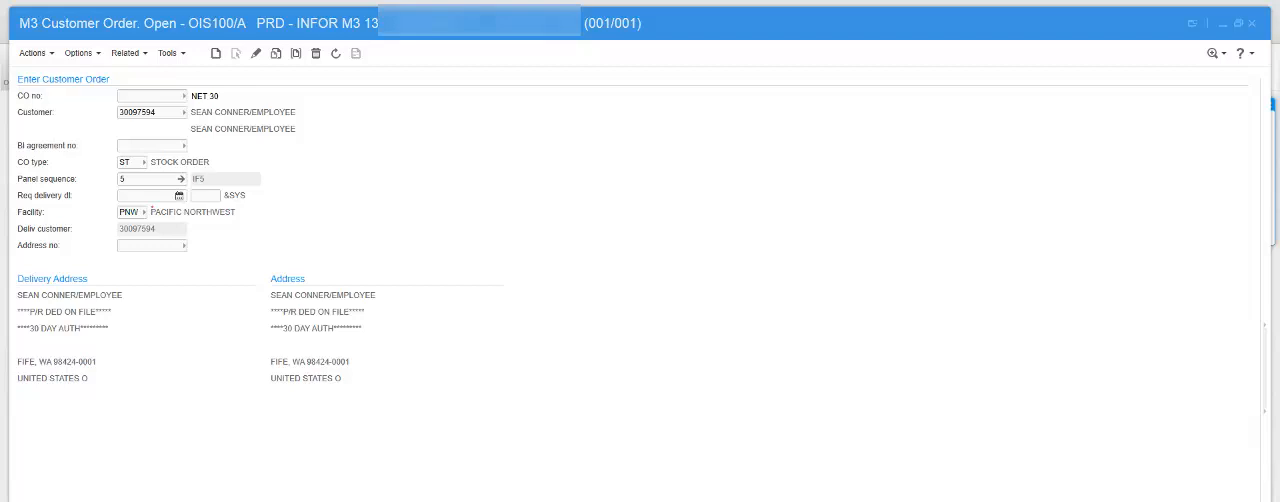
Sales Management5
Groups core order-entry functions for assigning prices to order lines, linking workflow functions to order types, quick order entry, and equipment quotations.
Assigning a Sales Price to a Customer Order Line · Connect FAM Function to an Order Type · Entering Customer Order: Quick Entry · Equipment Quotation Management
Enabling Rental Management19
Sets up the foundational configuration for rental agreements in M3, covering agreement order types, reason codes, package structures, usage meters, and rental depots.
Reason Codes in (STS060) · Adding Contact Persons to Rental Agreement · Calculating Service Days for Rental Statistics and Utilization · Calculation of rental usage meters · Connect usage or consumption meters to a rental agreement line
Enabling Sales26
Configures the foundational customer, assortment, season, and contact-plan data needed to enable sales, including customer addresses, buying patterns, service-level parameters, and order-entry defaults.
Assortment · Basic Data for Customer Orders · Build Equipment using Attribute Management · Buying Patterns per Customer · Connect a Delivery Window to a Season
Internal Sales19
Manages sales between divisions or companies within the same M3 group, covering order creation, pricing, invoicing, deliveries, and quality checks for goods moved internally.
Internal Sales Overview · Internal Sales Process Limitations · Define Internal Sales · Fixed Asset handling in Internal Sales transactions · Managing Internal Purchase Orders
Rental-Operated Plant3
Supports renting equipment together with the operator needed to run it, independent of any separate equipment rental.
Processing Rental-Operated Plant · Defining Rental-Operated Plant Process
Complaint Management4
Tracks abnormal events and customer complaints against maintained objects, from initial registration through decisions and follow-up complaints.
Handling Complaints · Register Complaints and Decisions · Register Subsequent Complaint
Setup of basic information39
Covers the administrative setup required before quoting -- equipment attributes, pricing, sales roles, order types, and records for warranty, financing, and promotions.
Associating basic information with equipment and attributes · Non-item attributes · Quick entry of attributes · Sales and cost prices · Equipment sales prices
Pricing and Conditions56
Manages sales pricing, discounts, campaigns, customer charges, bonus and commission agreements, and supplier rebate programs that determine what customers pay and what recipients earn.
Advance Frequency - Bonus/Commission · Advance Percentage - Bonus/Commission · Bonus/Commission Agreement · Campaign · Costing Model - Sales Price
Internal Rental14
Manages rental transactions between divisions of the same M3 company, covering internal purchase orders, pricing, delivery, invoicing, and returns.
Internal Rental Overview · Internal Rental Process Limitations · Defining Internal Rental · Managing Internal Purchase Orders for Internal Rental · Managing Internal Rental Agreements
EQM mashup and EQM Manager mashup9
Provides the day-to-day working applications for quoting -- the EQM mashup for sales executives and the EQM Manager mashup for oversight.
EQM mashup · My Quotations panel · All Quotations panel · Customer panel · Equipment panel
Customer Order Processing35
Handles the day-to-day processing of customer orders, including entry, copying, comments, charges, credit card and credit checks, allocation, returns, status tracking, and country- and industry-specific order flows.
Account Specification · Batch Order · Configure credit card management interface · Connect Customer Order Charges to an Existing Customer Order · Copy Customer Order or Quotation
Rental Agreement Processing26
Covers the operational lifecycle of a rental agreement -- creating, checking equipment in and out, exchanging or replacing items, tracking utilization, and terminating or closing agreement lines.
Check in Rental Agreement · Check Out Rental Agreement · Convert Preliminary Rental Agreement to Active Agreement or Quotation · Convert Rental Agreement to Rental Purchase Option · Copy Rental Agreement or Agreement Line
Quotation preparation process33
Walks through building a quotation -- creating the header, selecting and configuring products, adding warranty, service, financing, and other records.
Management of quotations · Creating a quotation · Updating the quotation header · Adding the product to the quotation · Updating the product
Processing CO Acquisition Variants2
Covers the extended catalog item used in the buy-to-order acquisition variant of customer order processing.
Extended Catalog Item
Rental Invoicing10
Covers generating, reviewing, and correcting rental invoices, including advance credits, interactive invoicing, and closing completed agreements.
Complete and Close Rental Agreements · Creating Auto Credit for a Rental Agreement Line · Define Days to be Invoiced in Rental · Invoice History per Equipment · Invoice Rental Agreement
Quotation management process10
Manages a quotation after its initial creation -- adjusting pricing and discounts, allocating equipment, calculating tax, tracking status, and routing it for approval.
Product price adjustment · Capture manual discounts · Quotation price adjustment · Allocation or deallocation of equipment · Sales Tax and VAT
Customer Order Invoicing and Financial Transactions24
Covers customer order invoicing and the resulting financial transactions, including advance and summary invoicing, corrective invoices, invoice printing and restart, EU sales reporting, and posting to the general ledger.
Advance Invoice · Advance Invoicing Methods · Create Advance Invoice Proposal Manually · Create Corrective Invoice in Sales Management · Customer Order Invoice - Cancel Transfer to FIM
Pricing9
Covers how rental prices are set, simulated, and updated -- including hourly rates, stepped pricing, meter-based pricing, and business-chain discounting.
Business chain on rental agreement · Rental meter price list · Rental Price Simulation · Setting up Rent by Hour · Simulate Rental Agreement Totals
Release of a quotation4
Covers what happens when a quotation is released -- generating sales, work, or project orders and reviewing the resulting deal.
Effects of releasing a quotation · Deal review · Quotation fulfillment
Customer Order Sourcing9
Covers how customer orders are sourced, including checking availability, creating linked purchase orders through buy-to-order, replacing discontinued items, and handling equipment trade-ins.
Availability Check - Customer Order Line · Buy-to-Order · Create a Purchase Order during Customer Order Entry · Creating a Purchase Order in the Customer Order Flow · Define an Extended Catalog Item
Invoicing Agreement6
Covers correcting rental and leasing invoices after they've been issued, through full or partial credits and re-invoicing.
Correcting Invoices in Rental and Leasing · Create Full Credit in Rental and Leasing · Create Partial Credit in Rental and Leasing · Credit and Re-invoice · Corrective Invoice
EQM Product Support14
Provides a dedicated workspace for product support sales representatives to sell aftermarket parts, service, and warranty against existing customers or equipment.
EQM Product Support · Workflow · Customer · Starting the workflow from the customer list · Creating an aftermarket sale of parts
Customer Delivery Schedules26
Manages customer delivery schedules for repetitive demand, from partner and schedule type setup through creation, activation, deviation checks, and reconciliation of delivery schedule demands.
Activate a Delivery Schedule · Check a Delivery Schedule for Deviations · Create Delivery Schedule Demands Manually · Create a Delivery Schedule Header Manually · Create Delivery Schedule Item Lines Manually
Leasing17
Manages equipment leasing agreements and their financial mechanics -- financing, leasing curves, price indexing, and periodic invoicing -- alongside standard rentals.
Create and Manage Leasing Agreement Using EQM with Funder · Create and Manage Leasing Agreement Using EQM Without Funder · Create and manage leasing agreement using (STS100) · Copy Leasing Line · Convert a rental line to a leasing line in (STS201)
EQM Rental4
Supports quoting rental transactions from within Equipment Quotation Management, alongside standard equipment sales.
M3 EQM Rental panel · Rental agreement · Rental workflow
Point of Sales30
Integrates M3 with external point-of-sale systems, downloading customer, item, price, and user data, and handling cash, credit, telesales, returns, and refund transactions at the shop.
Correct Errors that Occur during Sales Ticket Validation · Create a New Shop · Creating a New Shop in M3 · Define Settings for General Ledger Update in M3 · Define Basic Settings for Enabling POS Integration with M3
Initial Provisioning11
Sets up the foundational data needed before maintenance operations can run, including work centers, costing, document structures, and initial data conversion from a prior system.
Define Document Structure · Enter Hourly Costs per Work Center · Enter Work Center · Initial Provisioning (IP) · IP - M3 Basic Data
Experience Designer Applications7
Provides modern Experience Designer applications for quoting, equipment search, and rental, offering a customizable alternative to the classic mashups.
EQM - Equipment Quotation Management · EQM Details · EQM Search and Connect · EQM Rental · EQM Rental Details
Cash Desk16
Handles cash desk operations, including registering, reconciling, and validating cash payments and invoices, printing checks, and managing petty cash and credit card payments taken at the desk.
Configure a cash desk for registering cash payments · Display and Restart Interrupted Payment Transactions · Handling Cash Payments of Invoices · Handling Petty Cash in Cash Desk · Move Cash between Cash Desks in Cash Desk
Integration with other M3 products4
Connects Equipment Quotation Management to related M3 products, including Customer LifeCycle Management and Infor Document Management.
M3 Customer LifeCycle Management setup for M3 Equipment Quotation Management · Uploading images to Infor Document Management · Context Viewer in Infor OS Portal
Sales Statistics26
Covers sales budgeting, forecasting, and statistics, including building datasets, tracking budget and demand data, calculating forecasts, and reporting on sales performance.
Accumulator Field · Adjust Budget Values · Calculate Budget Distribution Percentages · Calculating Sales Forecasts · Copy Demand in Dataset
MCO Processing26
Manages the full maintenance customer order cycle, including quoting, invoicing, warranty claims, credit limits, and delivery of serviced objects back to customers.
Automatically Create Supplier Invoice Batch for Miscellaneous Cost · Check and Adjust Preliminary Invoice Specification · Creating a Maintenance Customer Order · Create Project Budget or Financial Budget from a Maintenance Agreement Quote · Credit Limits for Maintenance Customer Orders
Trade Agreements16
Manages trade agreements that calculate and process accruals, advances, and settlements for one or more recipients based on customer order activity.
Trade Agreements - Introduction · Trade agreements - Overview · Cross-Division Trade Agreements · Defining Trade Agreements - Basic Information · Defining Trade Agreements
MCO Maintenance Agreements26
Manages the terms, pricing, and coverage of maintenance service agreements with customers, including quotes, charges, discounts, and periodic invoicing rules.
Close Maintenance Agreements · Connect an Additional Payer to a Maintenance Agreement Line · Connect Model Individuals and Objects to a Maintenance Agreement to Limit the Agreement Validity · Connect and Prioritize Additional Warehouse to Maintenance Agreement · Create Maintenance Agreement Quote
Work Order Enabling Work Orders3
Configures the default parameters used when entering new work requests, both in standard and quick-entry mode.
Set Basic Parameters for Entry of Work Requests · Set Basic Parameters for Quick Entry of Work Requests
Inventory Management
strongInventory tracking, stock management, reorder point planning, multi-location management, and inventory valuation across warehouses and locations.
›135 documented capabilities in 11 areas
Inventory Management
strong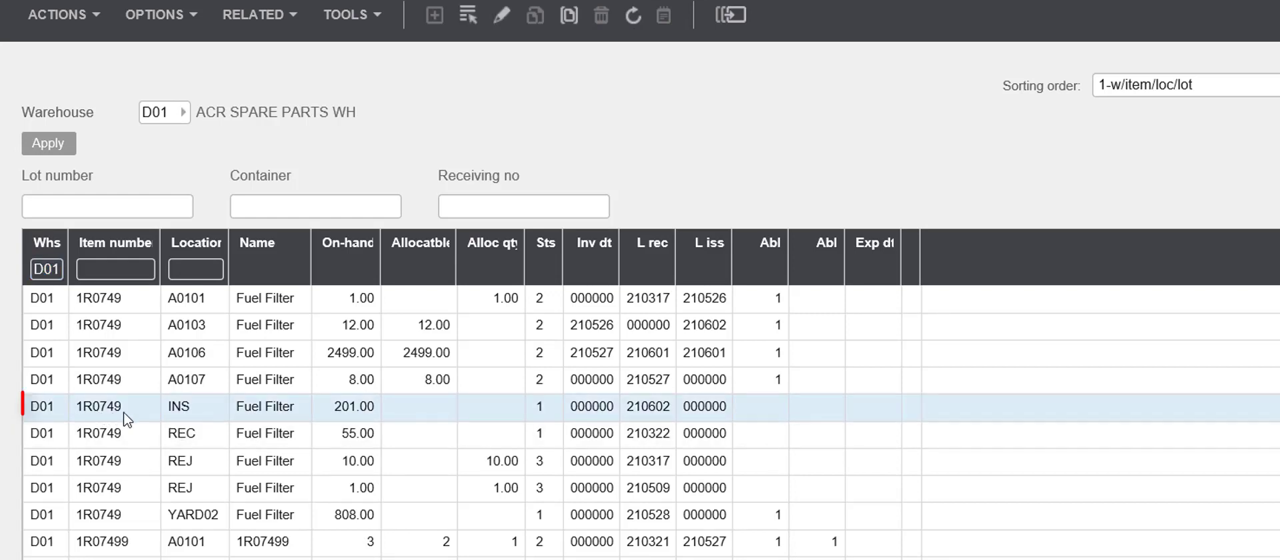
Demand Planning7
Covers building and managing sales forecasts and budgets, including closed-loop forecasting that exchanges demand data between M3 Business Engine and M3 Demand Planner.
Calculate Sales Forecast · Closed Loop Forecasting · Enable Closed Loop Forecasting · Managing Closed Loop Forecasting · Managing Sales Budget
Supply Planning10
Covers modeling how items are supplied across warehouses and suppliers, including sourcing rules, distribution chains, supply models, and availability simulation as part of the capacity-to-promise process.
Simulate Availability (Supply Model Simulate) · Define Distribution Chain · Define Rules for Planned Distribution Order Priority · Define a Sourcing Rule · Define Supply Model
Managing DO/RO13
Covers distribution orders and requisition orders used to move stock between warehouses or fill internal shortages, including order entry, allocation, dispatch, and the related settings and lead times.
Distribution Calendar · Handling Requisition Order · Display Information about Distribution Order · Distribution Order · Distribution Order Entry
Balancing Supply and Demand2
Covers balancing supply against demand, including territorial roll-up for businesses that cannot rely on distribution order demand within item statistics.
Managing Territorial Roll-up
Managing Items26
Covers item master data management -- alias numbers, catch weight, lot and expiration handling, item hierarchies, and interfaces for bulk item data -- used to define and maintain items across the warehouse.
Alias Number · Alias Type · Archive and Delete Lot and Sublot · Catch Weight Loss Transactions · Catch Weight Management
Customer Order Processing4
Handles the day-to-day processing of customer orders, including entry, copying, comments, charges, credit card and credit checks, allocation, returns, status tracking, and country- and industry-specific order flows.
Manage Location Based Catch Weight · Managing sales price U/M for items with location based catch weight · Customer order processing · Entry of catch weight at customer order entry
Warehouse Management Interfaces13
Covers the interfaces that connect M3 warehouse operations to external warehouse and material handling systems, including data downloads, uploads, and the transactions used to synchronize stock and order activity.
Item Overview · M3 Business Engine Administrator's Guide for Warehouse Management Interfaces · Supported Processes for Warehouse Management Interfaces · Download processes · Supported processes
Customer Order Sourcing9
Covers how customer orders are sourced, including checking availability, creating linked purchase orders through buy-to-order, replacing discontinued items, and handling equipment trade-ins.
Availability Check - Customer Order Line · Buy-to-Order · Create a Purchase Order during Customer Order Entry · Creating a Purchase Order in the Customer Order Flow · Define an Extended Catalog Item
Transportation Management Interfaces12
Covers the Transportation Execution Interface, which exchanges transportation and customs information with third-party logistics systems, including its architecture, triggers, and transfer processes.
M3 Business Engine Administrator's Guide for Transportation Execution Interface (TEI) · Business Requirements and Solutions for M3 Transportation Execution Interface · Scenarios for Using M3 Transportation Execution Interface · Settings for Transportation Execution Interface (TEI) · Overview of TEI Architecture
Managing Current Assets13
Covers financial inventory valuation, including acquisition cost, actual value, and work-in-process valuation for cost accounting.
Acquisition Cost · Actual Value · Calculation of Inventory Value · Create accounting strings for inventory valuation variances · Create Inventory Valuation Proposal
Defining Basic Settings26
Covers foundational master data and configuration -- items, facilities, warehouses, locations, lead times, and user authorization -- required before supply chain execution processes can run.
Administration Lead Time · Company Structure Overview · Connect Item to Warehouse · Create and Apply User Authorization to Different Objects · Copy Items in Different Ways
Procurement
strongPurchase order management, supplier management, requisition workflows, contract management, and spend analytics.
›262 documented capabilities in 19 areas
Procurement
strong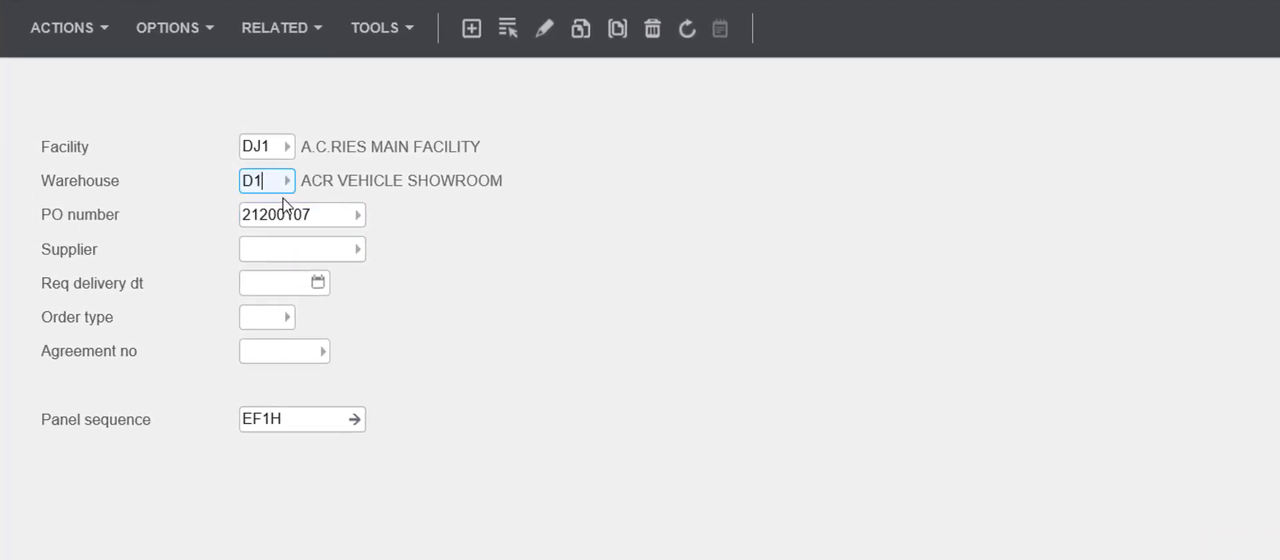
Internal Sales19
Manages sales between divisions or companies within the same M3 group, covering order creation, pricing, invoicing, deliveries, and quality checks for goods moved internally.
Internal Sales Overview · Internal Sales Process Limitations · Define Internal Sales · Fixed Asset handling in Internal Sales transactions · Managing Internal Purchase Orders
Purchase Order Processing26
Covers creating, releasing, and managing purchase orders, including planned PO hubs, central procurement, fashion matrix entry, and the settings and parameters that govern the purchase order flow.
Basic Settings for the Purchase Flow · Additional Settings for the Purchase Flow · Central Procurement in M3 BE · Confirmation, Delivery Advice and Transport Notification for PO · Create and Connect Delivery Note and Package to a PO Line
Pricing and Conditions22
Manages sales pricing, discounts, campaigns, customer charges, bonus and commission agreements, and supplier rebate programs that determine what customers pay and what recipients earn.
Supplier Rebate on Sales · Sales Promotion · Sales Agreement · Claimable Status Indicator · Rebate Calculation
Purchase Agreements8
Covers setting up and maintaining purchasing agreements with suppliers, including agreement types, pricing organizations, and mass updates applied across purchase orders.
Agreement Type - Purchasing · Create Agreements with Supplier · Create Purchase Organization for Pricing · Define Settings for Agreements · Managing Agreements with Suppliers
Receiving Inbound Goods11
Covers the inbound goods flow, from system-directed and two-step put-away to cross-docking and the receipt of distribution or requisition orders.
Basic Settings for System-Directed Put-Away · Create Location Type Table (MMS057) · Cross-Docking and Extended Cross-Docking · Define Cross-Docking Settings · Goods Receiving with Two-Step Put-Away
Goods Receiving13
Covers receiving purchased goods into the warehouse, including put-away, quality inspection in its standard, extended, and statistical forms, and country-specific receiving rules.
Extended Quality Inspection in the Receiving Flow · Goods Receiving Flow for Purchase Orders · Perform Extended Quality Inspection · Perform Goods Receipt per Package and Delivery · Perform Quality Inspection of Goods
Core Remanufacturing11
Manages the exchange, tracking, and remanufacturing of reusable components known as cores, such as engines or gearboxes, including core policies, supplier and customer exchanges, and returns.
Cost Accounting and Component Exchange between Customer and Company · Core Tracking · Create Core Policy · Create Core Policy Selection Table · Defining Settings for Component Exchange with Supplier in Core Management Process
Warehouse Management Interfaces13
Covers the interfaces that connect M3 warehouse operations to external warehouse and material handling systems, including data downloads, uploads, and the transactions used to synchronize stock and order activity.
Item Overview · M3 Business Engine Administrator's Guide for Warehouse Management Interfaces · Supported Processes for Warehouse Management Interfaces · Download processes · Supported processes
Authorization3
Controls user authorization limits for placing and releasing purchase orders based on defined spending thresholds.
Define Purchase Authorization for User · Use Authorization in Procurement
Purchase Order Batch Entry5
Supports batch creation and processing of purchase orders, including administrator setup, configuration settings, and day-to-day batch management.
M3 Business Engine Administrator's Guide for Purchase Order Batch Entry · Purchase Order Batch Entry · Settings for Purchase Order Batch Entry · Manage Purchase Order Batch Entry
Transportation Management Interfaces12
Covers the Transportation Execution Interface, which exchanges transportation and customs information with third-party logistics systems, including its architecture, triggers, and transfer processes.
M3 Business Engine Administrator's Guide for Transportation Execution Interface (TEI) · Business Requirements and Solutions for M3 Transportation Execution Interface · Scenarios for Using M3 Transportation Execution Interface · Settings for Transportation Execution Interface (TEI) · Overview of TEI Architecture
Supplier Evaluation and Statistics8
Tracks supplier performance through purchase, delivery time, and quality inspection statistics, and supports ABC classification to rank suppliers by performance criteria.
Create and Display Supplier Statistics · Define Settings for Supplier Evaluation and Statistics · Display Delivery Time Statistics · Display Purchase Statistics · Display Quality Inspection Statistics
Grower Contract Management13
Manages purchasing agreements with growers of crops, livestock, or aquaculture, covering settlement calculations, quality-linked payments, VAT overrides, and pricing selection matrices.
Grower Contract Management (GCM) - Overview · Grower Contract Management (GCM) - Worked Examples · Base Origin for Grower Agreement · Selection Matrix - Procurement · Create Selection Matrix - Procurement
Defining Basic Settings26
Covers foundational master data and configuration -- items, facilities, warehouses, locations, lead times, and user authorization -- required before supply chain execution processes can run.
Administration Lead Time · Company Structure Overview · Connect Item to Warehouse · Create and Apply User Authorization to Different Objects · Copy Items in Different Ways
Request for Quotations9
Covers the request-for-quotation process, from creating and sending inquiries to suppliers through evaluating responses and converting accepted quotes into purchase orders or agreements.
Accept/Reject Purchase Inquiry and Create Purchase Order · Approve/Reject a Purchase Quotation and Create Agreements from Quotation · Create Purchase Inquiry Manually · Create Purchase Inquiry from a Planned PO · Create Request for Purchase Quotation
PO with Subcontracting10
Manages purchase orders for subcontracted work, including settings for subcontracted items and operations, and the workflows for both continuous and occasional subcontracting.
Define Basic Settings for Subcontracting · Define Settings for Subcontracted Item · Define Settings for Subcontracted Operations · Managing Subcontracting in Procurement · Occasional Subcontracting
Purchase Delivery Schedules8
Manages recurring delivery schedules for frequently purchased items, covering schedule creation, related agreements, and goods receipt against scheduled deliveries.
Connect a Purchase Order to a Purchase Delivery Schedule · Create Agreement for Purchase Delivery Schedules · Create and Print Purchase Delivery Schedules · Define Settings for Purchase Delivery Schedules · Delivery Schedule - Purchasing
Supplier Rebate for Purchasing41
Manages retrospective rebate payments earned from suppliers for hitting agreed purchasing targets, covering agreement setup, rebate calculation, claim generation, and the full workflow from accrual to invoice.
Supplier Rebate Agreements Overview · Supplier Rebate Agreement Components · Supplier Rebate on Purchase Limitations · Supplier Rebate Activation · Configuring supplier rebate settings
Other capabilities4
Procurement Overview · Extended Catalog Item
Warehouse Management
strongWarehouse operations including receiving, putaway, picking, packing, shipping, and warehouse layout optimisation.
›215 documented capabilities in 10 areas
Warehouse Management
strongManaging Inhouse Activities26
Covers the day-to-day handling of stock already inside the warehouse, including moving items and balance IDs between locations, tracking lots and serial numbers, managing containers and consignment stock, and running physical inventory counts and statistics.
Analyze and Repair Mismatches for Item per Warehouse · Change Location for All Items · Change Location for Balance Identity · Change Location for an Item Coded as a Single Location Item · Consignment Stock
Managing DO/RO13
Covers distribution orders and requisition orders used to move stock between warehouses or fill internal shortages, including order entry, allocation, dispatch, and the related settings and lead times.
Distribution Calendar · Handling Requisition Order · Display Information about Distribution Order · Distribution Order · Distribution Order Entry
Managing Items26
Covers item master data management -- alias numbers, catch weight, lot and expiration handling, item hierarchies, and interfaces for bulk item data -- used to define and maintain items across the warehouse.
Alias Number · Alias Type · Archive and Delete Lot and Sublot · Catch Weight Loss Transactions · Catch Weight Management
Receiving Inbound Goods11
Covers the inbound goods flow, from system-directed and two-step put-away to cross-docking and the receipt of distribution or requisition orders.
Basic Settings for System-Directed Put-Away · Create Location Type Table (MMS057) · Cross-Docking and Extended Cross-Docking · Define Cross-Docking Settings · Goods Receiving with Two-Step Put-Away
Managing Outbound Goods26
Covers the outbound goods flow -- allocation, batch allocation, packing, dispatch policy, delivery confirmation, and transportation documents -- used to prepare and ship customer and other outbound orders.
Allocation and Cross-Docking Concepts · Automatic Allocation · Basic Delivery Value Check Settings · Basic Settings for Dispatch Policy · Batch Allocation Using Fair Share, Allocation Priority Rules or Allocation priority with Fair Share
Warehouse Management Interfaces38
Covers the interfaces that connect M3 warehouse operations to external warehouse and material handling systems, including data downloads, uploads, and the transactions used to synchronize stock and order activity.
Item Overview · M3 Business Engine Administrator's Guide for Warehouse Management Interfaces · Supported Processes for Warehouse Management Interfaces · Download processes · Supported processes
Managing Transportation Planning26
Covers transportation planning -- routes, freight cost, transportation equipment and resources, and shipment management -- used to plan and execute deliveries.
Additional Transportation Information · Basic Settings for Freight Cost and Freight Cost Calculation · Create Transportation Equipment · Create Transportation Resource · Define Settings for Transportation Management
Transportation Management Interfaces12
Covers the Transportation Execution Interface, which exchanges transportation and customs information with third-party logistics systems, including its architecture, triggers, and transfer processes.
M3 Business Engine Administrator's Guide for Transportation Execution Interface (TEI) · Business Requirements and Solutions for M3 Transportation Execution Interface · Scenarios for Using M3 Transportation Execution Interface · Settings for Transportation Execution Interface (TEI) · Overview of TEI Architecture
Supply Chain Order11
Covers supply chain orders, which link related orders across levels of the material flow, including their setup, allocation, and the rules that govern changes as they move through the chain.
Changing, Deleting and Releasing the Supply Chain · Linking Supply Orders · Order Environment Examples · Supply Chain Rules Introduction · Pre-allocation and Allocation of the Supply Chain
Defining Basic Settings26
Covers foundational master data and configuration -- items, facilities, warehouses, locations, lead times, and user authorization -- required before supply chain execution processes can run.
Administration Lead Time · Company Structure Overview · Connect Item to Warehouse · Create and Apply User Authorization to Different Objects · Copy Items in Different Ways
Quality Management
strongQuality control, inspection management, non-conformance tracking, CAPA, and compliance with quality standards (ISO, FDA, AS9100).
›42 documented capabilities in 2 areas
Quality Management
strongLaboratory and Inspection Control16
Manages laboratory-based quality inspection of manufactured and purchased items, covering test classes, limit values, requests, and certificates.
Actual Value - Text · Laboratory · Laboratory and Inspection Control · LI Class · LI Limit Values
Quality Management System26
Manages item quality across manufacturing, procurement, and distribution, covering specifications, tests, approval rules, and certificates of analysis, including migration from the legacy Laboratory Inspection and Control module.
Transition Quality Module from Laboratory Inspection and Control (LIC) to Quality Management System (QMS) · Managing Quality Control · Quality Management System (QMS) Setup for Attributes · Setup of Quality Inspection (QI) Requests · Quality Tests, Sets and Specifications
Asset Management
strongEnterprise asset management including preventive maintenance, asset lifecycle tracking, work order management, and asset depreciation.
›324 documented capabilities in 22 areas
Asset Management
strongCapability Management6
Manages the skills and capabilities needed to staff maintenance work, matching qualified people to work orders and repair jobs through capability data setup and employee allocation.
Allocate People by Multiple Choice · Capability at Repair Situation · Manually Allocate People to a Work Request or Work Order · Setting up Capability Data · Setting Employee Allocation
Rental-Operated Plant3
Supports renting equipment together with the operator needed to run it, independent of any separate equipment rental.
Processing Rental-Operated Plant · Defining Rental-Operated Plant Process
Complaint Management4
Tracks abnormal events and customer complaints against maintained objects, from initial registration through decisions and follow-up complaints.
Handling Complaints · Register Complaints and Decisions · Register Subsequent Complaint
Document Management5
Governs how documents are created, classified, and linked to required activities within the maintenance process, ensuring mandatory steps are completed and confirmed.
Approve Document Activity · Connect Additional Activities to a Document and Confirm Defaulted Activities · Create Document Type and Connect Activities that need to be Performed · Handling Document Activity Lists
Internal Rental14
Manages rental transactions between divisions of the same M3 company, covering internal purchase orders, pricing, delivery, invoicing, and returns.
Internal Rental Overview · Internal Rental Process Limitations · Defining Internal Rental · Managing Internal Purchase Orders for Internal Rental · Managing Internal Rental Agreements
Enabling Maintenance26
Configures the underlying settings, order types, and rules that enable maintenance operations, including work order types, customer order types, rental agreements, and complaint and engineering order settings.
Application Messages in Maintenance · Authorization Level · Business Chain on Maintenance Customer Order · Configuration - Maintenance · Connect Documents to Maintenance Customer Order Type
Rental Agreement Processing26
Covers the operational lifecycle of a rental agreement -- creating, checking equipment in and out, exchanging or replacing items, tracking utilization, and terminating or closing agreement lines.
Check in Rental Agreement · Check Out Rental Agreement · Convert Preliminary Rental Agreement to Active Agreement or Quotation · Convert Rental Agreement to Rental Purchase Option · Copy Rental Agreement or Agreement Line
Engineering Orders14
Manages engineering changes and modifications to equipment and components, from defining and revising engineering orders through to releasing approved changes into production.
Create Engineering Order Header · Create Engineering Order Line · Create Engineering Order Revision · Define Component Modification Reference · Defining Engineering Orders
Enterprise Asset Management9
Manages the resources behind maintenance work, including work centers, employee assignments, numbering series, and labor feedback used to plan and track work order execution.
Add Employees to Work Order · Assignment Statuses · Basic Data for Creating Work Center · Create Numbering Series · Feedback of Multiple Labor Hours Against Operation
Equipment and Component Control26
Tracks equipment, components, and their structures, covering configuration and as-built records, numbering systems, condition reporting, and classification of equipment across a maintenance organization.
Add Condition Report to Equipment · Add Documents to Position · Basic Prerequisites for As-built Structures · Create Alternative Structure · Create Equipment Component Link
Follow up Maintenance4
Reviews maintenance performance after the fact, analyzing complaint alarms, customer order statistics, and repeated issues to guide corrective action.
Analyze Complaint Alarms · Maintenance Customer Order Statistics · Update Complaint Alert
Leasing17
Manages equipment leasing agreements and their financial mechanics -- financing, leasing curves, price indexing, and periodic invoicing -- alongside standard rentals.
Create and Manage Leasing Agreement Using EQM with Funder · Create and Manage Leasing Agreement Using EQM Without Funder · Create and manage leasing agreement using (STS100) · Copy Leasing Line · Convert a rental line to a leasing line in (STS201)
Initial Provisioning11
Sets up the foundational data needed before maintenance operations can run, including work centers, costing, document structures, and initial data conversion from a prior system.
Define Document Structure · Enter Hourly Costs per Work Center · Enter Work Center · Initial Provisioning (IP) · IP - M3 Basic Data
End to End Processes5
Walks through complete maintenance scenarios end to end, covering field service purchases, inspections, subcontracted repairs, and warranty settlement.
Field Service with Direct Purchase (Reported as Misc Cost) · Perform Field Inspection Service for Equipment · Subcontract Service · Warranty Work Order - 100% Settled
MCO Processing26
Manages the full maintenance customer order cycle, including quoting, invoicing, warranty claims, credit limits, and delivery of serviced objects back to customers.
Automatically Create Supplier Invoice Batch for Miscellaneous Cost · Check and Adjust Preliminary Invoice Specification · Creating a Maintenance Customer Order · Create Project Budget or Financial Budget from a Maintenance Agreement Quote · Credit Limits for Maintenance Customer Orders
MCO Maintenance Agreements26
Manages the terms, pricing, and coverage of maintenance service agreements with customers, including quotes, charges, discounts, and periodic invoicing rules.
Close Maintenance Agreements · Connect an Additional Payer to a Maintenance Agreement Line · Connect Model Individuals and Objects to a Maintenance Agreement to Limit the Agreement Validity · Connect and Prioritize Additional Warehouse to Maintenance Agreement · Create Maintenance Agreement Quote
Service Definitions26
Defines the services that describe maintenance jobs, including their operations, materials, tools, meters, activities, and related-service relationships.
Add Activity List to Service Revision · Add Additional Meter to Service Revision · Add Documents to Service Revision · Add Materials and Purchase Requirements to Service Revision · Add Multiple Products to Service
Work Order Processing26
Plans, schedules, and manages maintenance work orders, from initial request through detailed scheduling, resource checks, and status updates.
Add Employees to a Work Order Operation · Add Tools to a Work Order Operation · Check Employee Availability for a Work Request · Check Tools Availability for a Work Request · Complaint - Register Decision
Work Order Enabling Work Orders3
Configures the default parameters used when entering new work requests, both in standard and quick-entry mode.
Set Basic Parameters for Entry of Work Requests · Set Basic Parameters for Quick Entry of Work Requests
Work Order Maintenance Follow-up17
Analyzes maintenance performance and reliability after work is completed, covering costing, diagnostics, downtime, and maintenance statistics.
Analyze Maintenance Statistics · Analyzing Reliability · Calculate and Display Product Costing for a Service · Create Diagnostics against Equipment · Define Cost Totals
Work Order Material Management9
Manages materials on work orders, covering issuing, receiving, returning, and sourcing stocked and non-stocked parts, plus warehouse priority rules.
Issue Materials Against a Work Order · Issue Materials Linked to a Work Order · Receive Goods Against a Work Order · Register Non-Stocked Materials for a Work Order · Return Work Order Materials
Work Order Operation Reporting21
Reports and closes work order operations, capturing time, costs, inspections, interruptions, and approvals throughout execution.
Approve Work Order Operation · Automatically Create Supplier Invoice Batch for Miscellaneous Cost Standalone WO · Close Work Order Operation · Mandatory Approval of Time and Miscellaneous Costs on Work Orders · Miscellaneous cost registration standalone WO
HR & Payroll
moderateHuman resources management including employee records, payroll processing, benefits administration, time and attendance, and talent management.
›42 documented capabilities in 3 areas
HR & Payroll
moderateCapability Management6
Manages the skills and capabilities needed to staff maintenance work, matching qualified people to work orders and repair jobs through capability data setup and employee allocation.
Allocate People by Multiple Choice · Capability at Repair Situation · Manually Allocate People to a Work Request or Work Order · Setting up Capability Data · Setting Employee Allocation
Time and Attendance26
Tracks employee schedules, calendars, and clocked time, and calculates, reviews, and transfers time results to payroll.
Adjust Employee Calendars in Time and Attendance · Approving Calculated Times in Time and Attendance · Calculate Times by Night Runs in Time and Attendance · Calculating and Handling Missing Time in Time and Attendance · Capacity per Work Center/Day
Time Accounting10
Covers reporting, approving, authorizing, and transferring employee time and cost data to the general ledger, integrated with project management.
Approve Time Report · Authorize Time Report · Basic Data for Time Accounting · Create Time Report and Report Time and Costs · Enter Labor Code Template
Business Intelligence
moderateReporting, dashboards, analytics, and data visualisation capabilities built into the ERP platform for operational and strategic decision-making.
›60 documented capabilities in 3 areas
Business Intelligence
moderate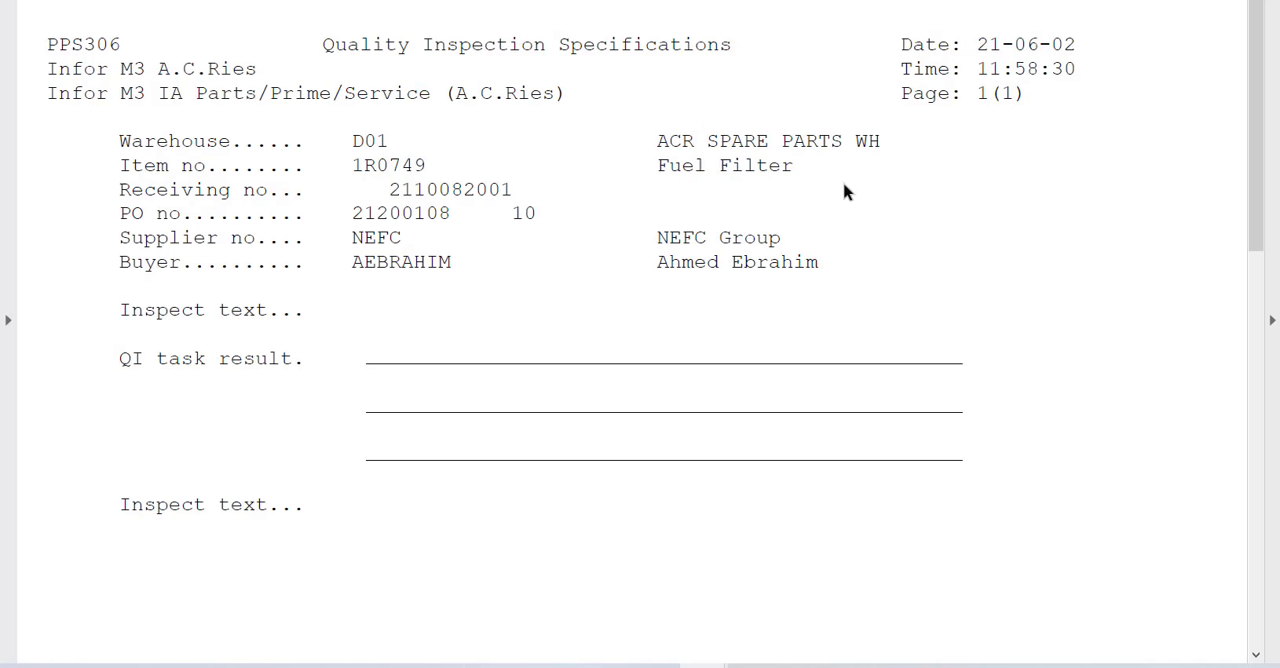
Managing Group Consolidation9
Covers consolidating financial results from subsidiaries into a parent company's accounts, including chart-of-accounts conversion and subsidiary configuration.
Configure transfer of consolidation transactions · Create and approve consolidation proposal for subsidiary · Define consolidation settings for subsidiary · Define conversion of subsidiary's chart of accounts · Enable M3 Group Consolidation
Creating Financial Reports25
Covers building and running custom financial reports in M3, including report structure, access control, and country-specific electronic reporting formats.
Create Account Translation Scenario · Authorize Access to Online Reports · Create Category Group for Claim/Liability Reports · Create Cells · Create Columns
Sales Statistics26
Covers sales budgeting, forecasting, and statistics, including building datasets, tracking budget and demand data, calculating forecasts, and reporting on sales performance.
Accumulator Field · Adjust Budget Values · Calculate Budget Distribution Percentages · Calculating Sales Forecasts · Copy Demand in Dataset
Project Management
basicProject planning, resource allocation, time tracking, expense management, and project accounting for project-centric businesses.
›44 documented capabilities in 3 areas
Project Management
basicManaging Project Order16
Covers the foundational structure of a project order -- its type, numbering, elements, partners, status, and invoicing corrections.
Create Corrective Invoice in Project Order · Correcting Invoices for Project Orders · On Account Invoicing · Partner · Project Type
Project Management26
Covers day-to-day project execution -- budgeting, scheduling, time reporting, invoicing, and recognizing costs and revenues as the project runs.
Activity - Project Management · Add Serial Number in POM · Budget Item · Centralized Time Reporting · Create Invoice Lines
Project Accounting2
Covers recognizing project revenue and cost at period end based on budget, actual values, and percentage of completion.
Project Accounting
Ecommerce
basicIntegrated ecommerce and online storefront capabilities including B2B and B2C portals, product catalogue management, and order management.
Infor M3 does not offer or rate: Field Service.
Ready to move on Infor M3?
Price it, put it head-to-head with alternatives, or talk to a partner who has implemented it.
Infor M3 add-ons & integrations
Extend Infor M3 with best-of-breed software that integrates with it:
Highlighted product links go straight to the vendor and are affiliate links — we may earn a commission if you sign up. This never affects which products we list or how we rank them.
Infor M3 Modules FAQ
What is Infor M3?
Infor M3 is a process manufacturing ERP built for industries like food & beverage, pharmaceuticals, and chemicals that need batch and formula control, lot traceability, and regulatory compliance (FDA, HACCP). It's owned by Infor (part of Koch Industries) and covers finance, manufacturing, supply chain, warehouse, and asset management, scaling to multi-plant operations for mid-size to large process manufacturers.
What does Infor M3 stand for?
Infor M3 doesn't stand for an acronym the way some ERP names do — "M3" is the product name Infor uses for this ERP line, tracing back to earlier Movex/Intentia software before Infor's acquisition and rebrand. It's best understood simply as Infor's process manufacturing ERP product, not an abbreviation of specific words.
What is Infor M3 used for?
Infor M3 is used to run process manufacturing operations — batch and formula production, lot/serial traceability, and regulatory compliance — alongside finance, supply chain, warehouse management, and asset management. It's particularly common in food & beverage and pharmaceutical companies needing FDA/HACCP-grade traceability and multi-plant scalability, and is less suited to businesses needing a lightweight CRM or field service.
What is Infor M3 ERP?
Infor M3 ERP is Infor's enterprise resource planning system purpose-built for process manufacturers — food & beverage, pharmaceuticals, chemicals — needing deep batch/formula control and traceability. It covers financial management, manufacturing, supply chain, warehouse, and asset management in one platform, with implementations typically running 8–15 months and $250K–$1.5M given its enterprise-grade scope and steeper configuration complexity.